Switch dart M, GigE, 2 Port, AUX#
信息
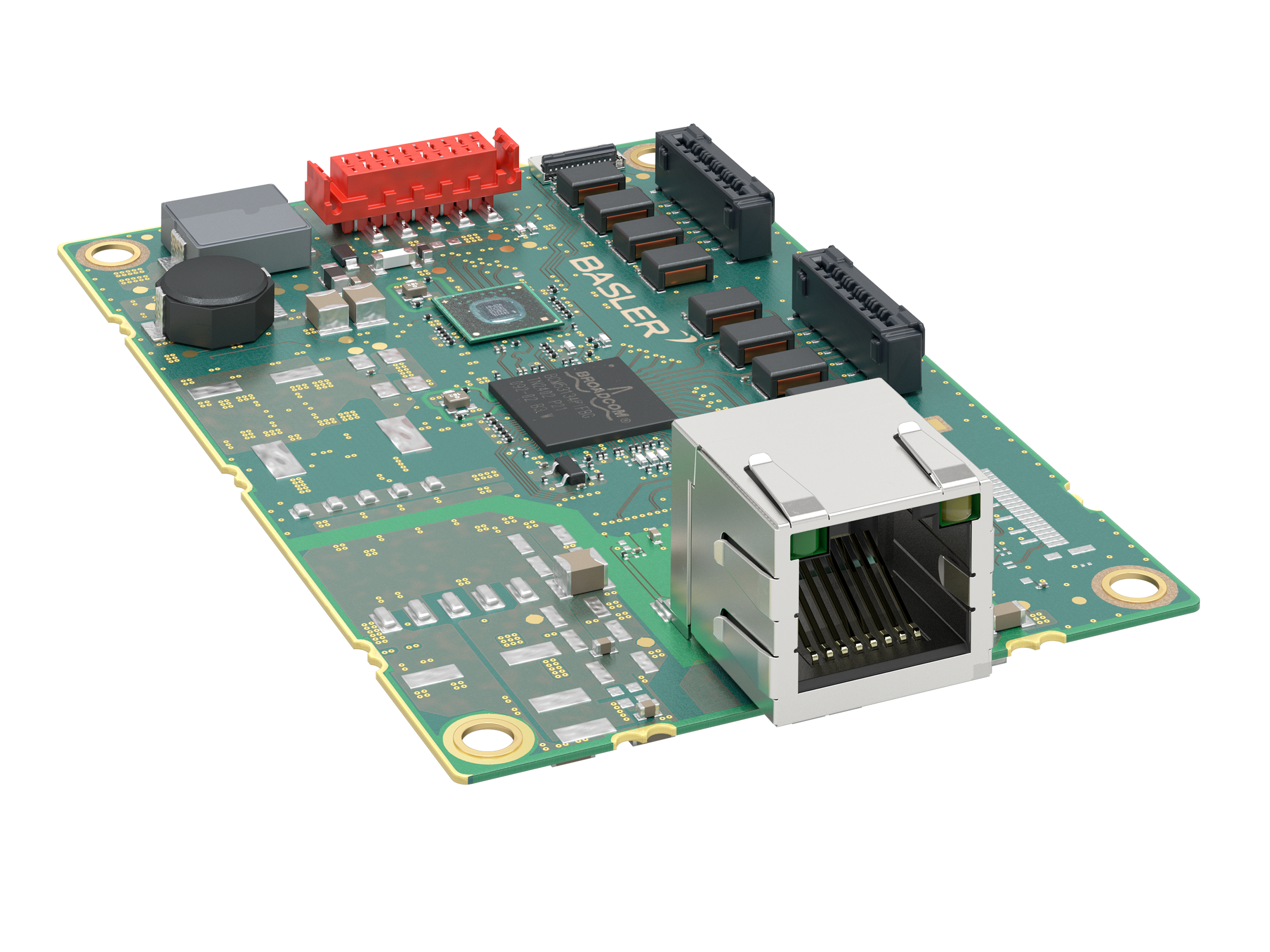
如果您使用 Basler dart M GigE 相机模块和 Basler dart M GigE 交换机,则使用 dart M GigE 交换机代替接口板 dart M GigE RJ45 AUX 。
如果使用 dart M GigE 交换机,则 I/O 电路位于交换机上;请参阅电路图(dart M GigE 交换机)主题。
主要功能#
- 在 LAN 中连接 dart M GigE 相机模块以实现高速数据传输
- 可与所有 Basler dart M GigE 相机模块一起使用
- 高达 1 Gbit/s 的带宽
- 只需一根数据线即可访问单个交换机上的多达 两个 dart M GigE 相机模块
- 可通过交换机上的 I/O 接口访问相机模块的 GPIO
- 支持巨型帧 (Jumbo Frames)
规格#
通用规格#
| 规格 | Switch dart M, GigE, 2 Port, AUX |
|---|---|
| 订单号 | 109788 |
| 端口数 | 2 |
| I/O 线路 | 2 条通用输入 (GPI) 线路 2 条通用输出 (GPO) 线路 2 条通用输入输出 (GPIO) 线路 |
| 接口 | GigE, 1000 Mbit/s |
| 电源 | 12–24 VDC(最大 25 瓦) |
| 功耗 | 取决于应用场景。 请参见 Power Consumption For Different Use Cases。 |
| 大小 | 56.0 x 85.0 x 20.7 mm |
| 重量 | <50 g |
| 受支持的 Standard | IEEE 802.3 IEEE 802.3at PoE+ IEEE 802.3ab(1000BASE-T 千兆以太网) IEEE 802.3u(100BASE-TX 快速以太网) IEEE 802.3x(全双工流量控制) |
| 符合标准 | CE (包含 RoHS), UKCA, FCC, KC |
| 最大数据包大小 | 最高 9720 字节 |
巨型帧
- 如果您将相机中的数据包大小增加到 1 500 字节以上,则必须在所有网络设备上启用巨型帧支持。否则,可能会因数据包受阻而导致数据流传输失败。
- 如果您想将巨型帧的数据包大小设为最大值,请按照 网络配置(GigE 相机) 主题中的说明将网卡设为最大值。同时,将
GevSCPSPacketSize参数设为最大大小。请注意,大多数 Basler dart M GigE 摄像头模块仅支持最大 8192 字节的数据包大小。
机械规格#
尺寸和安装点#
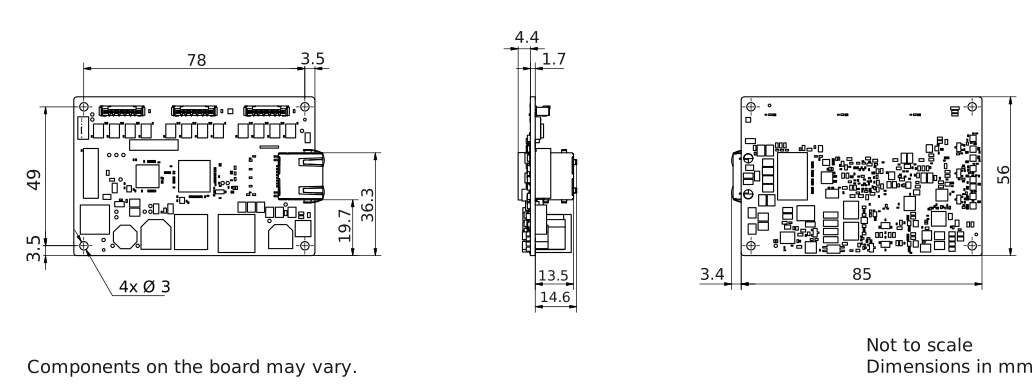
→ 下载该交换机的 CAD/技术图纸。
环境要求#
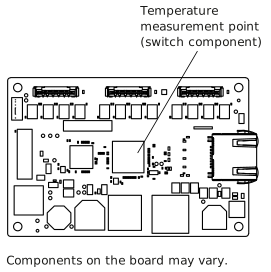
温度测量点#
温度和湿度#
| 运行期间的 Device Temperature | 0–70 °C (32–158 °F) 请查看温度测量点。 |
| 存储期间的 Device Temperature | 0–80 °C (32–176 °F) |
| 湿度 | 20-80%,相对湿度,无冷凝 |
Basler dart M GigE 交换机交付时不带外壳。
警告 — 烫伤危险
在运行期间,GigE 交换机的组件会产生较高的温度。在交换机开启时触摸交换机及其组件可能会导致烫伤。
采取措施确保在运行期间无法触摸到交换机的炽热组件(例如,将交换机安装到外壳中)。
注意 – 超出指定范围的温度可能会损坏 dart M GigE 交换机。
在规格表中给出的范围之外的温度下运行交换机会导致以下问题:
- Dart M GigE交换机可能会损坏。
- 开关的使用寿命会缩短。
确保开关元件的温度保持在 70 °C (158 °F) 以下!
提供足够的散热。参见温度测量点。
电气要求#
注意 – 缺少 EMI 保护可能会导致交换机运行故障。
在没有电磁干扰 (EMI) 保护的情况下运行交换机可能会导致交换机出现运行故障。
采取措施防止 EMI 问题,例如将交换机安装到外壳中。
有关更多信息,请参见避免 EMI 和 ESD 问题。
电源#
电源必须通过 I/O 接口供电。Switch Dart M(千兆以太网,2 端口,AUX)不支持 PoE 供电。
工作电压为 12–24 VDC(最大功率 25 W)。最低供电电压为 10.8 VDC。为避免损坏设备,最大电压不得超过 30 VDC。
注意——超出规定范围的电压可能会损坏开关。
您必须在通用规格表中规定的安全工作电压范围内供电。
不同应用场景下的功耗#
下表显示了不同用例的典型功耗值。
| 用例 | 功耗 (W) |
|---|---|
| 无 dart M 相机模块的交换机;已连接到 LAN | 1.1 |
| 带 2 个 dart M 相机模块的交换机;未捕获图像 | 6.0 |
| 带 2 个 dart M 相机模块的交换机;已捕获图像;最大带宽 | 8.0 |
通用 I/O 线路#
注意:对 GPIO 线路施加不正确的电信号可能会严重损坏电路板。
确保按以下规定施加适当的输入或输出信号电压。
作为输入端运行#
| 电压 | 描述 |
|---|---|
| 30 VDC | 绝对最大值。绝不能超过此电压。否则可能会损坏电路板并使保修失效。 |
| 0–24 VDC | 安全工作范围。最小外部上拉电压为 3.3 VDC。 |
| 0-0.8 VDC | 表示逻辑 0(禁用逆变器)。 |
| >0.8-2.0 VDC | 发生逻辑电平转换的区域;此区域中未定义逻辑状态。 |
| >2.0 VDC | 表示逻辑 1(逆变器禁用)。 |
- Input current (high-level): <100 μA
- Input current (low-level): <5 mA sink current from the GPIO input line without exceeding 0.8 VDC.
作为输出端运行#
| 电压 | 描述 |
|---|---|
| 30 VDC | 绝对最大值。绝不能超过此电压。否则可能会损坏电路板并使保修失效。 |
| 3.3–24 VDC | 安全工作范围 |
| <3.3 VDC | 不可靠的 GPIO 输出 |
- 内部上拉电阻:≈650 Ω,集电极开路。在许多应用中必须提供一个额外的上拉电阻。
- Residual voltage ("on" state): 在 50 mA 和 25°C (77°F) 的外壳温度下 ≈0.4 VDC。实际残余电压取决于工作温度、负载电流和电子元件的生产差异。
- Leakage current: <60 µA. Actual leakage depends on operating temperature and production spread of electronic components.
- 最大负载电流:50 mA
- 最小负载电流: 未指明。考虑以下条件:
- 当负载电流低时,漏电流会产生更强的影响。
- 输出的传输延迟随着负载电流的减小而增加。
- 高阻抗电路往往更容易受到 EMI 影响。
- 对于长线缆而言,电流越高,其压降就会越高。
有关 I/O 线路的更多信息,请参见 I/O 控制部分。
线缆要求#
以太网线缆#
- 使用高质量的以太网线缆。建议使用带 S/STP 屏蔽的 Cat 5e 屏蔽线缆或更好的线缆。
- 使用直通(跳线)或交叉以太网线缆。
- 应避免靠近强磁场。
- Basler 建议使用 Basler 线缆产品组合中的以太网线缆。
I/O 线缆#
- I/O 电缆的横截面积必须至少为 0.09 mm²(接近 AWG28)。
- I/O 电缆用于供电。
- 电缆长度不得超过最大 10 m。
- 推荐连接器:TE 1-338095-0(压接式)或 WR-MM 690157001072(排线式)
- 应避免靠近强磁场。
- Basler 建议使用 dart M I/O 连接线。
扁平排线 (FFC)#
Basler 建议使用 dart 柔性扁平电缆。
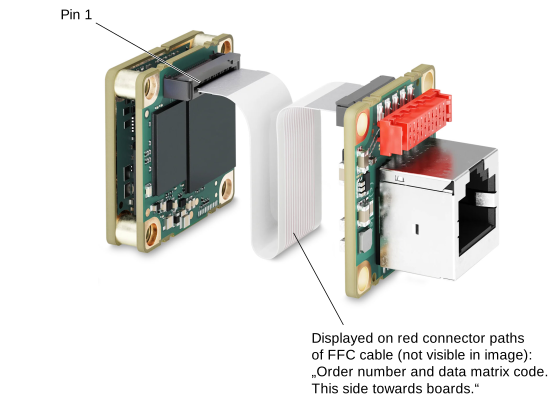
注意 – FFC 电缆的方向错误可能会损坏电子元件。
FFC 电缆的两端没有方向性,即您可以将任意一端连接到相机模块连接器或 dart M GigE 交换机的连接器。但重要的是,您必须确保以正确的方向插入电缆,即 FFC 电缆的红色导电路径必须面向电路板,如以下图像所示。该图像展示了一个接口板示例,但同样的原则也适用于交换机。
物理接口#
连接器#
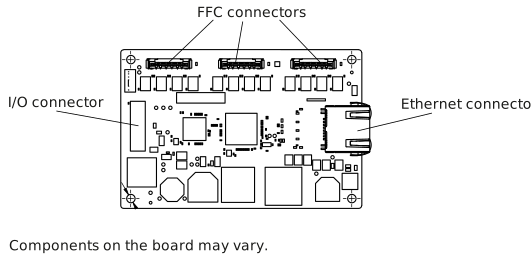
以太网连接器#
- 到交换机的 100/1000 Mbit/s 以太网连接
- 8 引脚 RJ45 插孔(8 引脚)
注意 — 以太网连接器上的机械应力可能会损坏交换机。
如果以太网连接器(RJ45 插孔)承受机械应力,请为电缆提供应力消除装置,以防止 dart M GigE 交换机受到机械损坏。
有关如何避免机械应力的信息,请参阅“安装说明”主题中的为 RJ45 接口提供应力消除一节。
FFC 连接器#
- 20 引脚 Hirose FH67 (FH67-20S-0.5SV) FFC/FPC 连接器
- 通过 dart FFC(柔性扁平电缆)提供与 dart M GigE 相机模块的接口。
I/O 连接器#
10 针母连接器:WR-MM 10 针 (690367291076)。更多信息,请参阅 I/O 连接器引脚图。
I/O 接口引脚分配
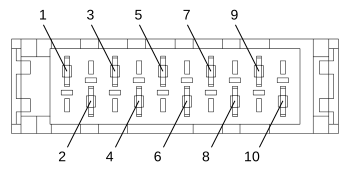
| 引脚 | 描述 |
|---|---|
| 1 | 辅助电压和 I/O 线的接地 |
| 2 | 外部施加的辅助电压 |
| 3 | 辅助电压和 I/O 线的接地 |
| 4 | 外部施加的辅助电压 |
| 5 | 通用 I/O (GPIO) 线路 CAM 2 |
| 6 | 通用 I/O (GPIO) 线路 CAM 1 |
| 7 | 用于 CAM 2 的通用输出 (GPO) 线路 |
| 8 | 用于 CAM 1 的通用输出 (GPO) 线路 |
| 9 | 用于 CAM 2 的通用输入 (GPI) 线路 |
| 10 | 用于 CAM 1 的通用输入 (GPI) 线路 |
状态 LED 指示灯#
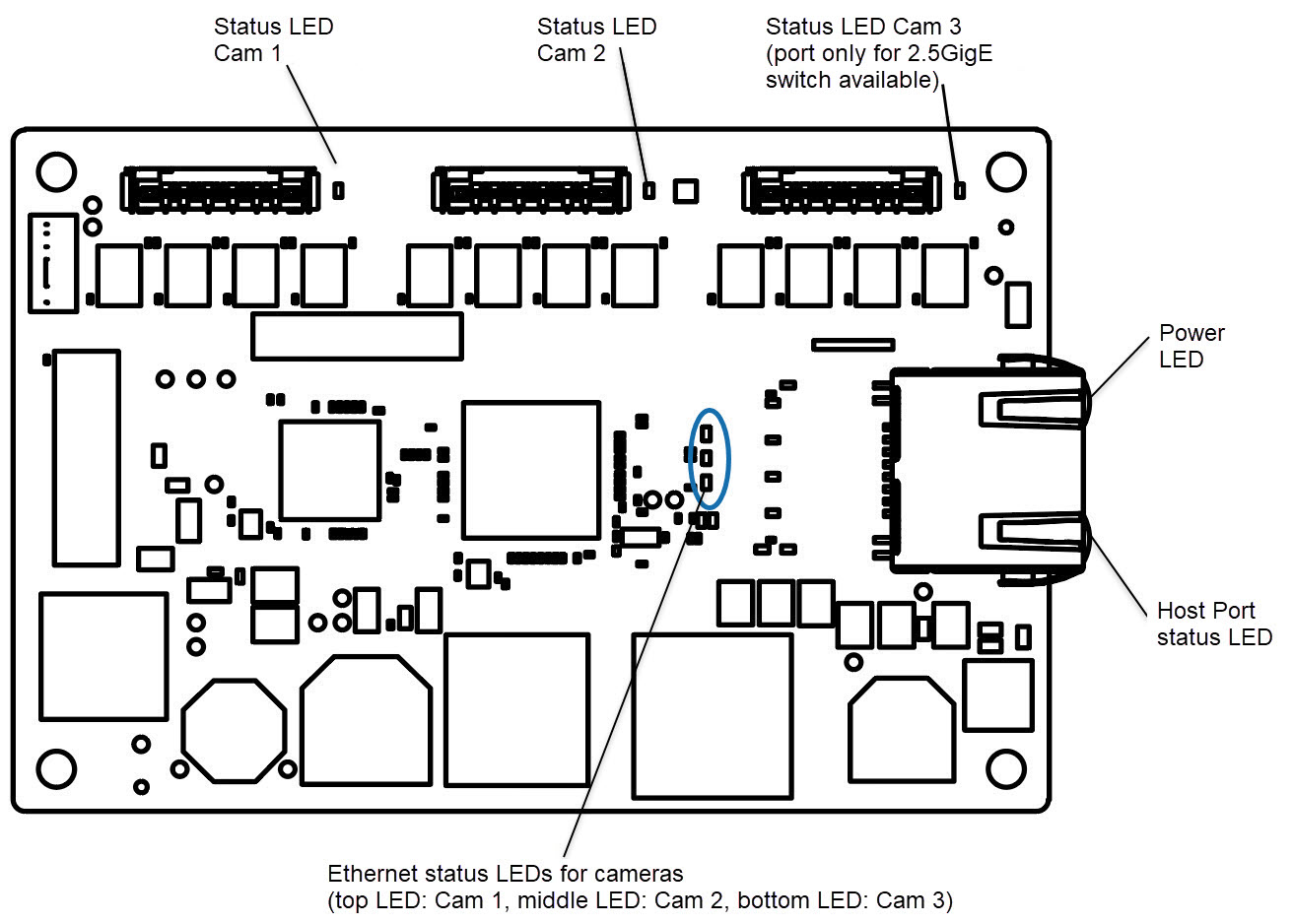
dart M GigE 交换机上有以下状态 LED:
相机状态 LED
摄像头状态指示灯(状态) LED 上图中的 Cam 1 至 3)指示连接的 Basler dart M GigE 相机模块的状态。
有关不同相机状态的信息,请参阅dart M 接口描述主题中的LED状态表。
电源 LED
| LED 状态指示灯 | 含义 |
|---|---|
| 熄灭 | 未通电 |
| 绿色常亮 | 已通电,已建立以太网连接 |
主机端口状态 LED
| LED 状态指示灯 | 含义 |
|---|---|
| 橙色常亮 | 已建立主计算机与 GigE 交换机之间的链路 |
| 橙色闪烁 | 指示主机计算机与 GigE 交换机之间的活动 |
以太网端口状态 LED
对于通过 FFC 连接器连接到 dart M GigE 交换机的每个相机模块,相应的以太网端口状态 LED 指示以下内容:
| LED 状态指示灯 | 含义 |
|---|---|
| 熄灭 | 相机模块未连接到交换机 |
| 绿色常亮 | 相机模块已连接到交换机 |
| 闪烁绿色 (间隔较大/呈脉冲状) | 相机模块已连接到交换机 与 pylon 软件的连接已建立 |
| 闪烁绿色 (非常快的脉冲) | 相机模块已连接到交换机 与 pylon 软件的连接已建立 图像采集已启动。 |
更多信息#
- 有关不同 dart M GigE 相机型号的信息,请参阅 Basler dart M 概述主题。
- 请参阅“硬件安装(千兆以太网摄像机)”主题中的“dart M 摄像机”部分。
- 请参阅 dart M 接口说明主题。
- 请参阅 电路图(dart M GigE 交换机)主题。
- 另请参阅Basler dart M GigE 配件。
- 请参阅网络配置(千兆以太网摄像机) 。
- 请参阅网络相关参数。