跳转到内容

Working with Kernels#

This topic explains what a kernel is and how you use kernels in VisualApplets for neighborhood operations such as noise reduction, blur, and edge detection.

After you have read this topic, you understand how to build a kernel, process it with filter operators, and convert it back to single pixels before DmaToPC.

Kernel Structure#

A kernel is a small window of neighboring pixel values around one position in an image. Many filters — noise reduction, blur, edge detection — compute a new output value from that neighborhood.

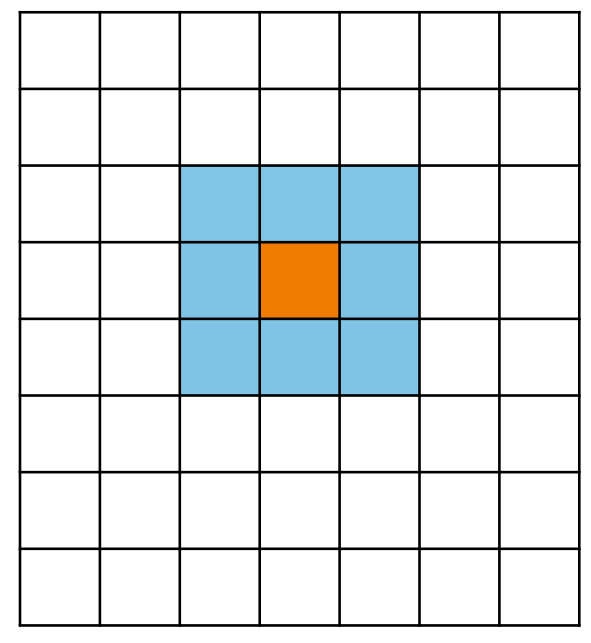
For a 3×3 kernel, the window contains nine values: the current pixel at that position plus eight neighbors. For odd kernel sizes, the current pixel sits in the center of the window.

The kernel moves across the image from left to right, row by row. At each position, the filter uses the neighborhood around that pixel:

3×3 Kernel Window Moving Across a 9×9 Image

In VisualApplets, that neighborhood is defined by link properties. How you build the window, and where the current pixel sits inside it, depends on the operator. Those details follow below.

Kernel Columns and Kernel Rows#

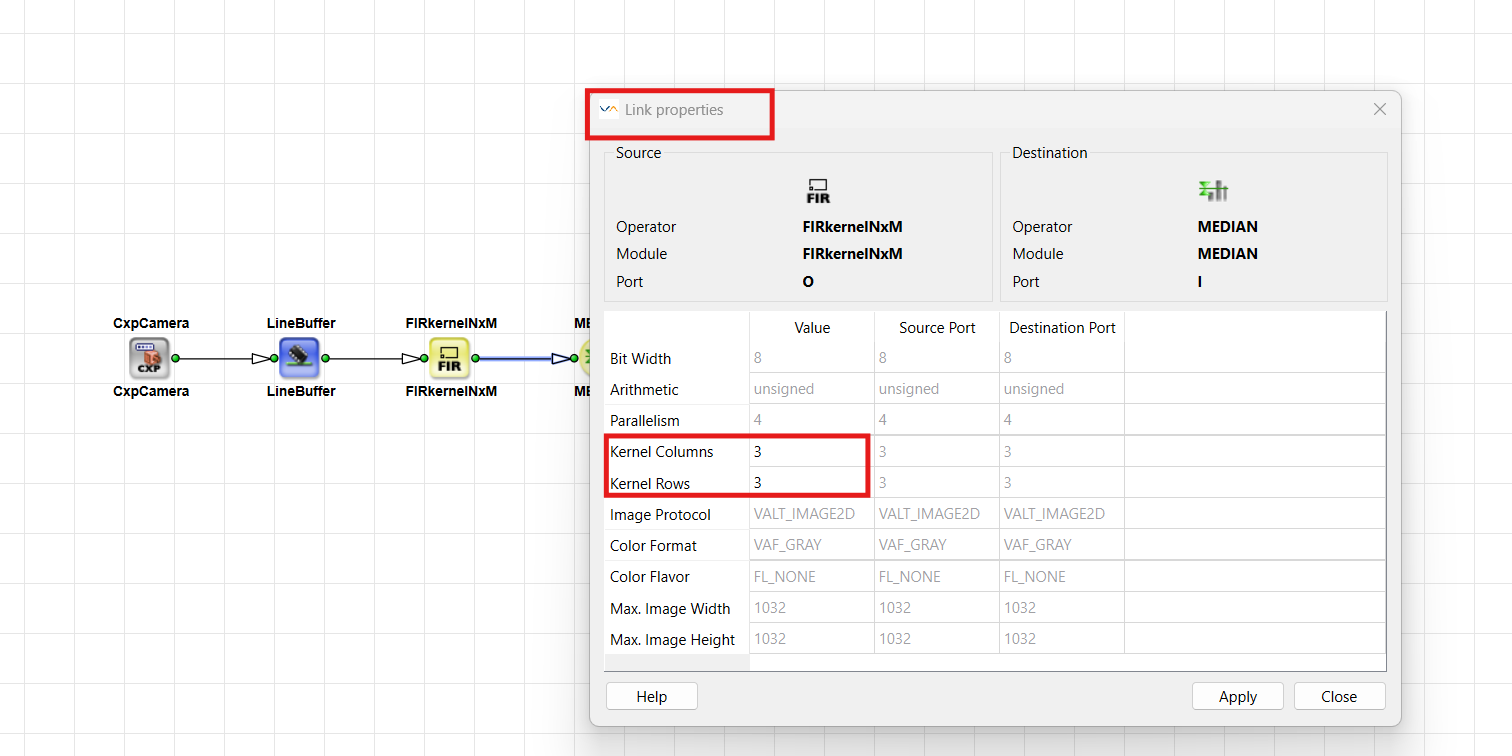
The kernel size is part of the link properties. KernelColumns is the width of the neighborhood window. KernelRows is its height. A 3×3 kernel therefore uses KernelColumns = 3 and KernelRows = 3.

The Kernel Size is a Link Property

In VisualApplets, N is the number of kernel rows and M is the number of kernel columns. Kernel elements are addressed by index instead of coordinates. Indexing runs row by row, from top-left to bottom-right.

Always check the operator documentation for the exact mapping of kernel indices to image positions.

Not every operator accepts or forwards kernels larger than 1×1. Each operator documents the allowed values in its Supported Link Format table in the Operator Reference. If you connect a kernel link to an operator that only allows Kernel Columns = 1 and Kernel Rows = 1, VisualApplets reports a link format conflict.

For an overview of all link properties, see Parameterization Tutorial topic.

Kernels and Parallelism#

Parallelism and kernels both increase the amount of data a link carries per clock cycle, but they describe different concepts:

Parallelism Kernel
Question How many independent pixels pass per clock? How many neighbor values belong to one position?
Typical use Match camera / DMA bandwidth Feed filters that need a neighborhood
Link properties Parallelism KernelColumns, KernelRows

You can keep parallelism at 1 and still carry more data per clock by using a kernel: the link carries one neighborhood (for example 3×3 values) as one data word. The amount of data per clock rises because more values move per clock, not because more new image positions are processed per clock. The pixel-rate bandwidth formula in the Parallelism Tutorial topic does not multiply by the kernel size.

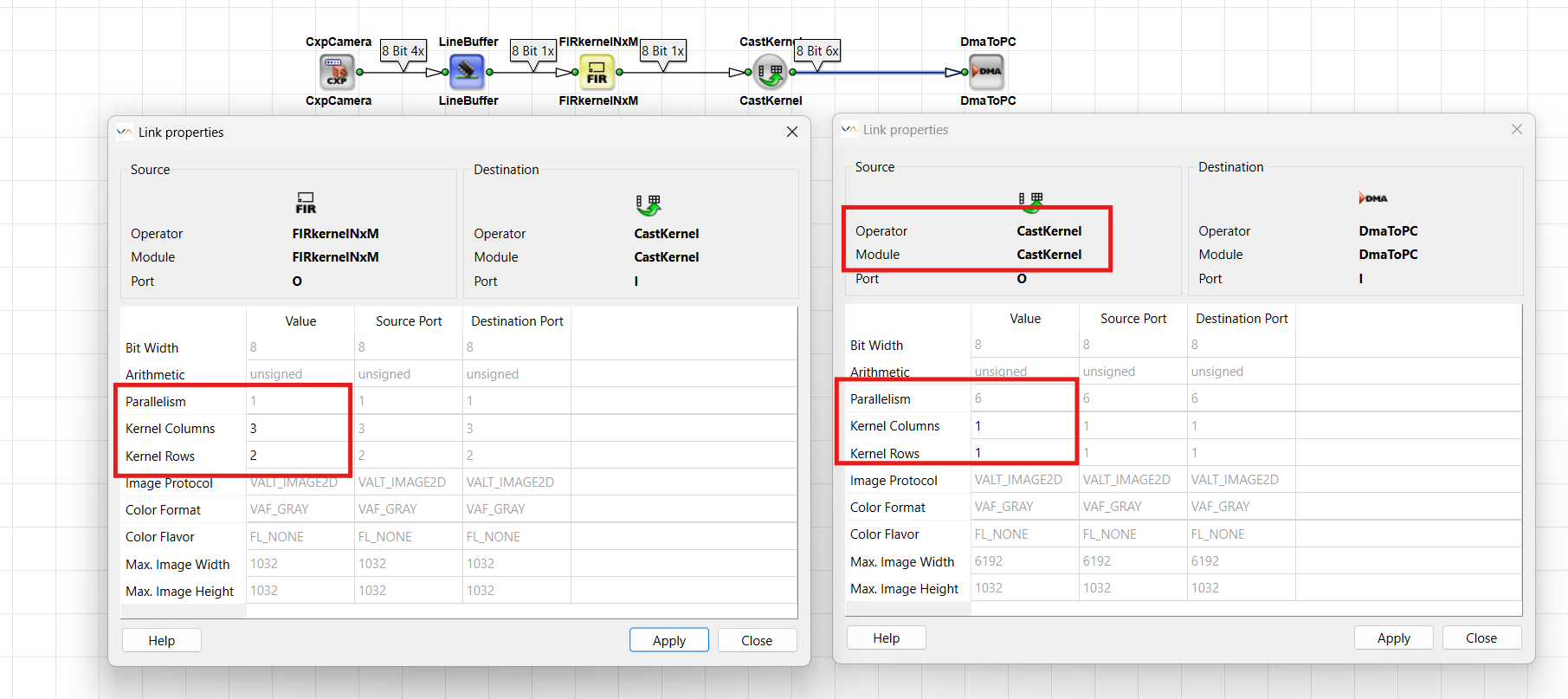
You can also combine both. The operator CastKernel can re-interpret the product of parallelism and kernel size between input and output, as long as that product stays the same. For example, parallelism 1 with kernel 3×2 can become parallelism 6 with kernel 1×1.

Cast Kernel translates Kernel and Parallel Components

For details, see CastKernel in the Operator Reference and Parallelism Tutorial topic.

Building Kernels#

To create neighborhood data from a normal pixel stream, use operators that set the kernel size on their 输出 link. FIRkernelNxM builds a centered 2D kernel window. LineNeighboursNx1 and PixelNeighbours1xM are a special case: they collect previous lines or previous pixels rather than a centered window. The operators differ in where the current pixel sits, in operator type, in FPGA cost and latency, and in edge handling (see below). Choose the operator that matches your use case: a centered 2D filter neighborhood, a comparison across previous lines or pixels, or a resource-efficient alternative to a full FIR-style window.

FIRkernelNxM#

The operator FIRkernelNxM (library Filter) creates a rectangular kernel window around each pixel, including the neighbor pixels. Despite its name, it does not implement an FIR filter. It prepares the kernel data that filter operators need. For odd kernel sizes, the current pixel is in the center of the kernel. For kernels of even size, there is no exact center; the central position is displaced to the upper left.

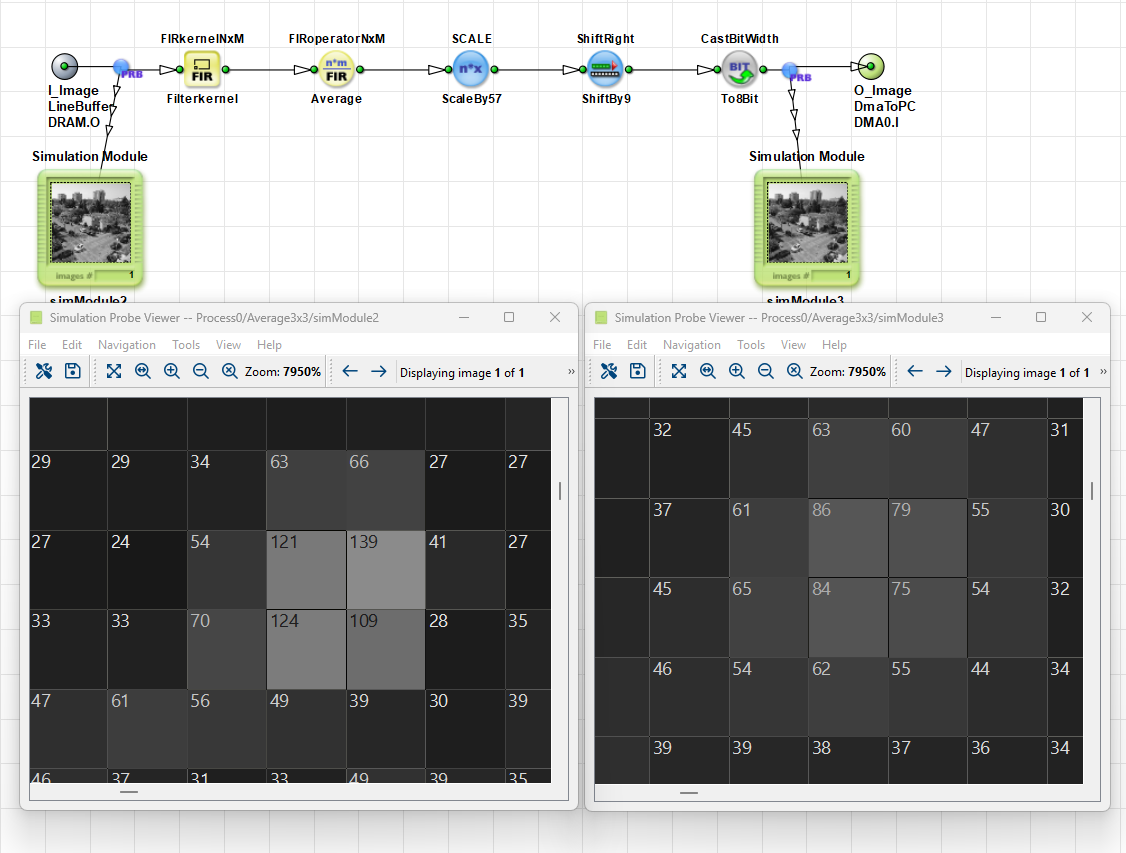
Smoothing with a 3×3 Average Filter:

Smoothing with a 3×3 Average Filter Using FIRkernelNxM

The design builds a centered 3×3 neighborhood with FIRkernelNxM (Filterkernel), averages it with FIRoperatorNxM (Average), then scales and casts the result back to 8-bit. The simulation probes compare pixel values before and after averaging: sharp local peaks become smoother, more uniform values.

You define the kernel size by editing the output link (Kernel Columns and Kernel Rows). The operator buffers the required pixels until the full neighborhood is available. At image borders, neighbors may be missing. Parameter EdgeHandling selects how missing values are filled (EdgeMirroredEdgeConstant).

FIRkernelNxM is an M-type operator. Building a centered neighborhood such as 3×3 requires buffering and therefore uses more FPGA resources and adds more delay than the line- or pixel-neighbor operators below. Use FIRkernelNxM when a filter truly needs a centered 2D neighborhood — for example before FIRoperatorNxM for blur, averaging, or edge detection.

For details about the operator, see FIRkernelNxM in the Operator Reference.

LineNeighboursNx1 and PixelNeighbours1xM#

LineNeighboursNx1 and PixelNeighbours1xM are a special case. They do not build a centered kernel in the usual sense.

LineNeighboursNx1 creates a kernel of N rows and 1 column. The current pixel is at kernel index 0; the other elements are pixels from previous lines (above). PixelNeighbours1xM creates a kernel of 1 row and M columns. The current pixel is again at kernel index 0; the other elements are previous pixels on the same line (to the left).

Unlike FIRkernelNxM, these operators do not center the current pixel and do not provide "future" neighbors that have not been processed yet. They look only into the past (previous lines or previous pixels). They are O-type operators and do not add the line or pixel delay that comes from buffering a centered neighborhood. That makes them simpler and usually cheaper in FPGA resources than FIRkernelNxM. You can still form a larger neighborhood — for example by combining both operators into a 3×3 window — but at the start of a line or image the past neighbors are not yet available, so those kernel elements stay empty until enough history has been collected. Missing pixels outside the image borders are set to parameter Constant; there is no mirrored edge handling.

Typical use cases:

  • Compare or reduce values across previous lines with LineNeighboursNx1 — for example find the minimum pixel value of the current pixel and the lines above it:

    Comparing Values Across Lines with LineNeighboursNx1

  • Compare or reduce values across previous pixels on the same line with PixelNeighbours1xM.

    Comparing Pixel Values with PixelNeighbours1xM

  • Feed a reduction operator such as MINMAX: these operators expect a kernel on the input, select one value from the neighborhood (for example the smallest pixel), and output a 1×1 result. After that step the kernel is resolved again.

    Minimum Pixel Value Across Neighboring Lines:

    Minimum Pixel Value Across Neighboring Lines with LineNeighboursNx1

    Maximum Pixel Value Across Neighboring Pixels:

    Maximum Pixel Value Across Neighboring Pixels with PixelNeighbours1xM

To build a two-dimensional kernel, you can combine LineNeighboursNx1 followed by PixelNeighbours1xM.

For details about the operators, see LineNeighboursNx1 in the Operator Reference and PixelNeighbours1xM in the Operator Reference.

ExpandToKernel#

The operator ExpandToKernel expands a single pixel input to an arbitrary kernel size. It replicates the input value to every kernel component. You define the new kernel size on the output link.

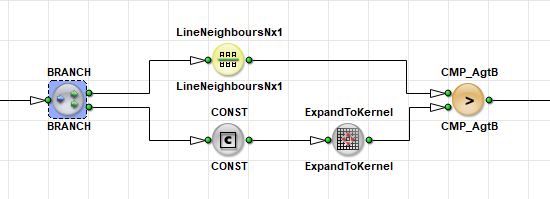
Use ExpandToKernel when a downstream operator expects a kernel on the input, but you only have a single pixel value — for example a threshold, a mean, or a reference pixel. A common pattern is to expand that constant or reference so it matches an existing neighborhood from FIRkernelNxM, LineNeighboursNx1, or PixelNeighbours1xM. Then you can apply operators such as CMP, SUB, or ADD element-wise across the full kernel (for example compare every neighbor with the same threshold).

Comparing Neighborhood Values with a Threshold Using ExpandToKernel

For details about the operator, see ExpandToKernel in the Operator Reference.

Processing Kernels#

After you have built a kernel, you can filter it, extract a subset, merge or split kernel streams, or reorder kernel components. The operators in this section process an existing kernel. Before DmaToPC, you must reduce the kernel to 1×1 — see Connecting to DMA.

FIRoperatorNxM#

The operator FIRoperatorNxM multiplies each kernel element with a coefficient and sums the products. You can define these coefficients with the Coefficients parameter.

The output of the FIRoperatorNxM operator has the kernel size 1×1, which means a single filtered pixel value per position. Use FIRkernelNxM, LineNeighboursNx1, or PixelNeighbours1xM to generate the required input kernel.

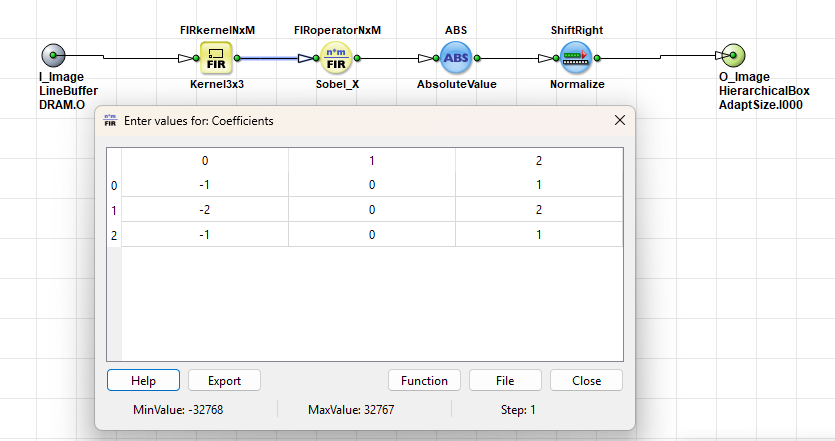
Use this operator for classical FIR-style filters (averaging, Gaussian, Sobel, and similar) when you already have a neighborhood on the link and need one filtered output pixel per position:

klzzwxh:0096 Operator in the Sobel X Filter

The screenshot shows the design example Examples\Processing\Filter\EdgeDetection\SobelGradientX delivered with VisualApplets.

For details about the operator, see FIRoperatorNxM in the Operator Reference.

SelectSubKernel#

即: SelectSubKernel operator extracts a rectangular subset of the input kernel. Its parameters FirstROW and FirstCOL define the offset of the subset. The new kernel size is set on the output link.

With SelectSubKernel you extract the central element of a kernel — typically the original pixel at that image position — when you no longer need the full neighborhood.

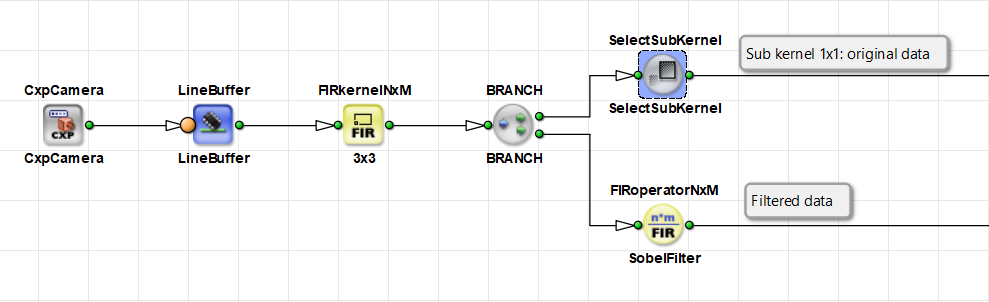
A typical use case is to apply a filter and still keep the original image. After FIRkernelNxM has built the neighborhood, you branch the kernel link. One path computes the filtered result. The other path uses SelectSubKernel to extract a 1×1 sub-kernel — the original pixel at that image position. You then have both the filtered data and the unfiltered image.

Keeping Original Image Data Next to a Filter:

Keeping Original Image Data Next to a Filter with SelectSubKernel

The design builds a 3×3 neighborhood with FIRkernelNxM, then branches. The upper path uses SelectSubKernel to extract the original pixel (sub-kernel 1×1). The lower path applies FIRoperatorNxM as a Sobel filter.

For details about the operator, see SelectSubKernel in the Operator Reference.

MergeKernel and SplitKernel#

The operator MergeKernel merges several input links into one output kernel. For this, one kernel dimension (either rows or columns) must match on all inputs; the other dimension on the input may differ. The Alignment parameter with the values horizontalvertical defines how the inputs are concatenated.

The opposite operator is SplitKernel. SplitKernel splits an N×M kernel into N×M separate output links, each with kernel size 1×1. The number of outputs must equal the number of kernel components and is fixed when you instantiate the operator.

A typical use case is to combine several variants of the same image — for example different grayscale or processed versions — into one kernel so you can compare or process them together. Use SplitKernel when you need to process individual kernel components on separate paths again.

Together, MergeKernel and SplitKernel can also replace a design that would otherwise need a SYNC operator: SYNC usually requires buffers on its inputs and therefore costs FPGA resources. When the streams can be carried as kernel components instead, merging and splitting kernels is often the more resource-efficient approach.

Use this pattern only for several variants of the same image that still share a common source, for example two different processings of one camera stream. Do not use MergeKernel to merge two independent cameras. Independent cameras remain asynchronous sources and still need SYNC (or another operator with asynchronous inputs) and buffers. See Operator Types and Synchronization Tutorial topic.

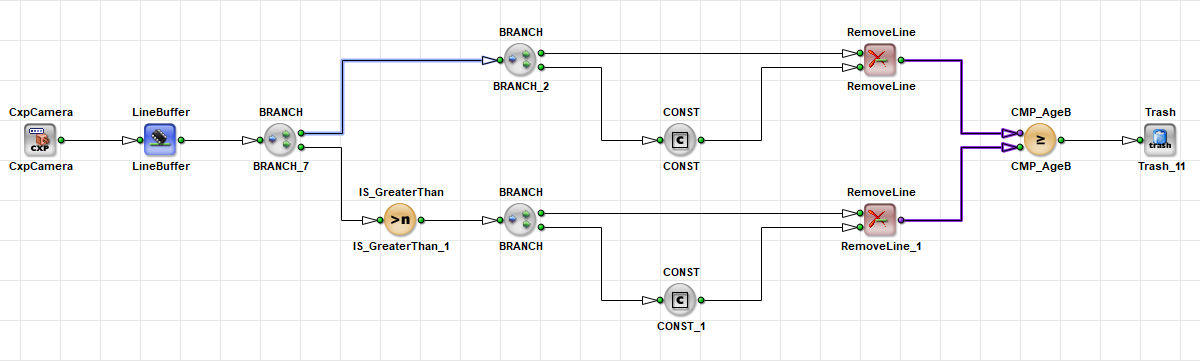
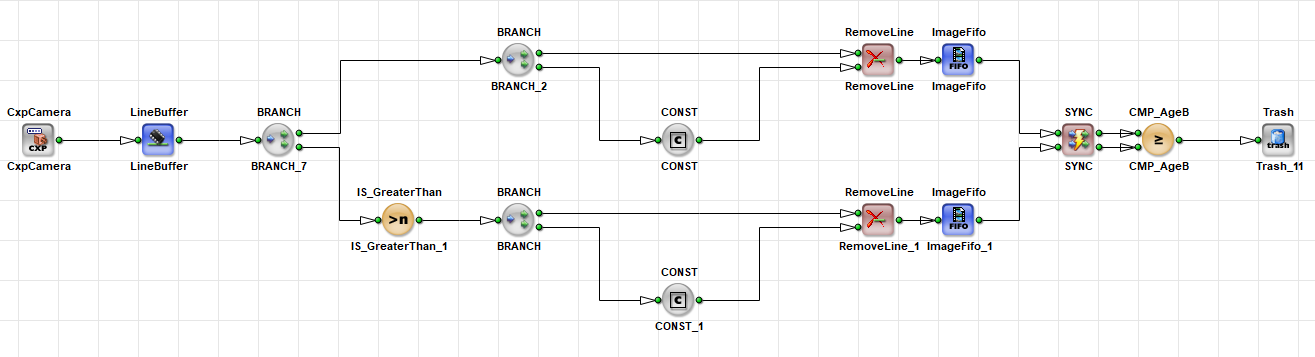
Sync Error When Merging Asynchronous Paths:

Sync Error When Merging Asynchronous Paths

Here two branches process the same image differently and then feed a common CMP operator. Because an M-type operator on one path has made the branches asynchronous, VisualApplets reports a synchronization error (purple links) — you cannot connect them directly. This example is still one camera, not two independent cameras.

Sync Error Resolved with Buffers and SYNC:

Sync Error Resolved with Buffers and SYNC

One valid fix is to place an ImageFifo (or another buffer) on each path and re-synchronize with SYNC before CMP. This works, but the extra buffers cost FPGA resources.

Sync Error Resolved with MergeKernel and SplitKernel:

Sync Error Resolved with MergeKernel and SplitKernel

The resource-efficient alternative carries both variants as kernel components: MergeKernel combines the two paths into one kernel link, processing continues on that link, and SplitKernel separates the components again before CMP. No SYNC and no extra synchronization buffers are required.

For details about synchronization and synchronization errors, see the Operator Types and Synchronization Tutorial topic.

For details about the operators, see MergeKernel in the Operator Reference and SplitKernel in the Operator Reference.

CastKernel#

CastKernel re-organizes parallelism and kernel size of the incoming data. You can change the kernel size on the output link. The product of kernel rows, kernel columns, and parallelism must be identical on input and output.

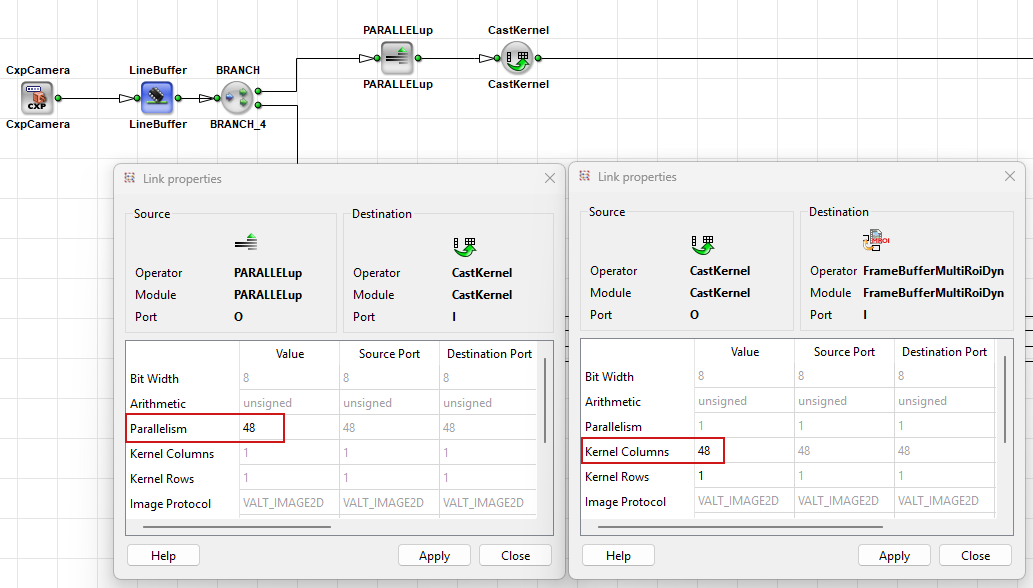
With CastKernel you can convert parallelism into a kernel. For example, parallelism 48 with kernel 1×1 becomes parallelism 1 with 48 kernel columns. The same 48 pixel values still move in one clock cycle, but they are now kernel components instead of parallel pixels. That is useful before memory operators that allow only a specific parallelism.

Converting Parallelism into a Kernel Before a Memory Operator:

Converting Parallelism 48 into a 48-Column Kernel with CastKernel

In the screenshot, PARALLELup raises the parallelism to 48 (kernel 1×1). CastKernel re-interprets that as parallelism 1 with 48 kernel columns, so the following memory operator can accept the data.

For details about the operator, see CastKernel in the Operator Reference.

KernelRemap#

KernelRemap remaps kernel components between input and output. The kernel dimensions stay the same. With the SourceSelect parameter, you can assign an input kernel index to each output kernel component.

With this operator, you can mirror or rotate the kernel content, map one input element to several outputs, or discard unused input elements.

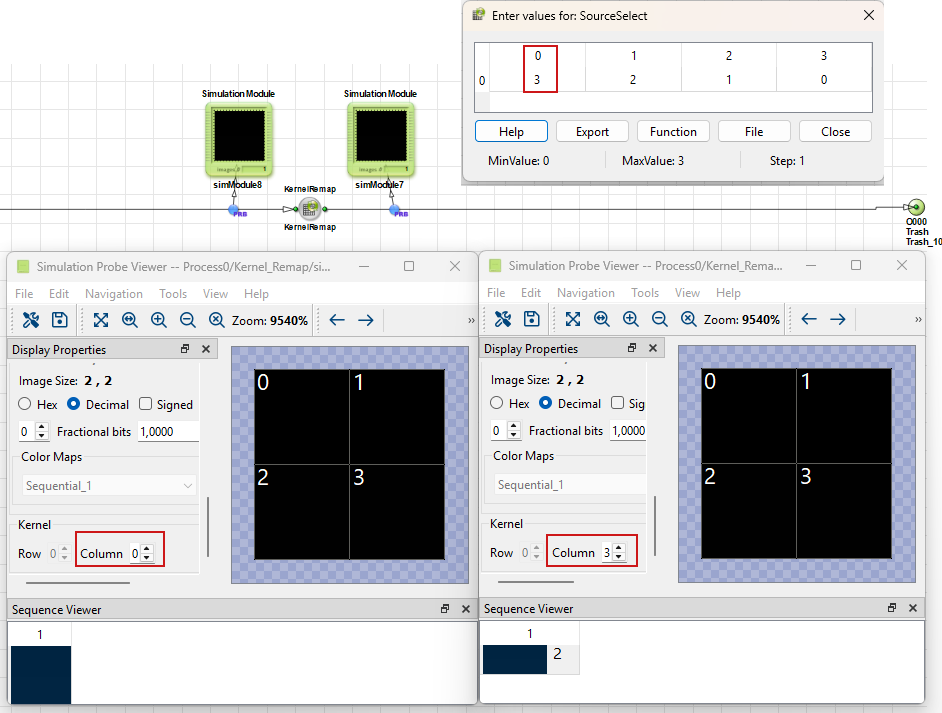
Swapping Kernel Columns with KernelRemap:

Swapping Kernel Columns with KernelRemap

The design in the screenshot shows how KernelRemap swaps kernel columns: column 0 and column 3 exchange places (and the inner columns follow). The mapping comes from the SourceSelect parameter, here 0, 1, 2, 33, 2, 1, 0. The simulation probes show the kernel components before and after the remap.

For details about the operator, see KernelRemap in the Operator Reference.

Connecting to DMA#

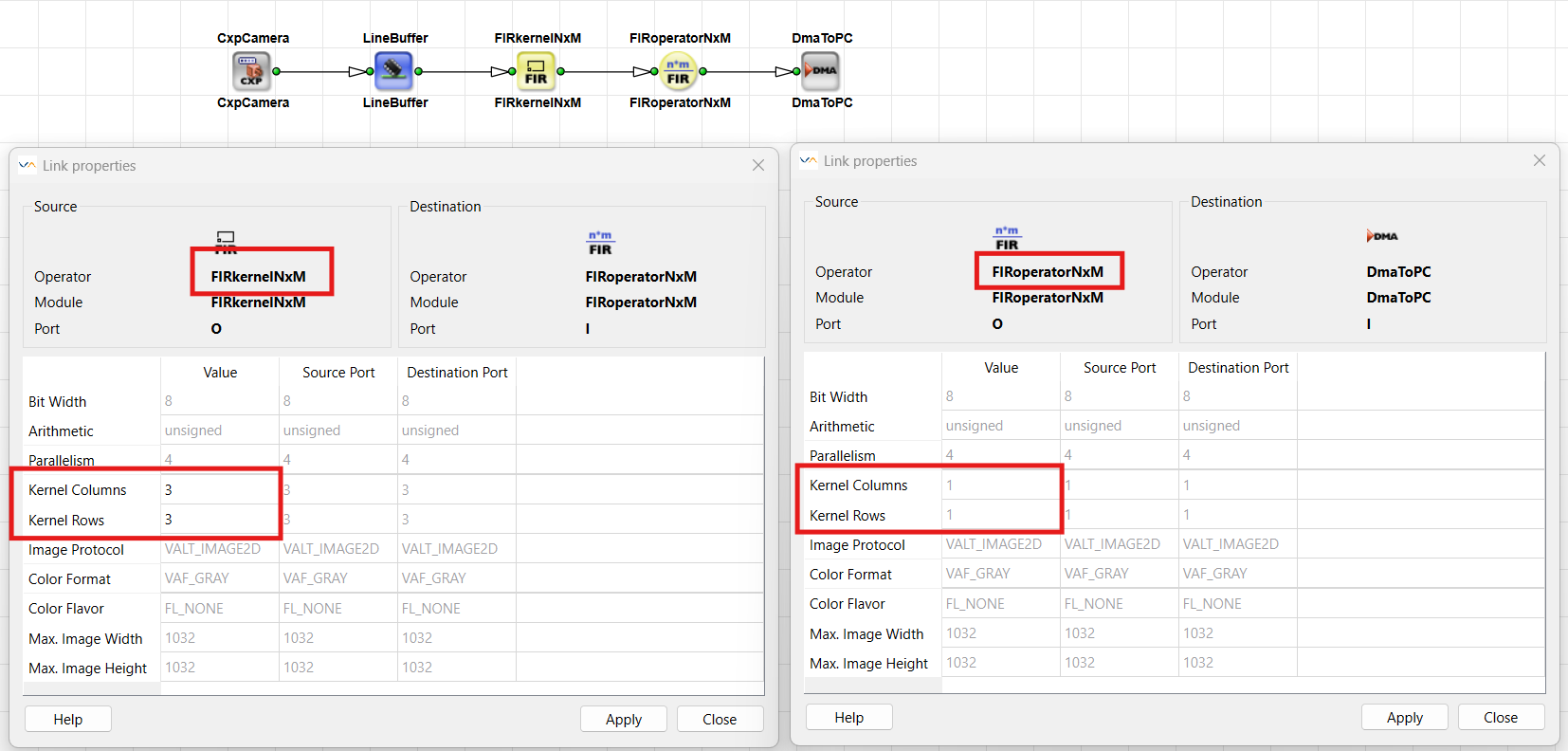
A raw kernel link must not go directly into DmaToPC. DmaToPC accepts only Kernel Columns = 1 and Kernel Rows = 1.

Therefore, always place one of the following operators between the kernel output and DmaToPC. These operators convert the kernel to single pixels or to a smaller kernel you can then reduce further:

  • FIRoperatorNxM
  • SelectSubKernel
  • SplitKernel
  • MINMAX
  • Median

Example Design#

A typical filter path looks like this:

Filter Operation

  1. The camera delivers single pixels (kernel 1×1).
  2. A buffer, for example LineBufferImageBuffer, decouples the camera from processing and provides the line data that neighborhood operators need.
  3. FIRkernelNxM builds a kernel out of the neighboring pixels, for example 3×3 or 5×5, on its output link.
  4. FIRoperatorNxM applies filter coefficients and outputs one pixel per position.
  5. DmaToPC transfers the single-pixel stream to the host.

Detailed filter examples, for example averaging, Gaussian, Sobel, adaptive threshold, and others, are listed in the Examples of Use sections of the FIRkernelNxM in the Operator Reference and FIRoperatorNxM in the Operator Reference.

Design Guideline

Always check the Supported Link Format of the following operator before you create a kernel larger than 1×1 on a link. Especially before DmaToPC, reduce the kernel to 1×1.