imaFlex CXP-12 Quad#
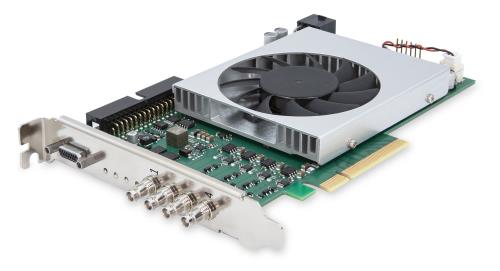
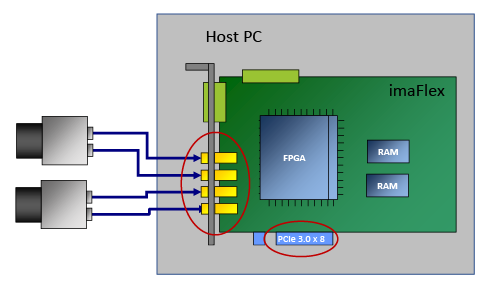
要将 imaFlex CXP-12 Quad 安装到主机中,请将其插入 PCIe Gen. 3.0 x8 或更高版本的插槽中。下图显示了连接了两台相机的 imaFlex CXP-12 Quad:
图像处理#
该采集卡可由 VisualApplets 进行完全编程。您可以设计适合您特定需求的图像处理应用程序。Basler 提供咨询支持、VisualApplets 培训,当然 Basler 也可以为您实现您的特定应用程序。
有关如何编写您自己的小程序的说明,请参阅 VisualApplets documentation。
生产线集成#
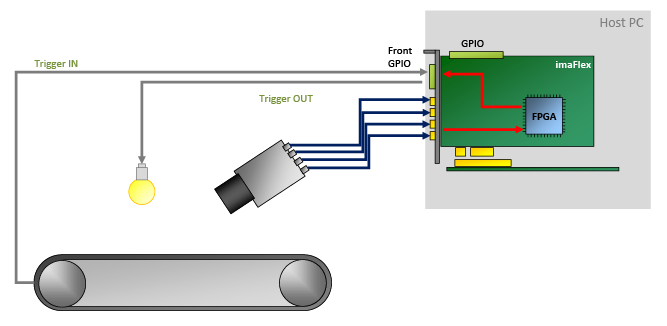
为了融入生产线,imaFlex CXP-12 Quad 提供了多个通用输入和输出。其中 4 到 20 个 GPIO(取决于所使用的硬件附件)经过电气隔离。
这些 GPIO 使您能够执行以下操作:
- 通过发送触发信号(例如照明信号和相机信号)来控制外围设备
- 接收来自外围设备的各种触发信号,例如轴编码器和光电开关
- 同步多个 imaFlex CXP-12 Quad 采集卡,以及/或者
- 同步连接的设备。
软件编程和配置接口#
imaFlex CXP-12 Quad 提供了一个易于使用的 API。通过 Framegrabber API,您可以将采集卡集成到任何图像处理应用程序中。您可以使用 Framegrabber API 用以下语言编写代码:
- C/C++
- C#(提供封装)
- Python(提供封装)
有关 Framegrabber API 的更多信息,请参见 Framegrabber API 文档。
或者,您可以使用 Basler GenTL 接口开发 GenTL 消费者形式的应用。有关 Basler GenTL 接口的更多信息,请参见 GenTL 接口文档。
连接器和 LED#
连接器#
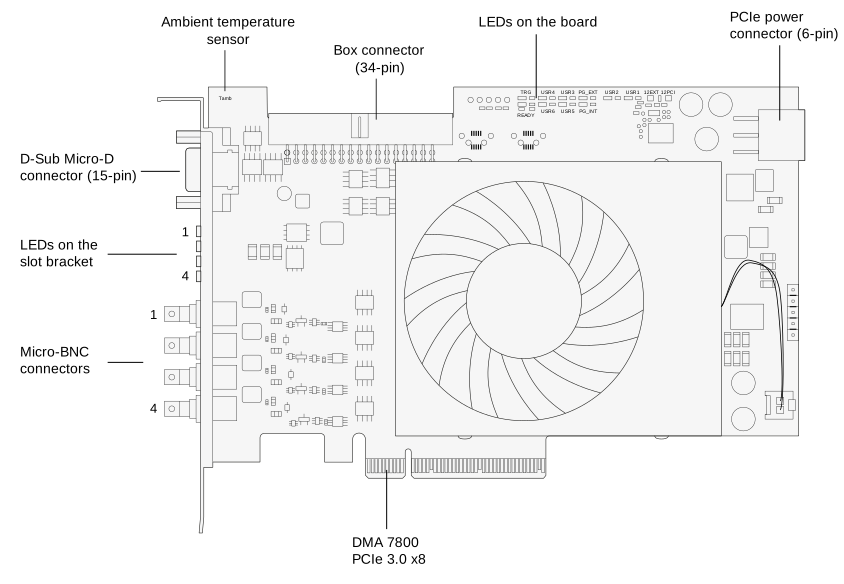
imaFlex CXP-12 Quad 具有以下接口:
插槽托架上的 LED 指示灯#
imaFlex CXP-12 Quad 的插槽支架上有四个 LED,用于指示各个 CXP 链路的状态:
 CXP 链路连接已准备就绪,可投入运行
 CXP 链路无连接
板上的 LED 指示灯#
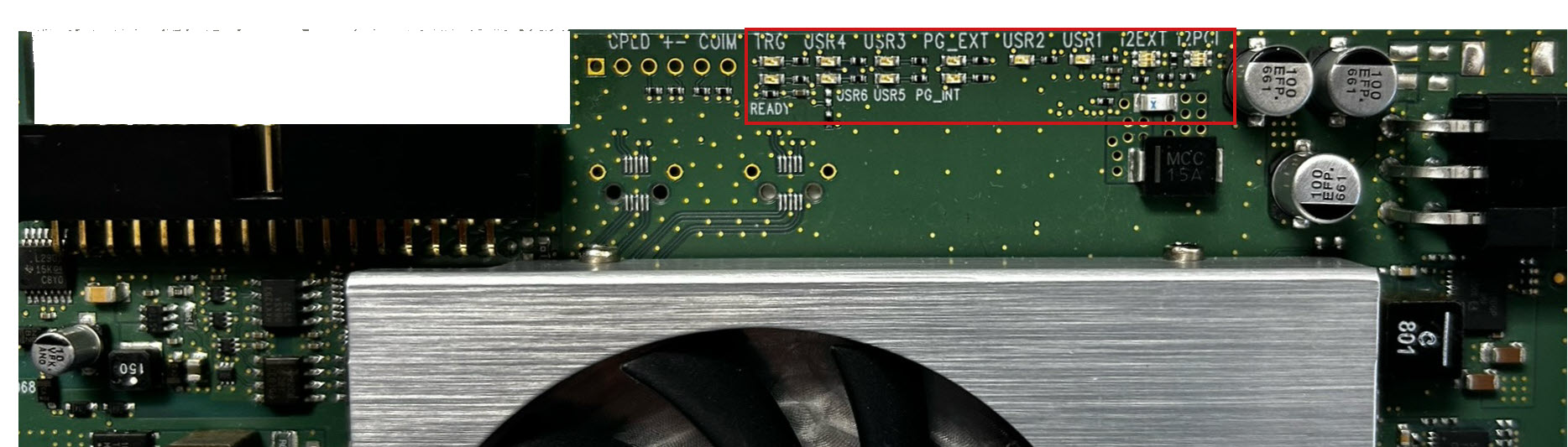
| LED 名称 | LED 颜色 | 含义 |
|---|---|---|
| TRG | 黄色 | 通过 15 引脚连接器供应的外部电压。 |
| READY | 橙色 | FPGA 已成功配置,可以投入工作。 |
| PG_INT | 绿色 | PG_INT = Power Good Internal PCIe 插槽上的电压稳定。内部生成的电压也稳定。 |
| PG_EXT | 绿色 | 未定义/内部功能。 |
| USR1 至 USR6 | 绿色 | 用户自定义。可通过 VisualApplets 软件控制这些 LED。它们与相机连接器无关,可用于任何目的。 |
| 12EXT | 绿色 | 采集卡的 PCIe 电源连接器通过主计算机连接至电源。 |
| 12PCI | 绿色或红色 | 绿色:采集卡通过 PCIe 插槽(12 VDC IN)接收电源。 红色:采集卡未通过 PCIe 插槽获取电源。 |
规格#
| imaFlex CXP-12 Quad | |
|---|---|
| 主机接口 | PCIe Gen 3 x8(直接内存访问) |
| 带宽(典型值/最大值) | 6520 MB/s |
| 板载 Memory | 1.5 GB DDR4-RAM |
| 电源(输入)/ 电流 PCIe 插槽 | 12 V (±5 %) / <1.5 A (actual values depend on processing) |
| 电源(输入)/电流 PCIe 6 引脚连接器 | 12 V (±5 %) / <6.5 A (actual values depend on connected PoCXP cameras) |
| PoCXP 供电(输出) | 每个 CoaXPress 连接器提供 17 W 的 24 V DC 稳压电源 |
| 尺寸(长 x 高) | PCIe 标准高度 半高卡: 167.64 mm x 111.15 mm |
| 重量 | 274 g |
| 相机接口 | 4 x CXP-12(CXP-1 至 CXP-12,micro-BNC/HD-BNC 连接器) |
| 操作温度 | 100 LFM 时为 0–50 °Ca |
| 存放温度 | -50-80°C |
| 工作期间的湿度 | 5–90 % |
| 存储期间的湿度 | 5%-95% |
| 合规性 | CE、FCC、RoHS、WEEE、REACH、UKCA、KC 您的接口卡证书 有关更多信息,请参见 Basler 网站上的合规性部分。 |
-
LFM = Linear Feet per Minute(线性英尺每分钟),用于测量气流速度的单位。 ↩
信息
PCIe 总线数据吞吐量取决于主板、芯片组以及主机的 BIOS 配置。安装的 PCIe 板卡数量也会影响吞吐量,例如 PCIe x8 连接器可能仅支持 x4 性能。请务必仔细检查主板手册以确保符合要求。
前面板 GPIO 连接器#
前置 GPIO 接口涵盖了采集卡的基准触发设置。其触发接口允许您控制外围设备(PLC)。
该插座位于插槽挡板上:
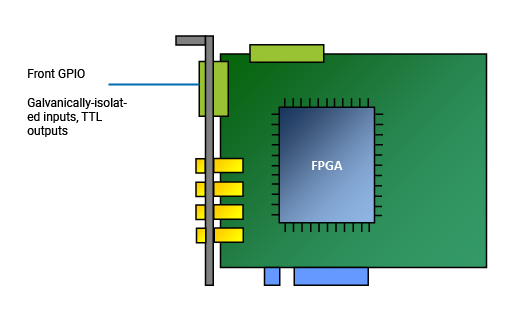
在默认配置下,前面板 GPIO 连接器的触发连接器提供以下功能:
- 上拉模式下的 3 个差分输入信号,或 2 个差分和 1 个单端输入信号
- 2 个 TTL 输出信号
信息
您可以配置前面板 GPIO 连接器的引脚分配以提供不同的输入信号,例如:
- 下拉
- 4 个单端信号(无差分信号)。
若要更改 GPIO 配置,请使用随 Framegrabber SDK 一起安装的命令行工具。
有关更多信息,请参阅输入配置和使用 gpioTool 配置触发信号的物理 Property。
前面板 GPIO 连接器引脚排布#
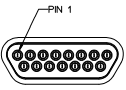
信息
前置 GPIO 接口采用 MOLEX 83612-9020 接口形式。针对此接口,可提供匹配的现成 MOLEX D-Sub 电缆(MOLEX 083422-9018)。
| 引脚编号 (3P FPGA) | 电气隔离 | 信号 | 参考信号 |
|---|---|---|---|
| 1 | 无 | GPO 0 (TTL) | 5 V / 全局 GND(引脚 6) |
| 2 | 无 | GPO 1 (TTL) | 5 V / 全局 GND(引脚 6) |
| 3 | 无 | 预留用于 RS 485 (GND) | |
| 4 | 无 | 预留用于 RS 485 | |
| 5 | 无 | 5 V_OUT(最大 0.5 A) | |
| 6 | 无 | GND(全局接地) | |
| 7 | 无 | — | |
| 8 | 是 | GPI 2(如果用于差分信号则为 GPI2+) | GPI 电压输入(引脚 10)/ GPI GND(引脚 15) |
| 9 | 是 | GPI 3(如果用于差分信号则为 GPI2-) | GPI 电压输入(引脚 10)/ GPI GND(引脚 15) |
| 10 | 是 | GPI 电压 IN(4.5–28 V) | GPI GND(引脚 15) |
| 11 | 是 | GPI 0+ | GPI 电压输入(引脚 10)/ GPI GND(引脚 15) |
| 12 | 是 | GPI 0- | GPI 电压输入(引脚 10)/ GPI GND(引脚 15) |
| 13 | 是 | GPI 1+ | GPI 电压输入(引脚 10)/ GPI GND(引脚 15) |
| 14 | 是 | GPI 1- | GPI 电压输入(引脚 10)/ GPI GND(引脚 15) |
| 15 | 是 | GPI 接地 | |
| 屏蔽 | 无 | GND(非隔离地 / 接地 / 支架) |
可能的拓扑#
您可以按如下方式操作 imaFlex CXP-12 Quad:
| 相机 数量 | 通道 数量 | 拓扑 |
|---|---|---|
| 1 | 1 | 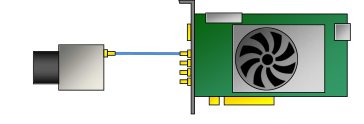 |
| 1 | 2 | 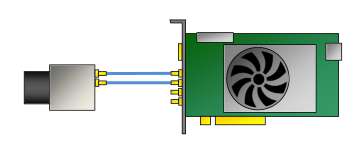 |
| 1 | 4 | 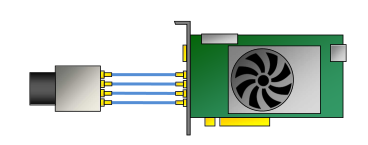 |
| 2 | 2 | 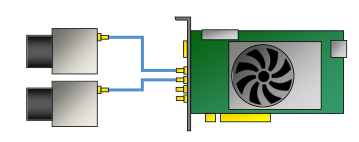 |
| 2 | 3 | 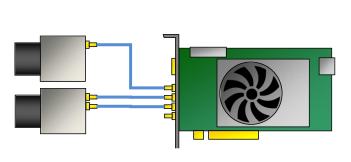 |
| 2 | 4 | 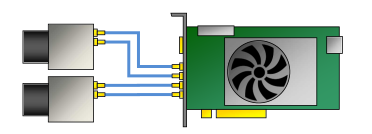 |
| 3 | 3 | 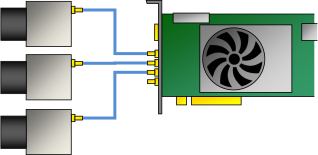 |
| 3 | 4 | 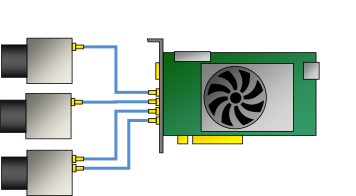 |
| 4 | 4 | 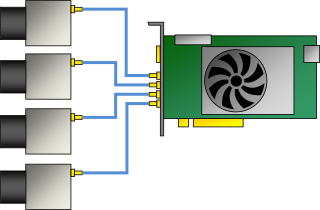 |
当通过始终提供 12 V 电压的 PCIe 6 引脚连接器连接到计算机电源时,imaFlex CXP-12 Quad 支持 Power over CXP (PoCXP)。
您可以按任意顺序连接相机。
信息
如果您打算在一台主计算机中使用多个 imaFlex CXP-12 Quad 板卡,请确保主计算机中每块板卡都有一个 PCIe Gen. 3.0 x8 或更高规格的插槽可用。有关更多信息,请参见 Using Multiple Boards in one Host。
采集小程序#
为确保优化使用系统资源,并非所有为 imaFlex CXP-12 Quad 设计的图像采集和处理功能都会同时加载到 imaFlex CXP-12 Quad 上。相反,Basler 提供了特定图像采集和处理功能的各种编译组合,以满足特定应用领域的要求。
通常,一个 Applet 支持特定的相机接口标准和拓扑结构、特定的图像采集功能以及可能的图像(预)处理功能。通过将 Applet 加载到采集卡上,您可以定义采集卡的功能并使其适应您的特定应用需求。
Applets 分为三种:由 Basler 始终提供的 Acquisition Applets(*.dll)、您自己或 Basler 使用 VisualApplets 开发的自定义 applets(*.hap)以及 Enhanced Applets:
- Enhanced Applets 是适用于 imaFlex CXP-12 Quad 的一套全新即用型 applets。Enhanced Applets 是 AcquisitionApplets 与 Custom Applets 之间的纽带:Enhanced Applets 包含用于采集和预处理图像与信号数据以及处理系统信息的功能。它们提供了 Binning、Flat-Field Correction 和 PGI 功能集。在 Enhanced Applets (imaFlex CXP-12 Quad) 中,您可以找到可用 Enhanced Applets 的概述。
- 有关随附采集 applets 的更多信息,请参阅 Acquisition Applets for imaFlex CXP-12。
- 有关随附采集 applets(GenTL 和 Fglib)的 PDF 文档,请参阅 Applets for imaFlex CXP-12 Quad Documentation。
- 除了随附的采集 applets 之外,imaFlex CXP-12 Quad 还可以进行编程,以执行特定应用所需的高度特定的图像处理任务。编程可以由 Basler、认证合作伙伴或您自己使用易于使用的图形化 FPGA 编程环境 VisualApplets 来完成。
预防措施#
→ 请参阅安全说明(图像采集卡)。
安装#
→ 请参阅连接图像采集卡。
→ 请参阅连接相机。