使用 pylon 配置图像采集卡#
信息
本主题介绍了基本用例。有关采集卡软件功能的深入信息,请参阅以下文档:
在以下情况下,配置图像采集卡特别有用:
- 您想要更改采集卡使用的 applet。
- 您想要通过采集卡触发已连接的 Basler boost 相机。
- 您想要在采集卡上执行去马赛克处理,以提升成像系统的性能。
- 您想要使用相机上不可用的输出格式,例如 16 位单色格式。
- 您想要配置采集卡接收或发送的触发信号。
更改小程序#
在图像采集卡上运行的小程序定义了其功能。对于某些相机设置,您可能需要更改默认小程序。
若要更改采集卡使用的 Applet,请将 InterfaceApplet 参数设置为要加载的 Applet 的名称,例如: Acq_DualCXP12Area.
若要了解哪些 applet 可用,请参阅 Acquisition Applets for imaWorx CXP-12 Quad。
使用采集卡触发 Basler boost 相机#
信息
本节仅适用于您明确希望通过采集卡触发相机的情况。通常情况下,相机是通过其 I/O 接口进行触发的。有关详细信息,请参阅触发图像采集。
硬件触发(外部)#
启用外部触发后,您可以向采集卡发送触发输入信号,采集卡会将这些信号转发给 Basler boost 相机。
若要将采集卡配置为外部硬件触发:
- 设置
AreaTriggerMode参数至External. - 设置
TriggerInSource参数设置为所需的“Front GPI”输入线。
例如,如果您想使用 GPI0(采集卡上的引脚 11 和 12)进行外部触发,请将参数设置为FrontGpiTriggerSource0. - 设置
TriggerCameraOutSelect参数设置为相应的“Bypass”选项。
例如,如果您选择了FrontGpiTriggerSource0,将TriggerCameraOutSelect参数至BypassFrontGpi0. - 设置
TriggerState参数至Active. - 如有必要,按如下所述配置触发信号。
所有触发信号均会转发至相机的源信号 CxpTrigger0 和 CxpTrigger1 (目前这两条线路的行为没有区别)。这些信号可用于多种用途。最常见的应用场景是图像采集。请参阅 下方的示例.
硬件触发(内部)#
启用内部触发后,图像采集卡会在指定的频率下在内部生成触发信号。所有外部触发信号都将被忽略。
要配置图像采集卡以进行内部硬件触发:
- 设置
AreaTriggerMode参数至Generator. - 设置
TriggerOutputFrequency参数设置为所需的触发输出频率。例如,如果您将该参数设置为 8,则采集卡将每秒生成 8 个触发信号。 - 设置
TriggerCameraOutSelect参数设置为所需的输出线,例如PulseGenerator0. - 设置
TriggerState参数至Active.
现在,每当您开始图像采集时,采集卡就会以指定的频率生成触发信号。
所有触发信号均会转发至相机的源信号 CxpTrigger0 和 CxpTrigger1。这些信号可用于各种用途。最常见的应用场景是图像采集。请参阅 下方的示例.
示例:使用触发信号进行图像采集#
- 在相机上,将
TriggerSelector参数至FrameStart. - 设置
TriggerMode参数至On. - 设置
ExposureMode参数至Timed. - 设置
TriggerSource参数至CxpTrigger0或CxpTrigger1.
由于目前两条线路的行为没有区别,您可以任选其一。
现在,每当采集卡接收或生成触发信号时,相机就会采集一幅图像。
信息
您可以将触发信号用作任何可由信号源控制的 Basler boost 相机功能的源。例如,将 CounterTriggerSource 参数至 CxpTrigger0 允许您使用接口卡控制 Counter 使用采集卡的功能。
在采集卡上执行去马赛克处理#
您可以在图像采集卡上执行去马赛克(debayering)处理。这可以减轻相机和主机的计算负荷。
为此:
- 在相机上,将
PixelFormat参数设为 Bayer Pixel Format,例如BayerRG12. - 在图像采集卡上,将
AutomaticFormatControl参数至false.
这使您可以独立于相机使用的像素格式来设置输出格式。 - 在图像采集卡上,将
Format参数设置为相应的 RGB Pixel Format。
位深度必须是 Bayer Pixel Format 位深度的三倍。例如,BayerRG12(相机)= Color36bit(采集卡)。
现在,图像采集卡将对相机的原始图像数据执行去马赛克处理,并输出 RGB 图像数据。
信息
请确保在上面的第 3 步中设置了正确的 RGB Pixel Format。否则,将无法正常采集图像。
使用相机上不可用的输出格式#
Basler boost 相机可以输出多种 pixel format 的图像数据,例如 Bayer RG 8 或 RBG 8。有关更多信息,请参见 pixel format 主题。
如果您的相机上没有所需的 Pixel Format,且您又想避免在主计算机上进行图像转换,您或许可以使用采集卡提供的其中一种像素格式。
图像采集卡提供以下格式:
| Gray8bit | Gray10bit | Gray12bit | Gray16bit |
| Color24bit | Color30bit | Color36bit | Color48bit |
| Bayergr8 | Bayergr10 | Bayergr12 | Bayergr16 |
| Bayerrg8 | Bayerrg10 | Bayerrg12 | Bayerrg16 |
| Bayergb8 | Bayergb10 | Bayergb12 | Bayergb16 |
| Bayerbg8 | Bayerbg10 | Bayerbg12 | Bayerbg16 |
要使用相机上不可用的输出格式,请执行以下操作:
- 在相机上,将
PixelFormat参数设置为所需的相机 Pixel Format,例如Mono12. - 在图像采集卡上,将
AutomaticFormatControl参数至false.
这使您可以独立于相机使用的像素格式来设置输出格式。 - 在图像采集卡上,将
Format参数设为所需的输出格式,例如Gray16bit.
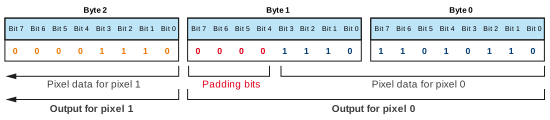
使用上述示例值,采集卡将基于 12 位相机图像数据输出 16 位图像数据。填充位(零)按如下方式插入。
使用 gpioTool 配置触发信号#
通过 gpioTool 命令行工具,您可以配置采集卡接收或发送的触发信号的物理 Property:
gpioTool 包含在 Framegrabber SDK 和 pylon Software Suite 中。
有关详细信息,请参阅 gpioTool。
示例代码#
// Select the Acq_SingleCXP12Area applet
camera.GetTLParams().InterfaceApplet.SetValue(Acq_SingleCXP12Area);
// Configure the frame grabber for external triggering
camera.GetTLParams().AreaTriggerMode.SetValue(AreaTriggerMode_External);
camera.GetTLParams().TriggerInSource.SetValue(TriggerInSource_FrontGpiTriggerSource0);
camera.GetTLParams().TriggerCameraOutSelect.SetValue(TriggerCameraOutSelect_BypassFrontGpi0);
camera.GetTLParams().TriggerState.SetValue(TriggerState_Active);
// Configure the frame grabber for internal triggering
camera.GetTLParams().AreaTriggerMode.SetValue(AreaTriggerMode_Generator);
camera.GetTLParams().TriggerOutputFrequency.SetValue(8);
camera.GetTLParams().TriggerCameraOutSelect.SetValue(TriggerCameraOutSelect_PulseGenerator0);
camera.GetTLParams().TriggerState.SetValue(TriggerState_Active);
// Use the external or internal trigger signals for image acquisition
camera.TriggerSelector.SetValue(TriggerSelector_FrameStart);
camera.TriggerMode.SetValue(TriggerMode_On);
camera.ExposureMode.SetValue(ExposureMode_Timed);
camera.TriggerSource.SetValue(TriggerSource_CxpTrigger0);
// Perform debayering on the frame grabber (Bayer RG 12 --> RGB 36 bit)
camera.PixelFormat.SetValue(PixelFormat_BayerRG12);
camera.GetTLParams().AutomaticFormatControl.SetValue(false);
camera.GetTLParams().Format.SetValue(Format_Color36bit);
// Configure the frame grabber to output 16-bit mono image data based on
// 12-bit mono image data from the camera
camera.PixelFormat.SetValue(PixelFormat_Mono12);
camera.GetTLParams().AutomaticFormatControl.SetValue(false);
camera.GetTLParams().Format.SetValue(Format_Gray16bit);
此示例代码仅适用于 C++ 语言。
您也可以使用 pylon Viewer 来设置参数。