Light Control#
该功能所基于的 SLP 协议支持相机和光源设备直接相互通信。
如果您使用的是 Basler Light 或其他制造商的 LED 照明解决方案,则需要 Basler SLP Strobe Controller 来启用相机与照明设备之间的通信。
如果您使用 Basler Camera Light,由于其中已经包含了控制器功能,因此不需要单独的控制器。
信息
对于 dart M camera modules,目前只有在使用 Basler dart M 接口板(Interface Board dart M GigE RJ45 PoE 或 Interface Board dart M GigE RJ45 AUX)时,才能使用 Light Control 功能。
该功能的使用#
配置光源设备#
要配置您的光源设备:
-
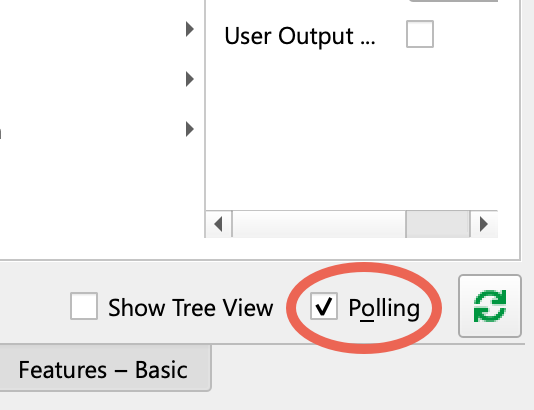
使用 pylon Viewer 时,请确保选择了功能窗格中的轮询选项:
-
确保相机空闲,即未在捕获图像。
- 如果尚未连接照明设备和控制器,请执行连接。
- 设置
BslLightControlMode参数至On. - 执行
BslLightControlEnumerateDevices命令。
这可以通过以下方式启用照明设备通信: GPIO line 并分配一个 light device ID. - 如果您有 多个 环境中的照明设备,请将
BslLightDeviceSelector参数设置为您要配置的设备。
确保设备正确连接,即BslLightDeviceErrorStatus参数返回NoError. -
如果您使用 Basler SLP Strobe Controller:
- 设置
BslLightDeviceControlMode参数至Current. - 设置
BslLightDeviceOperationMode参数至Off. -
设置
BslLightDeviceMaxCurrent参数设置为您的照明设备在连续运行时的额定电流(以 mA 为单位)。注意 – 指定过高的标称额定电流会损坏您的光源。
使用电流控制时,请确保指定您的光源可以承受的标称额定电流。
否则,您的光源会在工作时损坏。
- 设置
-
设置
BslLightDeviceBrightness参数设置为所需的亮度。
100.0 的值对应于照明设备额定电流的 100 %。50 % 会将电流降低 2 倍。您还可以将亮度设置得高于 100 %。这称为 overdriving. - 设置
BslLightDeviceOperationMode参数设置为所需模式:On:使光源持续发光。Strobe:将光源设置为 strobe mode.
- 如果需要,请将设置保存在用户设置中。
信息
- 如果您使用的是 Basler Camera Light,则
BslLightDeviceControlMode和BslLightDeviceMaxCurrent参数会自动设置。 - 在您每次从电流切换到电压时(反之亦然),控制器存在短暂的初始化阶段,在此期间,连接的光源设备将亮起。此阶段可能会持续长达 15 s,这是正常现象。
频闪模式#
频闪模式允许您在需要时操作闪光灯等照明设备,而不是连续操作它。
使用频闪模式具有以下优点:
- 它可以帮助延长光源的预期寿命。通过仅在需要时打开光源,LED 中产生的热量更少。这减慢了光源的老化过程。
- 在频闪模式下,您可以使光源过载,也就是说,将提供的电流最大增加到 500%(对于光源控制器),从而增加光源的亮度。
要启用选通模式,请选择一个照明设备并设置 BslLightDeviceOperationMode 参数至 Strobe.
配置触发信号和频闪持续时间#
一般来说,触发光源设备的工作原理如下:
- 最初,光源已关闭。
- 光源由触发信号打开。
- 光源保持打开一段时间,即频闪持续时间。
- 频闪持续时间结束后,光源将再次关闭。
ace 2、boost R 和 dart M 相机#
若要在 ace 2、boost R 和 dart M 相机上配置触发信号和选通持续时间:
- 设置
BslLightControlTriggerSource参数设置为要用于开启连接光源的源,例如:FlashWindow. - 如果适用,请设置
BslLightControlTriggerActivation参数设置为以下值:RisingEdge(default):当信号 上升时,即信号状态从低电平变为高电平时,所有连接的光源都会点亮。FallingEdge:当信号 下降时,即信号状态从高电平变为低电平时,所有连接的光源都会点亮。AnyEdge:当信号 下降或上升.
- 设置
BslLightDeviceStrobeMode参数设置为以下值:Automatic:选通脉冲持续时间由相机的闪光窗口持续时间(BslFlashWindowDuration参数)控制。该BslLightDeviceStrobeDuration参数将变为只读,并显示计算出的选通脉冲持续时间。Manual:您可以使用BslLightDeviceStrobeDuration参数。
- 如果您选择了
Manual选通模式,请将BslLightDeviceStrobeDuration参数设置为所需的选通脉冲持续时间(以微秒为单位)。
信息
- 如果您使用的是触发宽度 Exposure Mode 或 Exposure Auto Auto Functions,请勿使用自动频闪模式。否则,相机和光源可能会表现出不可预测的行为。
- 如果您使用的是 Sequencer 功能,则自动频闪模式不可用。
- 在自动频闪模式下,计算出的频闪持续时间可能比闪烁窗口持续时间短。这样做是为了补偿光源打开所需的时间,即打开延迟。
- 如果您在达到相机性能上限时操作相机,则可能会出现过度触发。
ace U/L 相机#
要配置 ace U/L 相机上的触发信号和频闪持续时间:
-
如果您使用的是 滚动快门 相机,请将
BslLightControlTriggerMode参数设置为以下值:ExposureActive:所有连接的光源在曝光开始时点亮。请仅在 不重叠 图像采样的前提下使用此模式。FlashWindow:当相机的 闪烁窗口 信号上升时,所有连接的光源都会点亮。如果使用此模式,请确保您的相机型号支持 Flash Window 信号。
在全局快门相机上,曝光开始时所有连接的光源总是会打开。
-
设置
BslLightDeviceStrobeMode参数设置为以下值:Automatic:选通脉冲持续时间由相机的ExposureTime参数控制。Manual:您可以使用BslLightDeviceStrobeDuration参数。
- 如果您选择了
Manual选通模式,请将BslLightDeviceStrobeDuration参数设置为所需的选通脉冲持续时间。
信息
- 如果您使用的是触发宽度 Exposure Mode、Sequencer 功能或 Gain Auto 或 Exposure Auto Auto Functions,则自动频闪模式不可用。
- 如果您在达到相机性能上限时操作相机,则可能会出现过度触发。
使光源设备过载#
注意 – 过载可能会损坏您的光源。
请仔细阅读本节中的说明,以免损坏连接的光源,并确保光源不会过早老化。
使光源过载意味着您可以增加电流,从而在光源处于频闪模式时提高光源强度。
要使光源设备过载:
-
如果您使用的是 Basler Light 或第三方照明设备:
- 根据当前占空比和选通脉冲持续时间,计算设备的允许最大电流。在 Basler ace 2、boost R 和 dart M 相机上,您可以读取
BslLightDeviceDutyCycle参数以确定当前的占空比。 - 设置
BslLightDeviceOverdriveLimit参数进行相应的设置。例如,如果您的光源能够承受其标称电流额定值的 200%,请将过载限制设为 200.0。
如果您使用的是 Basler Camera Light,则会自动计算过载限制,并且
BslLightDeviceOverdriveLimit参数不可用。 - 根据当前占空比和选通脉冲持续时间,计算设备的允许最大电流。在 Basler ace 2、boost R 和 dart M 相机上,您可以读取
-
设置
BslLightDeviceBrightness设为大于 100.0 的值。
过载时,请考虑以下几个方面,以免损坏您的光源:
- 如果不确定光源在频闪模式下可以承受的最大电流,请与光源的制造商联系。
- 由于增加的电流会导致 LED 发热量增大,因此必须在各次频闪脉冲之间留出足够的时间,以保证光源再次冷却。根据经验,脉冲强度越高,两次脉冲之间应留出的时间越长。
- 考虑曝光时间,因为这会影响脉冲的长度和占空比。
安全功能#
以下安全功能在 Basler 照明设备中实现,以避免损坏硬件:
SLP Light Controller 上的安全功能#
大于 2 A 的电流以及较长的 Exposure Time 和高占空比可能会损坏控制器硬件。
为避免这种情况,您无法将 Basler SLP Light Controller 的标称电流(BslLightDeviceMaxCurrent 参数)设为超过 2000 mA。
不过,如果使设备过载,最终电流可能会超过 2 A。
在这种情况下,相机会自动调整某些照明设备设置的最大值。请参阅下表。
| 输出电流(标称电流 x 亮度 %) | 最大频闪持续时间 | 最大占空比 |
|---|---|---|
| 2 A 以下 | - | 100 % |
| 2 A to <3 A | 5 ms | 15 % |
| 3 A to <4 A | 5 ms | 8 % |
| 4 A to <5 A | 5 ms | 6 % |
| 5 A to <6 A | 5 ms | 4 % |
| 6 A to <8 A | 1 ms | 4 % |
| 8 A to <9 A | 1 ms | 3 % |
| 9 A to <10 A | 1 ms | 2 % |
Camera Lights 上的安全功能#
在 Basler Camera Lights 上,如果所选亮度相对于频闪持续时间和占空比过高,则频闪持续时间将减少,或者触发将被忽略。请参阅下表。
| 所需亮度 | 最大频闪持续时间 | 最大占空比 |
|---|---|---|
| 0–100 % | - | 100 % |
| 101-200 % | 30 ms | 30 % |
| 201-300 % | 10 ms | 20 % |
| 301-500 % | 2 ms | 10 % |
| 501-1000 % | 1 ms | 5 % |
GPIO 线路配置#
相机通过相机的一条 GPIO 线路与照明设备通信:
-
在 ace 2、boost R 和 dart M 相机,相机始终使用 Line 3 进行光通信。因此,当启用 Light Control 功能时, 线模式 的 Line 3 设置为
InOut和 线路连接 设为LightControl. -
在 ace U/L 相机,
BslLightControlSource参数显示相机用于光通信的 GPIO 线路。
光源设备 ID#
每个通过 SLP 协议连接的光源设备都有一个光源设备 ID。ID 存储在设备上。
有效的光源设备 ID 为 1、2、3、4 和 7。所有设备随附的 ID 均设置为 7(出厂设置)。
使用 BslLightControlEnumerateDevices 命令枚举设备时,相机自动搜索 ID 设置为 7 的设备,并为其分配 1 到 4 之间下一个可用的 ID。
如果使用多个光源设备,则必须确保它们的 ID 都不同。使用具有相同 ID 的设备会导致通信错误。
- 示例 1:假设您连接一个新的光源设备并枚举设备。相机将 ID 1 分配给设备。然后,断开该设备的连接,连接下一个光源设备,然后再次枚举设备。相机还会将 ID 1 分配给该设备。
- 示例 2:假设您连接两个新的光源设备并枚举设备。相机找到两个 ID 设置为 7 的设备,并将下一个可用 ID 分配给每个设备,即 1。
在这两个示例中,当您将两个照明设备连接到相机时,都会发生通信错误。您必须更改其中一个 ID 才能解决冲突。
提示
防止冲突的最佳方法是依次连接设备,并在连接设备后始终分配一个新的唯一 ID。
更改光源设备 ID#
要更改光源的 ID:
- 设置
BslLightControlMode参数至On. - 设置
BslLightDeviceOperationMode参数至Off. - 设置
BslLightDeviceSelector参数设置为您要更改其 ID 的 Basler 光源设备。 - 设置
BslLightDeviceChangeID参数设置为所需的 ID,例如Device1.
在 ace U/L 相机,ID 将立即更改。 - 在 ace 2、boost R 和 dart M 相机,执行
BslLightDeviceNewIDSave命令。
Light Control 功能使用注意事项#
- 当
BslLightControlMode设为On, Serial Communication 功能被禁用时。这是因为 Light Control 功能同时也使用了 Serial Communication。 - Basler Camera Lights use pulse width modulation (PWM), the Basler SLP Strobe Controller doesn't. If you're using very short exposure times (<500 µs) and a brightness value other than 100 %, PWM can lead to brightness fluctuations or to stripes in rolling shutter cameras.
- 避免使用非常短的闪烁窗口信号。否则,生成的图像中的某些线条可能太亮,而另一些线条可能太暗。
- 在设置
BslLightControlMode参数至On时,光源设备实际开启会有最多 1 秒的延迟。因此,第一幅图像可能会过暗。您可以丢弃该图像,或者如果需要所有图像,请在适当的延迟后开始图像采集。 - 如果使 Basler Camera Light 过载,请不要以超过每秒 60 帧的速度操作相机。否则,相机和光源设备可能会表现出不可预测的行为。
- Basler ace 2、boost R 和 dart M 相机:从以下位置加载光源设备设置时: user set,只有在执行以下操作后,设置才会生效:
BslLightControlEnumerateDevices命令。
过度触发#
如果您在达到相机性能上限时操作相机,则可能会发生光源设备的过度触发。过度触发表示光源设备接收到未准备好接收的触发,例如,因为其仍处在关闭光源的过程中。这意味着触发将被忽略且该光源在下次曝光时不会亮起。
为了更好地理解此问题,请参考以下示例。
具有 100 fps 速度的相机在 Exposure Time 设置为 50 ms 的情况下运行。因此,相机可以每秒 20 帧进行快速连续采集,而曝光之间不会暂停。这意味着必须正好在两次曝光之间的边沿触发光源设备。
实际上,这几乎是无法实现的,因为固有抖动会造成以下情况:有时在触发信号达到时,光源仍关闭。在这种情况下,触发将被忽略且生成的图像太暗。
由于抖动是不规则的,没有精确的方法可防止此情况的发生。如果您注意到其中一些图像比其他的要暗,请考虑以连续模式操作光源。您还可以尝试使用 Acquisition Frame Rate 功能调整帧速率。
监控过度触发#
在 ace 2、boost R 和 dart M 相机, BslLightControlOvertriggerCount 参数可用。它允许您监控:当至少有一个连接的灯光设备尚未准备就绪时,发送了多少个触发信号。
示例: 假设您的相机连接了 4 个灯光设备。当其中 3 个设备尚未准备就绪时,您发送了一个触发信号。因此, BslLightControlOvertriggerCount 参数增加 1。
该参数计数到最大值 65 535,然后停止计数。
要重置过触发 Counter,请执行 BslLightControlOvertriggerCountReset 命令。
检查和清除错误#
ace 2、boost R 和 dart M 相机#
Basler ace 2、boost R 和 dart M 相机可以从连接的灯光设备中读取以下错误数据:
- 错误状态可以帮助您自行更正错误。
- 错误代码提供了有关错误类型的附加信息,且可以由 Basler 支持人员进行评估。
要检查并清除错误:
- 如果您连接了多个设备:
- 检查
BslLightControlErrorSummary参数以找出哪个设备遇到问题,例如,Device2. - 设置
BslLightDeviceSelector参数分配给遇到问题的设备。
- 检查
- 获取
BslLightDeviceErrorStatus参数的值,并在下方的 错误状态 表中查找其含义。 - 如果错误状态为“硬件错误”:
- 执行
BslLightDeviceErrorStatusReadAndClear命令。 - 获取
BslLightDeviceErrorCode参数的值,并在下方的 Error Codes 表中查找其含义。 - 如果可能的话,请更正错误。
- 执行
- 如果错误状态不是“硬件错误”(Hardware Error):
- 如果可能的话,请更正错误。
- 执行
BslLightDeviceErrorStatusReadAndClear命令,将错误状态重置为NoError.
错误状态#
即: BslLightDeviceErrorStatus 参数可采用以下值:
| 值 | 含义 |
|---|---|
| 通信故障 | 如果光源设备和相机之间的数据传输错误,则会发生通信错误。原因可能是使用了过长的线缆或线路上的噪音过大。 |
| 连接丢失 | 与先前连接的光源设备的连接已丢失。例如,如果电缆松动,就会发生这种情况。 |
| 硬件错误 | 灯光设备遇到技术故障。有关硬件错误类型的更多信息,请执行 BslLightDeviceErrorStatusReadAndClear 命令以检索 错误代码.a |
| 光源设备错误 | 光源设备遇到内部错误。a |
| 无错误 | 未检测到错误。 |
| 未连接 | 灯光设备未连接到相机或尚未枚举。执行 BslLightControlEnumerateDevices 命令以枚举设备。 |
| 不支持的设备版本 | 该光源设备与当前相机不兼容。请联系支持人员以了解固件更新是否可用。 |
Error Codes#
即: BslLightDeviceErrorCode 参数可采用以下值:
| 值 | 含义 |
|---|---|
| 0x30024 | 光源控制器的照明连接器存在短路。这可能是由于光源设备故障造成的。 |
| 0x3002A | Light Controller 无法提供所需的电流。请尝试降低 BslLightDeviceCurrent 参数值。 |
| (其他) | 请联系 Basler 支持人员并提供该错误代码。 |
ace U/L 相机#
Basler ace U/L 相机可以从连接的光源设备读取错误列表。
最多可以存储 25 个错误。如果发生第 26 个错误,则最早的错误将被覆盖,依此类推。
检查和清除错误是一个反复迭代过程,具体取决于发生了多少个错误。
要检查并清除错误:
- 如果您连接了多个设备:
- 检查
BslLightControlErrorStatus参数以找出哪个设备遇到问题,例如,Device2. - 设置
BslLightDeviceSelector参数分配给遇到问题的设备。
- 检查
- 获取
BslLightDeviceLastError参数并在下表中查找其含义。 - 更正相应的错误。
- 要从错误列表中删除最后一个错误,请执行
BslLightDeviceClearLastError命令。 - 持续获取并删除最后一个错误,直到
BslLightDeviceLastError参数显示NoError.
| 值 | 含义 |
|---|---|
| 通信故障 | 如果光源设备和相机之间的数据传输错误,则会发生通信错误。原因可能是使用了过长的线缆或线路上的噪音过大。 |
| 连接错误 | 如果光源设备和相机之间的连接断开或发生了通信错误,则会发生连接错误。其他原因还可能包括连接松动或控制器完全断开。 |
| 硬件错误 | 光源设备出现技术故障。a |
| 电流不足 | Light Controller 无法提供所需的电流。请尝试降低 LightDeviceMaxCurrent 参数值。 |
| 无错误 | 自上次清除错误内存以来,光源设备未检测到任何错误。 |
| 短路 | 光源控制器的照明连接器存在短路。这可能是由于光源设备故障造成的。 |
-
断开并重新连接电源可以解决此问题。为确保重启,需要将控制器断开电源五分钟。这是正常现象。如果您使用多个控制器,即使其他控制器没有遇到任何故障,也必须重启其他控制器的电源。
示例代码#
ace 2、boost R、dart M 相机#
// Enable the light control mode
camera.BslLightControlMode.SetValue(BslLightControlMode_On);
//Enumerate the light devices
camera.BslLightControlEnumerateDevices.Execute();
//Select light device 1
camera.BslLightDeviceSelector.SetValue(BslLightDeviceSelector_Device1);
//Set the nominal current of device 1 to 100 mA
camera.BslLightDeviceCurrent.SetValue(100.0);
//Set the brightness to 100 %
camera.BslLightDeviceBrightness.SetValue(100.0);
//Set the operation mode to Strobe
camera.BslLightDeviceOperationMode.SetValue(BslLightDeviceOperationMode_Strobe);
INodeMap& nodemap = camera.GetNodeMap();
// Enable the light control mode
CEnumParameter(nodemap, "BslLightControlMode").SetValue("On");
// Enumerate the light devices
CCommandParameter(nodemap, "BslLightControlEnumerateDevices").Execute();
// Select light device 1
CEnumParameter(nodemap, "BslLightDeviceSelector").SetValue("Device1");
// Set the nominal current of device 1 to 100 mA
CFloatParameter(nodemap, "BslLightDeviceCurrent").SetValue(100.0);
// Set the brightness to 100 %
CFloatParameter(nodemap, "BslLightDeviceBrightness").SetValue(100.0);
// Set the operation mode to Strobe
CEnumParameter(nodemap, "BslLightDeviceOperationMode").SetValue("Strobe");
// Enable the light control mode
camera.Parameters[PLCamera.BslLightControlMode].SetValue(PLCamera.BslLightControlMode.On);
// Enumerate the light devices
camera.Parameters[PLCamera.BslLightControlEnumerateDevices].Execute();
// Select light device 1
camera.Parameters[PLCamera.BslLightDeviceSelector].SetValue(PLCamera.BslLightDeviceSelector.Device1);
// Set the nominal current of device 1 to 100 mA
camera.Parameters[PLCamera.BslLightDeviceCurrent].SetValue(100.0);
// Set the brightness to 100 %
camera.Parameters[PLCamera.BslLightDeviceBrightness].SetValue(100.0);
// Set the operation mode to Strobe
camera.Parameters[PLCamera.BslLightDeviceOperationMode].SetValue(PLCamera.BslLightDeviceOperationMode.Strobe);
/* Macro to check for errors */
#define CHECK(errc) if (GENAPI_E_OK != errc) printErrorAndExit(errc)
GENAPIC_RESULT errRes = GENAPI_E_OK;  /* Return value of pylon methods */
/* Enable the light control mode */
errRes = PylonDeviceFeatureFromString(hdev, "BslLightControlMode", "On");
CHECK(errRes);
/* Enumerate the light devices */
errRes = PylonDeviceExecuteCommandFeature(hdev, "BslLightControlEnumerateDevices");
CHECK(errRes);
/* Select light device 1 */
errRes = PylonDeviceFeatureFromString(hdev, "BslLightDeviceSelector", "Device1");
CHECK(errRes);
/* Set the nominal current of device 1 to 100 mA */
errRes = PylonDeviceSetFloatFeature(hdev, "BslLightDeviceCurrent", 100.0);
CHECK(errRes);
/* Set the brightness to 100 % */
errRes = PylonDeviceSetFloatFeature(hdev, "BslLightDeviceBrightness", 100.0);
CHECK(errRes);
/* Set the operation mode to Strobe */
errRes = PylonDeviceFeatureFromString(hdev, "BslLightDeviceOperationMode", "Strobe");
CHECK(errRes);
# Enable the light control mode
camera.BslLightControlMode.Value = "On"
# Enumerate the light devices
camera.BslLightControlEnumerateDevices.Execute()
# Select light device 1
camera.BslLightDeviceSelector.Value = "Device1"
# Set the nominal current of device 1 to 100 mA
camera.BslLightDeviceCurrent.Value = 100.0
# Set the brightness to 100 %
camera.BslLightDeviceBrightness.Value = 100.0
# Set the operation mode to Strobe
camera.BslLightDeviceOperationMode.Value = "Strobe"
您也可以使用 pylon Viewer 轻松设置参数。
ace U/L 相机#
// Enable the light control mode
camera.BslLightControlMode.SetValue(BslLightControlMode_On);
//Enumerate the light devices
camera.BslLightControlEnumerateDevices.Execute();
//Select light device 1
camera.BslLightDeviceSelector.SetValue(BslLightDeviceSelector_Device1);
//Set the nominal current of device 1 to 100 mA
camera.BslLightDeviceMaxCurrent.SetValue(100.0);
//Set the brightness to 100 %
camera.BslLightDeviceBrightness.SetValue(100.0);
//Set the operation mode to Strobe
camera.BslLightDeviceOperationMode.SetValue(BslLightDeviceOperationMode_Strobe);
INodeMap& nodemap = camera.GetNodeMap();
// Enable the light control mode
CEnumParameter(nodemap, "BslLightControlMode").SetValue("On");
// Enumerate the light devices
CCommandParameter(nodemap, "BslLightControlEnumerateDevices").Execute();
// Select light device 1
CEnumParameter(nodemap, "BslLightDeviceSelector").SetValue("Device1");
// Set the nominal current of device 1 to 100 mA
CFloatParameter(nodemap, "BslLightDeviceMaxCurrent").SetValue(100.0);
// Set the brightness to 100 %
CFloatParameter(nodemap, "BslLightDeviceBrightness").SetValue(100.0);
// Set the operation mode to Strobe
CEnumParameter(nodemap, "BslLightDeviceOperationMode").SetValue("Strobe");
// Enable the light control mode
camera.Parameters[PLCamera.BslLightControlMode].SetValue(PLCamera.BslLightControlMode.On);
// Enumerate the light devices
camera.Parameters[PLCamera.BslLightControlEnumerateDevices].Execute();
// Select light device 1
camera.Parameters[PLCamera.BslLightDeviceSelector].SetValue(PLCamera.BslLightDeviceSelector.Device1);
// Set the nominal current of device 1 to 100 mA
camera.Parameters[PLCamera.BslLightDeviceMaxCurrent].SetValue(100.0);
// Set the brightness to 100 %
camera.Parameters[PLCamera.BslLightDeviceBrightness].SetValue(100.0);
// Set the operation mode to Strobe
camera.Parameters[PLCamera.BslLightDeviceOperationMode].SetValue(PLCamera.BslLightDeviceOperationMode.Strobe);
/* Macro to check for errors */
#define CHECK(errc) if (GENAPI_E_OK != errc) printErrorAndExit(errc)
GENAPIC_RESULT errRes = GENAPI_E_OK;  /* Return value of pylon methods */
/* Enable the light control mode */
errRes = PylonDeviceFeatureFromString(hdev, "BslLightControlMode", "On");
CHECK(errRes);
/* Enumerate the light devices */
errRes = PylonDeviceExecuteCommandFeature(hdev, "BslLightControlEnumerateDevices");
CHECK(errRes);
/* Select light device 1 */
errRes = PylonDeviceFeatureFromString(hdev, "BslLightDeviceSelector", "Device1");
CHECK(errRes);
/* Set the nominal current of device 1 to 100 mA */
errRes = PylonDeviceSetFloatFeature(hdev, "BslLightDeviceMaxCurrent", 100.0);
CHECK(errRes);
/* Set the brightness to 100 % */
errRes = PylonDeviceSetFloatFeature(hdev, "BslLightDeviceBrightness", 100.0);
CHECK(errRes);
/* Set the operation mode to Strobe */
errRes = PylonDeviceFeatureFromString(hdev, "BslLightDeviceOperationMode", "Strobe");
CHECK(errRes);
# Enable the light control mode
camera.BslLightControlMode.Value = "On"
# Enumerate the light devices
camera.BslLightControlEnumerateDevices.Execute()
# Select light device 1
camera.BslLightDeviceSelector.Value = "Device1"
# Set the nominal current of device 1 to 100 mA
camera.BslLightDeviceMaxCurrent.Value = 100.0
# Set the brightness to 100 %
camera.BslLightDeviceBrightness.Value = 100.0
# Set the operation mode to Strobe
camera.BslLightDeviceOperationMode.Value = "Strobe"