功能规格#
供应商标识符 (VID) 和产品标识符 (PID)#
| STM-501u | STM-502u | STM-951u | STM-952u | STM-951g | STM-955g | |
|---|---|---|---|---|---|---|
| 型号 | G40155-170 | G40155-180 | G40055-170 | G40055-180 | G40055-570 | G30056-370 |
| PID | 0x0800 | 0x0803 | 0x0804 | 0x0807 | 0x080E | 0x0815 |
| VID | 0x2BC5 | 0x2BC5 | 0x2BC5 | 0x2BC5 | 0x2BC5 | 0x2BC5 |
平台和系统要求#
Stereo mini 系列相机通过 USB 或以太网连接至主计算机,可兼容各种平台和系统要求。
USB#
| x86/x64 | ARM | |
|---|---|---|
| 操作系统 | Windows 10/11 Ubuntu 20.04 / 22.04 | Ubuntu 20.04 / 22.04 |
| USB | USB 3.0 | USB 3.0 |
| CPU | 四核,2.9 GHz | 四核,A57 |
| 参考型号 | Intel i3 10100 / Intel i5 8400 | NVIDIA Jetson Orin Nano / Raspberry Pi 5 |
| RAM | Windows:8 GB RAM 及以上 Ubuntu:4 GB RAM 及以上 | 4 GB RAM 及以上 |
GigE#
STM-951g#
| x86/x64 | ARM | |
|---|---|---|
| 操作系统 | Windows 10/11 Ubuntu 20.04 / 22.04 | Ubuntu 20.04 / 22.04 |
| 以太网 | 千兆以太网 | 千兆以太网 |
| CPU | 四核,2.9 GHz | Cortex-A78AE |
| 参考型号 | Intel i7 10700 | NVIDIA AGX Orin / Orin NX / Orin Nano |
| 网络适配器 | Intel ® Corporation Ethernet Connection (14) I219-LM (rev 11) | RTL8111/8168/8411 PCI Express Gigabit Ethernet Controller (rev 15) |
| RAM | Windows:8 GB RAM 及以上 Ubuntu:4 GB RAM 及以上 | 8 GB RAM 及以上 |
STM-955g#
| x86/x64 | ARM | |
|---|---|---|
| 操作系统 | Windows 10/11 Ubuntu 20.04 / 22.04 | Ubuntu 20.04 / 22.04 |
| 以太网 | 千兆以太网 | 千兆以太网 |
| CPU | 四核,2.9 GHz | 四核,A57 |
| 参考型号 | Intel i7 10700 | NVIDIA AGX Orin / Orin NX / Orin Nano |
| 网络适配器 | Intel ® Corporation Ethernet Connection (14) I219-LM (rev 11) | RTL8111/8168/8411 PCI Express Gigabit Ethernet Controller (rev 15) |
| RAM | Windows:8 GB RAM 及以上 Ubuntu:4 GB RAM 及以上 | 8 GB RAM 及以上 |
相机系统框架#
USB#
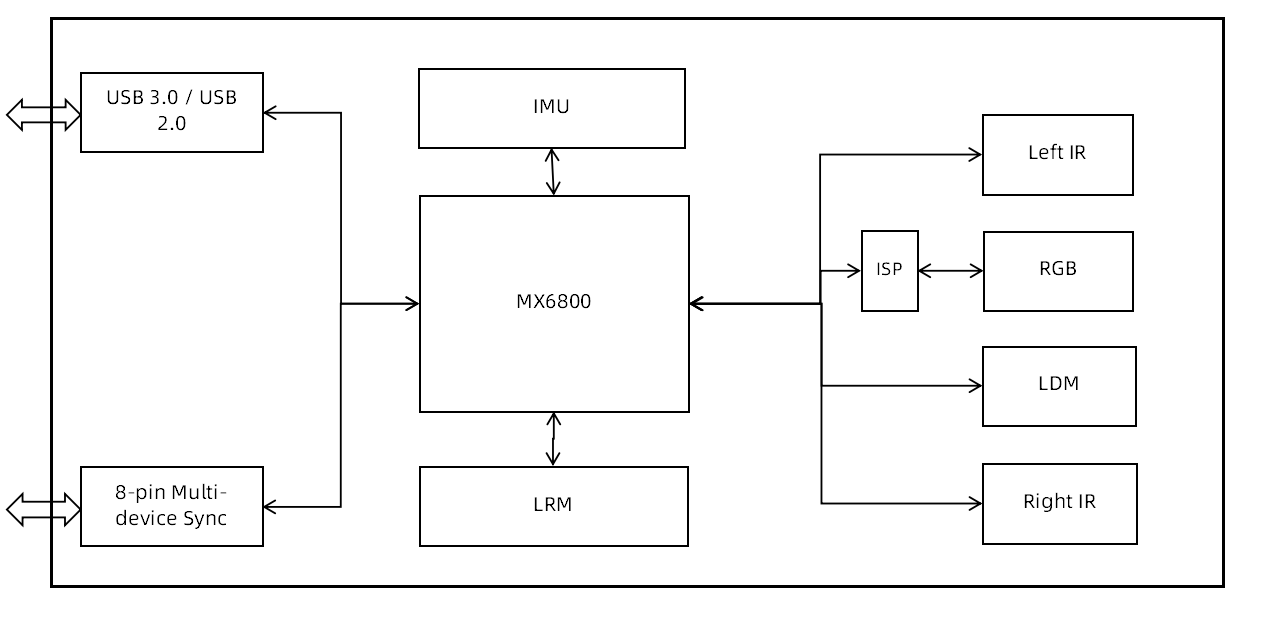
GigE#
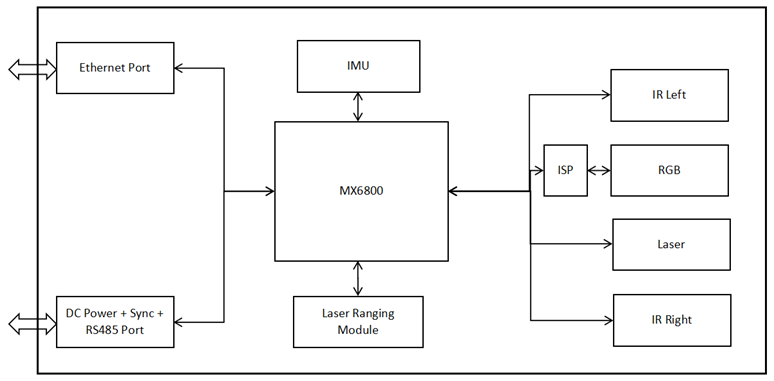
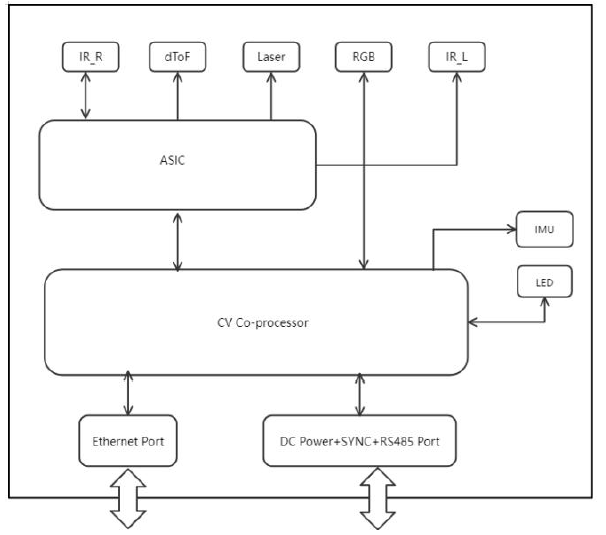
图像数据流#
USB#
Stereo mini 系列的 USB 相机可提供高质量的多分辨率深度流数据以及高清晰度彩色流数据。相机以 Y16 格式输出深度流数据。相机输出的彩色流数据为 MJPEG/YUYV 格式。SDK 支持以 MJPEG/YUYV/RGB8/BGR8/RGBA8/BGRA8/Y16 格式输出。相机以 Y8 格式输出 IR 图像数据,并且 SDK 还支持在最大分辨率下输出 Y16/Y12 格式的数据。
输出数据流 (USB3.0):STM-501u 和 STM-502u#
| 数据格式 | 纵横比 | 分辨率 | 帧速率 | |
|---|---|---|---|---|
| 深度 | Y16 | 16:10 | 1280 x 800 640 x 400 424 x 266 | 6, 10, 15, 30 |
| 深度 | Y16 | 16:9 | 1280 x 720 848 x 480 640 x 360 480 x 270 424 x 240 | 6, 10, 15, 30 6, 10, 15, 30, 60 6, 10, 15, 30, 60, 90 6, 10, 15, 30, 60, 90 6, 10, 15, 30, 60, 90 |
| 深度 | Y16 | 4:3 | 640 x 480 | 6, 10, 15, 30, 60, 90 |
| 深度 | Y16 | 其他 | 848 x 100 | 100 |
| IR | Y8 | 16:10 | 1280 x 800 640 x 400 424 x 266 | 6, 10, 15, 30 |
| IR | Y8 | 16:9 | 1280 x 720 848 x 480 640 x 360 480 x 270 424 x 240 | 6, 10, 15, 30 6, 10, 15, 30, 60 6, 10, 15, 30, 60, 90 6, 10, 15, 30, 60, 90 6, 10, 15, 30, 60, 90 |
| IR | Y8 | 4:3 | 640 x 400 | 6, 10, 15, 30, 60, 90 |
| IR | Y8 | 其他 | 848 x 100 | 100 |
| RGB | MJPEG & YUYV | 16:9 | 1920 x 1080 1280 x 720 960 x 540 848 x 480 640 x 360 424 x 240 320 x 180 | 6, 10, 15, 30 6, 10, 15, 30, 60 6, 10, 15, 30, 60 6, 10, 15, 30, 60 6, 10, 15, 30, 60 6, 10, 15, 30, 60 6, 30, 60 |
| RGB | MJPEG & YUYV | 4:3 | 640 x 480 320 x 240 | 6, 10, 15, 30, 60 6, 30, 60 |
输出数据流 (USB2.0):STM-501u 和 STM-502u#
| 数据格式 | 纵横比 | 分辨率 | 帧速率 | |
|---|---|---|---|---|
| 深度 | Y16 | 16:10 | 1280 x 800 640 x 400 424 x 266 | 6 6, 10, 15, 30 6, 10, 15, 30 |
| 深度 | Y16 | 16:9 | 1280 x 720 848 x 480 640 x 360 480 x 270 | 6 6, 8, 10 6, 10, 15, 30 6, 10, 15, 30, 60 |
| 深度 | Y16 | 4:3 | 640 x 360 | 6, 10, 15, 30 |
| IR | Y8 | 16:10 | 1280 x 800 640 x 400 424 x 266 | 6 6, 10, 15, 30 6, 10, 15, 30 |
| IR | Y8 | 16:9 | 1280 x 720 848 x 480 640 x 360 480 x 270 | 6 6, 8, 10 6, 10, 15, 30 6, 10, 15, 30, 60 |
| IR | Y8 | 4:3 | 640 x 480 | 6, 10, 15, 30 |
| RGB | MJPEG | 16:9 | 1920 x 1080 1280 x 720 | 8 6, 10, 15 |
| RGB | MJPEG & YUYV | 16:9 | 424 x 240 | 6, 15, 30, 60 |
| RGB | MJPEG & YUYV | 4:3 | 640 x 480 | 6, 15, 30 |
输出数据流 (USB3.0):STM-951u 和 STM-952u#
| 数据格式 | 纵横比 | 分辨率 | 帧速率 | |
|---|---|---|---|---|
| 深度 | Y16 | 16:10 | 1280 x 800 640 x 400 424 x 266 | 5, 10, 15, 30 |
| 深度 | Y16 | 16:9 | 1280 x 720 848 x 480 640 x 360 480 x 270 424 x 240 | 5, 10, 15, 30 5, 10, 15, 30, 60 5, 10, 15, 30, 60, 90 5, 10, 15, 30, 60, 90 5, 10, 15, 30, 60, 90 |
| 深度 | Y16 | 4:3 | 640 x 480 | 5, 10, 15, 30, 60, 90 |
| 深度 | Y16 | 其他 | 848 x 100 | 100 |
| IR | Y8 | 16:10 | 1280 x 800 640 x 400 424 x 266 | 5, 10, 15, 30 |
| IR | Y8 | 16:9 | 1280 x 720 848 x 480 640 x 360 480 x 270 424 x 240 | 5, 10, 15, 30 5, 10, 15, 30, 60 5, 10, 15, 30, 60, 90 5, 10, 15, 30, 60, 90 5, 10, 15, 30, 60, 90 |
| IR | Y8 | 4:3 | 640 x 480 | 5, 10, 15, 30, 60, 90 |
| IR | Y8 | 其他 | 848 x 100 | 100 |
| RGB | MJPEG & YUYV | 16:10 | 1280 x 800 640 x 400 | 5, 10, 15, 30, 60 5, 10, 15, 30, 60, 90 |
| RGB | MJPEG & YUYV | 16:9 | 1280 x 720 848 x 480 640 x 360 480 x 270 424 x 240 | 5, 10, 15, 30, 60 5, 10, 15, 30, 60 5, 10, 15, 30, 60, 90 5, 10, 15, 30, 60, 90 5, 10, 15, 30, 60, 90 |
| RGB | MJPEG & YUYV | 4:3 | 640 x 480 | 5, 10, 15, 30, 60, 90 |
输出数据流 (USB2.0):STM-951u 和 STM-952u#
| 数据格式 | 纵横比 | 分辨率 | 帧速率 | |
|---|---|---|---|---|
| 深度 | Y16 | 16:10 | 1280 x 800 640 x 400 424 x 266 | 5 5, 10, 15, 30 5, 10, 15, 30 |
| 深度 | Y16 | 16:9 | 1280 x 720 848 x 480 640 x 360 480 x 270 | 5 5, 10 5, 10, 15, 30 5, 10, 15, 30, 60 |
| 深度 | Y16 | 4:3 | 640 x 480 | 5, 10, 15, 30 |
| IR | Y8 | 16:10 | 1280 x 800 640 x 400 424 x 266 | 5 5, 10, 15, 30 5 10, 15, 30 |
| IR | Y8 | 16:9 | 1280 x 720 848 x 480 640 x 360 480 x 270 | 5 5, 10 5, 10, 15, 30 5, 10, 15, 30, 60 |
| IR | Y8 | 4:3 | 640 x 480 | 5, 10, 15, 30 |
| RGB | MJPEG | 16:10 | 1280 x 800 | 8 |
| RGB | MJPEG | 16:9 | 1280 x 720 | 5, 10, 15 |
| RGB | MJPEG & YUYV | 16:10 | 640 x 400 | 5, 10, 15, 30 |
| RGB | MJPEG & YUYV | 16:9 | 424 x 240 | 5, 10, 15, 30, 60 |
| RGB | MJPEG & YUYV | 4:3 | 640 x 480 | 5, 10, 15, 30 |
GigE#
Stereo mini 系列的 GigE 相机可提供高质量的多分辨率深度流数据以及高清晰度彩色流数据。
STM-951g 以 Y16 格式输出深度流数据。相机输出的彩色流数据为 MJPEG/YUYV 格式。SDK 支持以 MJPEG/YUYV/RGB8/BGR8/RGBA8/BGRA8/Y16 格式输出,并且还支持在最大分辨率下输出 RAW16 格式的数据。相机以 Y8 格式输出 IR 图像数据,并且 SDK 还支持输出 Y12 格式的数据。
STM-955g 以 Y16 或 RVL 格式输出深度数据,以 I420 或 MJPEG 格式输出彩色图像,以 Y8 格式输出 IR 图像。软件 SDK 还为彩色流支持 RGB/BGR/BGRA 格式。
输出数据流 (Gigabit Ethernet):STM-951g#
| 数据格式 | 纵横比 | 分辨率 | 帧速率 | |
|---|---|---|---|---|
| 深度 | Y16 | 16:10 | 1280 x 800 640 x 400 424 x 266 320 x 200 848 x 530 | 5, 10, 15, 30 5, 10, 15, 30 5, 10, 15, 30 5, 10, 15, 30 5, 10, 15, 30, 60 |
| 深度 | Y16 | 4:3 | 640 x 480 | 5, 10, 15, 30, 60, 90 |
| IR | Y8 | 16:10 | 1280 x 800 640 x 400 424 x 266 320 x 200 848 x 530 | 5, 10, 15, 30 5, 10, 15, 30 5, 10, 15, 30 5, 10, 15, 30 5, 10, 15, 30, 60 |
| IR | Y8 | 4:3 | 640 x 480 | 5, 10, 15, 30, 60, 90 |
| IR | Y16 | 16:10 | 1280 x 800 640 x 400 | 5, 10, 15 5, 10, 15, 30 |
| 彩色 | YUYV | 16:10 | 1280 x 800 848 x 530 640 x 400 | 5, 10, 15, 30 5, 10, 15, 30, 60 5, 10, 15, 30, 60, 90 |
| 彩色 | YUYV | 16:9 | 1280 x 720 640 x 360 | 5, 10, 15, 30 5, 10, 15, 30, 60, 90 |
| 彩色 | YUYV | 4:3 | 640 x 480 | 5, 10, 15, 30, 60, 90 |
| 彩色 | MJPEG | 16:10 | 1280 x 800 848 x 530 640 x 400 | 5, 10, 15, 30, 60 5, 10, 15, 30, 60 5, 10, 15, 30, 60, 90 |
| 彩色 | MJPEG | 16:9 | 1280 x 720 640 x 360 | 5, 10, 15, 30, 60 5, 10, 15, 30, 60, 90 |
| 彩色 | MJPEG | 4:3 | 640 x 480 | 5, 10, 15, 30, 60, 90 |
输出数据流 (Fast Ethernet):STM-951g#
| 数据格式 | 纵横比 | 分辨率 | 帧速率 | |
|---|---|---|---|---|
| 深度 | Y16 | 16:10 | 1280 x 800 848 x 530 640 x 400 424 x 266 320 x 200 | 5 5, 10 5, 10, 15 5, 10, 15, 30 5, 10, 15, 30 |
| 深度 | Y16 | 4:3 | 640 x 480 | 5, 10, 15, |
| IR | Y8 | 16:10 | 1280 x 800 848 x 530 640 x 400 424 x 266 320 x 200 | 5 5, 10 5, 10, 15 5, 10, 15, 30 5, 10, 15, 30 |
| IR | Y8 | 4:3 | 640 x 480 | 5, 10, 15 |
| 彩色 | YUYV | 16:10 | 1280 x 800 848 x 530 640 x 400 | 5 5, 10 5, 10, 15 |
| 彩色 | YUYV | 16:9 | 1280 x 720 640 x 360 | 5 5, 10, 15 |
| 彩色 | YUYV | 4:3 | 640 x 480 | 5, 10, 15 |
| 彩色 | MJPEG | 16:10 | 1280 x 800 848 x 530 640 x 400 | 5, 10, 15, 30 5, 10, 15, 30, 60 5, 10, 15, 30, 60, 90 |
| 彩色 | MJPEG | 16:9 | 1280 x 720 640 x 360 | 5, 10, 15, 30, 60 5, 10, 15, 30, 60, 90 |
| 彩色 | MJPEG | 4:3 | 640 x 480 | 5, 10, 15, 30, 60, 90 |
信息
单一数据流输出可以支持所有分辨率和帧率。然而,当同时输出两个、三个或四个深度和彩色数据流时,由于相机的千兆或快速以太网的实际带宽限制以及主机设备的性能,某些组合可能不受支持。
输出数据流 (Gigabit Ethernet):STM-955g#
| 数据格式 | 纵横比 | 分辨率 | 帧速率 | |
|---|---|---|---|---|
| 深度 | Y16 | 16:10 | 1280 x 800 640 x 400 | 5, 10 5, 10, 15, 20 |
| 深度 | RVL | 16:10 | 1280 x 800 640 x 400 | 5, 10 5, 10, 15, 20 |
| IR | Y8 | 16:10 | 1280 x 800 640 x 400 | 5, 10, 15, 20 5, 10, 15, 20 |
| 彩色 | I420 | 16:10 | 1280 x 800 640 x 400 | 5, 10, 15, 20 5, 10, 15, 20 |
| 彩色 | I420 | 16:9 | 1280 x 720 640 x 360 | 5, 10, 15, 20 5, 10, 15, 20 |
| 彩色 | I420 | 4:3 | 800 x 600 | 5, 10, 15, 20 5, 10, 15, 20 |
| 彩色 | MJPEG | 16:10 | 1280 x 800 640 x 400 | 5, 10, 15, 20 5, 10, 15, 20 |
| 彩色 | MJPEG | 16:9 | 1280 x 720 640 x 360 | 5, 10, 15, 20 5, 10, 15, 20 |
| 彩色 | MJPEG | 4:3 | 800 x 600 | 5, 10, 15, 20 |
信息
单一数据流输出可以支持所有分辨率和帧率。然而,当同时输出两个、三个或四个深度和彩色数据流时,由于相机的千兆或快速以太网的实际带宽限制以及主机设备的性能,某些组合可能不受支持。
视场#
景深视场定义#
下图显示了深度相机的视场角,即传感器“看到”的角度。此处以红外相机为例进行说明。
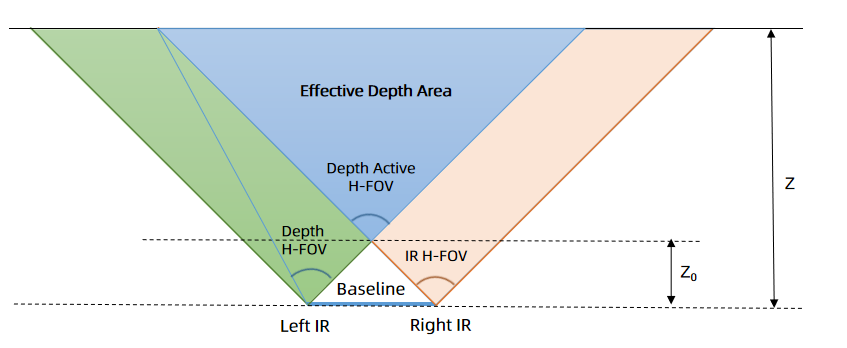
任意深度 (Z) 处的深度视场 (depth FOV) 可以通过以下公式计算:
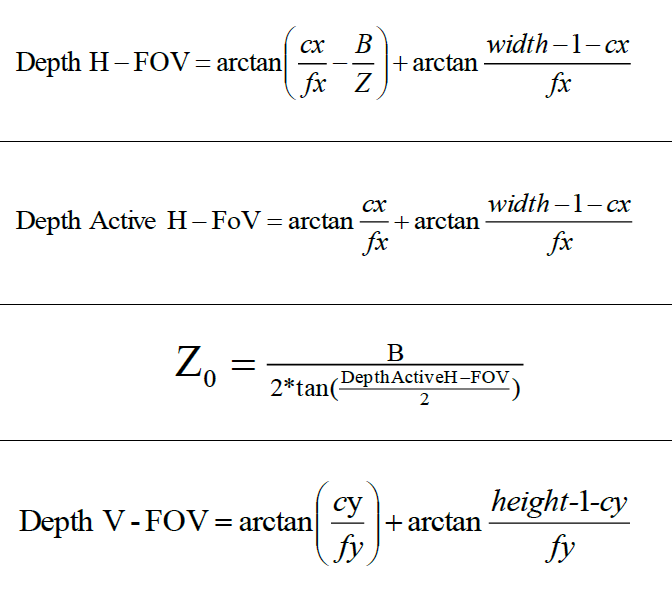
其中:
cx = 深度图像主点的 X 方向图像坐标
fx = 深度相机焦距
cy = 深度图像主点的 Y 方向图像坐标
fy = 深度相机焦距
width = 深度图像宽度
height = 深度图像高度
深度有效水平视场角 (Active H-FOV) = 左侧红外水平视场角
信息
- cx、fx 和 width 参数是通过 SDK 提供的深度内参获取的。参数值因相机而异。
- 在不同的深度值下,深度视场是不同的。深度越远,深度视场越大。
典型深度内参#
下表列出了 Stereo mini 相机的典型深度内参。
STM-501u 和 STM-502u#
基线:50 mm
| 分辨率 宽度 x 高度 (px) | cx (px) | cy (px) | Fx, Fy (px) |
|---|---|---|---|
| 1280 x 800 | 640 | 400 | 620.0, 620.0 |
| 1280 x 720 | 640 | 360 | 620.0, 620.0 |
| 848 x 480 | 424 | 240 | 410.7, 410.7 |
| 848 x 100 | 424 | 50 | 410.7, 410.7 |
| 640 x 480 | 320 | 200 | 372.0, 372.0 |
| 640 x 400 | 320 | 200 | 310.0, 310.0 |
| 640 x 360 | 320 | 180 | 310.0, 310.0 |
| 480 x 270 | 240 | 135 | 232.5, 232.5 |
| 424 x 240 | 212 | 120 | 205.4, 205.4 |
STM-951u 和 STM-952u#
基线:95 mm
| 分辨率 宽度 x 高度 (px) | cx (px) | cy (px) | Fx, Fy (px) |
|---|---|---|---|
| 1280 x 800 | 640 | 400 | 620.0, 620.0 |
| 1280 x 720 | 640 | 360 | 620.0, 620.0 |
| 848 x 480 | 424 | 240 | 410.7, 410.7 |
| 848 x 100 | 424 | 50 | 410.7, 410.7 |
| 640 x 480 | 320 | 200 | 372.0, 372.0 |
| 640 x 400 | 320 | 200 | 310.0, 310.0 |
| 640 x 360 | 320 | 180 | 310.0, 310.0 |
| 480 x 270 | 240 | 135 | 232.5, 232.5 |
| 424 x 240 | 212 | 120 | 205.4, 205.4 |
STM-951g#
基线:95 mm
| 分辨率 宽度 x 高度 (px) | cx (px) | cy (px) | Fx, Fy (px) |
|---|---|---|---|
| 1280 x 800 | 640 | 400 | 620.0, 620.0 |
| 848 x 530 | 424 | 265 | 410.7, 410.7 |
| 640 x 480 | 320 | 200 | 372.0, 372.0 |
| 640 x 400 | 320 | 200 | 310.0, 310.0 |
| 424 x 266 | 212 | 133 | 205.4, 205.4 |
| 320 x 200 | 160 | 100 | 186.0, 186.0 |
STM-955g#
基线:95 mm
| 分辨率 宽度 x 高度 (px) | cx (px) | cy (px) | Fx, Fy (px) |
|---|---|---|---|
| 1280 x 800 | 640 | 400 | 620.0, 620.0 |
| 640 x 400 | 320 | 200 | 310.0, 310.0 |
流 FOV 概述#
USB#
| FOV | 纵横比 | 分辨率 | STM-501u / STM-502u (H x V) | STM-951u / STM-952u (H x V) |
|---|---|---|---|---|
| D2C 前的深度视场 @ 2 m | 16:10 | 1280 x 800 640 x 400 424 x 266 | 90° x 65° | 90° x 65° |
| D2C 前的深度视场 @ 2 m | 16:9 | 1280 x 720 848 x 480 640 x 360 480 x 270 424 x 240 | 90° x 60° | 90° x 60° |
| D2C 前的深度视场 @ 2 m | 4:3 | 640 x 480 | 81° x 65° | 81° x 65° |
| D2C 前的深度视场 @ 2 m | 其他 (848 x 100) | 848 x 100 | 90° x 14° | 90° x 14° |
| IR | 16:10 | 1280 x 800 640 x 400 424 x 266 | 91° x 65° | 91° x 65° |
| IR | 16:9 | 1280 x 720 848 x 480 640 x 360 480 x 270 424 x 240 | 91° x 60° | 91° x 60° |
| IR | 4:3 | 640 x 480 | 81° x 65° | 81° x 65° |
| IR | 其他 (848 x 100) | 848 x 100 | 91° x 14° | 91° x 14° |
| RGB | 16:10 | 1280 x 800 640 x 400 424 x 266 | 不适用 | 94° x 68° |
| RGB | 16:9 | 1920 x 1080 1280 x 720 960 x 540 848 x 480 640 x 360 480 x 270 424 x 240 320 x 180 | 86° x 55° | 94° x 62° |
| RGB | 4:3 | 640 x 480 320 x 240 | 70° x 55° | 82° x 68° |
| D2C 后的深度视场(@ 2 m) | 16:10 | 1280 x 800 640 x 400 424 x 266 | 不适用 | 90° x 65° |
| D2C 后的深度视场(@ 2 m) | 16:9 | 1920 x 1080 1280 x 720 960 x 540 848 x 480 640 x 360 480 x 270 424 x 240 320 x 180 | 86° x 55° | 90° x 60° |
| D2C 后的深度视场(@ 2m) | 4:3 | 640 x 480 320 x 240 | 70° x 55° | 81° x 65° |
信息
- STM-501u 和 STM-502u 相机不支持以红色标记的分辨率。
- STM-951u 和 STM-952u 相机不支持以蓝色标记的分辨率。
GigE#
| FOV | 纵横比 | 分辨率 | STM-951g (H x V) |
|---|---|---|---|
| D2C 前的深度视场 @ 2 m | 16:10 | 1280 x 800 848 x 530 640 x 400 424 x 266 320 x 200 | 90° x 65° |
| D2C 前的深度视场 @ 2 m | 4:3 | 640 x 480 | 81° x 65° |
| IR | 16:10 | 1280 x 800 848 x 530 640 x 400 424 x 266 320 x 200 | 91° x 65° |
| IR | 4:3 | 640 x 480 | 81° x 65° |
| RGB | 16:10 | 1280 x 800 848 x 530 640 x 400 | 94° x 68° |
| RGB | 16:9 | 1280 x 720 640 x 360 | 94° x 62° |
| RGB | 4:3 | 640 x 480 | 82° x 68° |
| D2C 后的深度视场(@ 2 m) | 16:10 | 1280 x 800 848 x 530 640 x 400 | 90° x 65° |
| D2C 后的深度视场(@ 2 m) | 16:9 | 1280 x 720 640 x 360 | 90° x 60° |
| D2C 后的深度视场(@ 2m) | 4:3 | 640 x 480 | 81° x 65° |
| FOV | 纵横比 | STM-955g (H x V) |
|---|---|---|
| 深度(@ 2 m) | 16:10 | 90° x 65° |
| 深度(@ 2 m) | 4:3 | 81° x 65° |
| IR | 16:10 | 91° x 65° |
| IR | 4:3 | 81° x 65° |
| RGB | 16:10 | 94° x 68° |
| RGB | 16:9 | 94° x 62° |
| RGB | 4:3 | 82° x 68° |
| D2C 视场(@ 2 m) | 16:10 | 90° x 65° |
| D2C 视场(@ 2 m) | 16:9 | 90° x 60° |
| D2C 视场(@ 2m) | 4:3 | 81° x 65° |
FOV 图示#
STM-501u / STM-502u#
| 纵横比 | D2C 前的深度视场 | D2C 后的深度视场 |
|---|---|---|
| 16:10 | 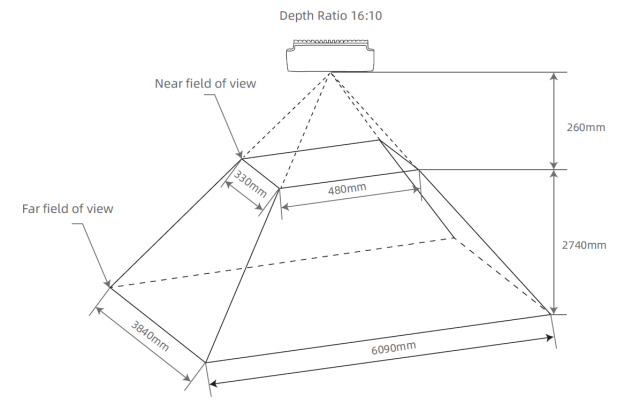 | 不适用 |
| 16:9 | 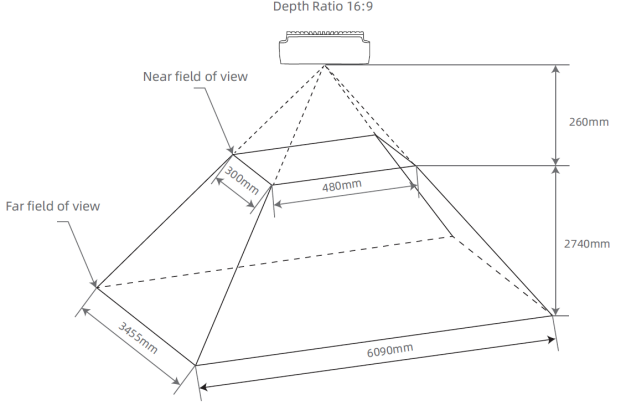 | 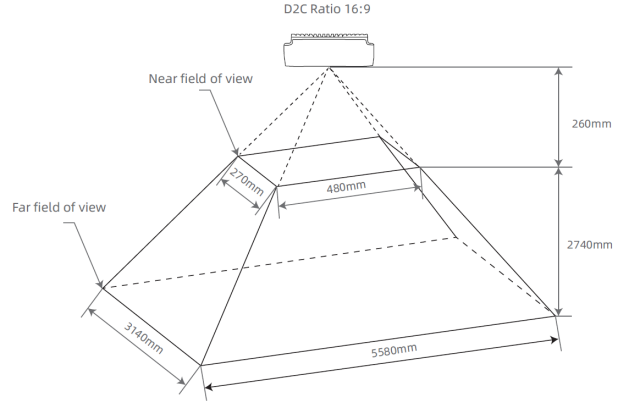 |
| 4:3 | 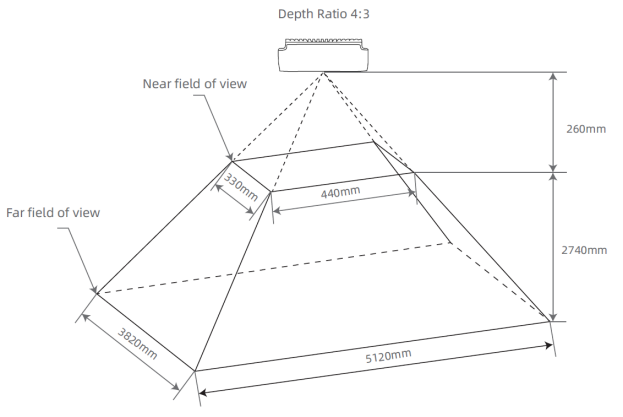 | 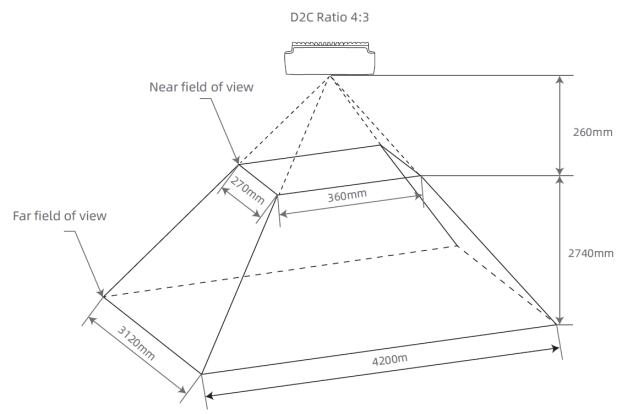 |
STM-951u / STM-952u#
| 纵横比 | D2C 前的深度视场 | D2C 后的深度视场 |
|---|---|---|
| 16:10 | 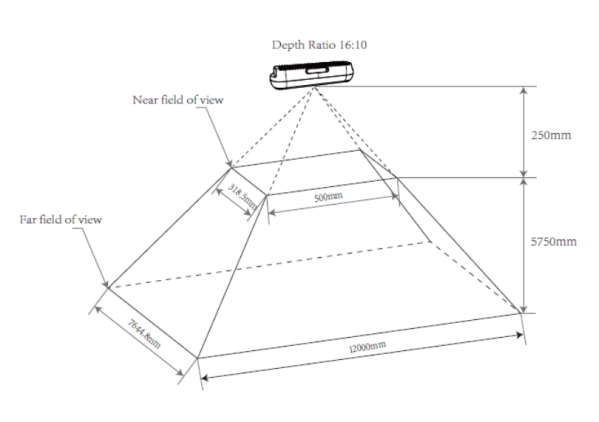 | 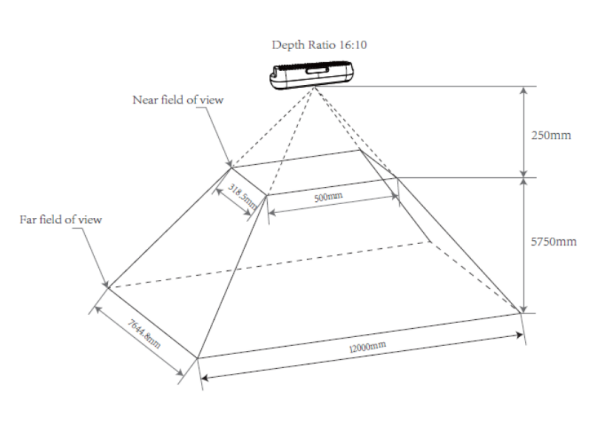 |
| 16:9 | 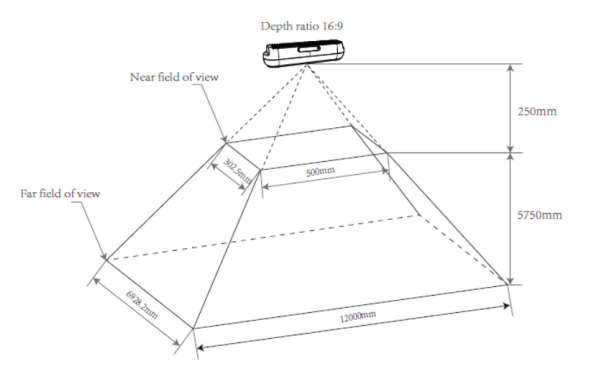 | 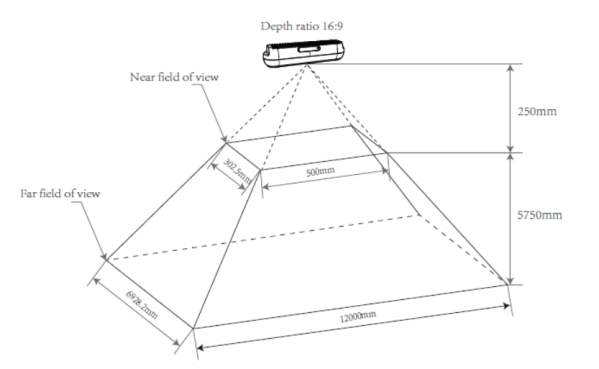 |
| 4:3 | 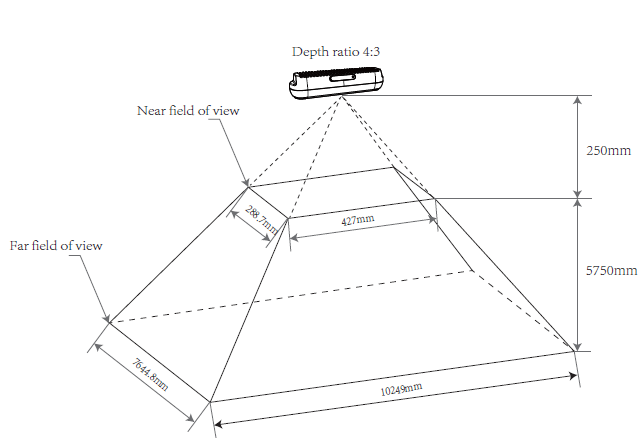 | 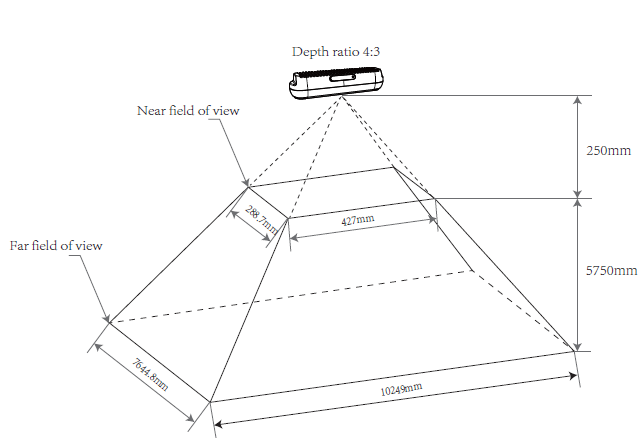 |
STM-951g#
| 纵横比 | D2C 前的深度视场 | D2C 后的深度视场 |
|---|---|---|
| 16:10 | 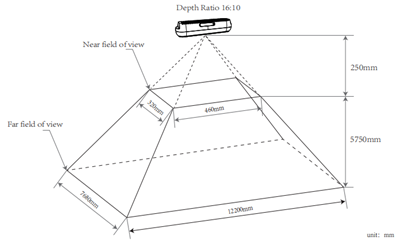 | 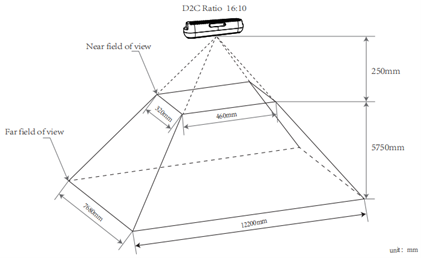 |
| 16:9 | 不适用 | 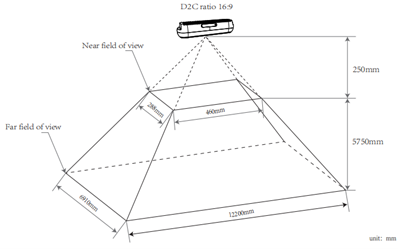 |
| 4:3 | 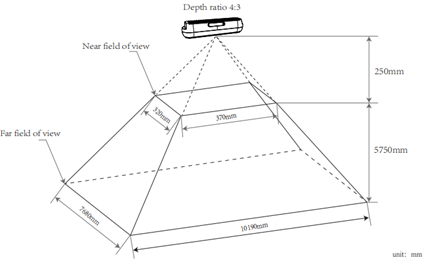 | 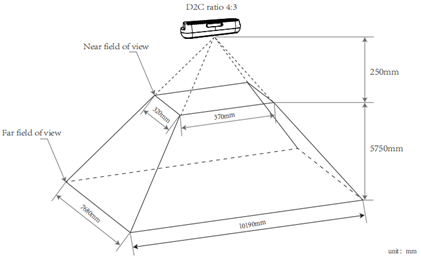 |
STM-955g#
| 纵横比 | D2C 前的深度视场 | D2C 后的深度视场 |
|---|---|---|
| 16:10 | 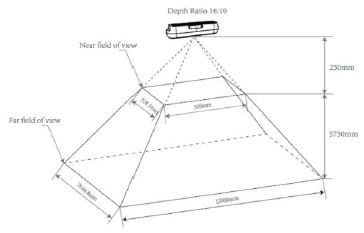 | 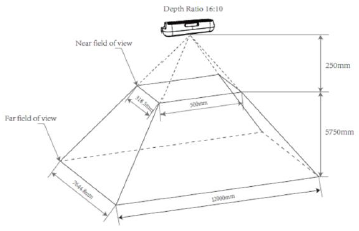 |
| 16:9 | 不适用 | 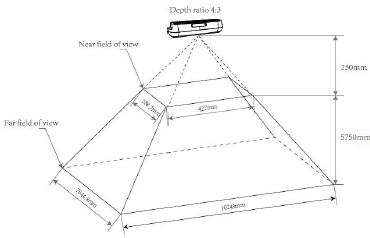 |
| 4:3 | 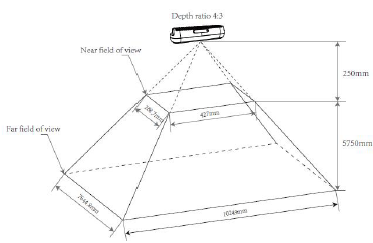 | 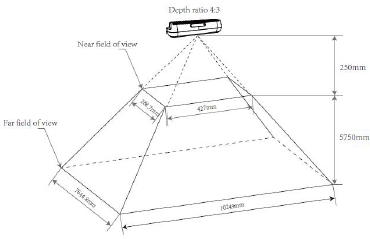 |
深度到彩色对齐#
深度转彩色(D2C)是对深度图像进行的逐像素几何变换,通过 D2C 变换实现深度图像与其对应彩色图像的空间对齐。这使得根据深度图像中的图像坐标,可以通过相同的图像坐标在 D2C 后的彩色图像中定位任意像素。
使用相同的图像坐标,可以在 D2C 后的深度图像中定位彩色像素的深度信息。系统会生成一个与 D2C 后的目标彩色图像大小相同的深度图像,其图像内容即为彩色相机坐标系中的深度数据。换句话说,系统会重建一幅使用彩色相机的原点和尺寸“拍摄”的深度图像,其中每个像素都与彩色相机对应像素的坐标相匹配。
通过软件进行 D2C 对齐:STM-501u / STM-502u#
| D2C 前的深度图像 | 彩色图像 | D2C 后的深度图像 | 纵横比 |
|---|---|---|---|
| 1280 x 800, 1280 x 720, 848 x 480, 640 x 480, 640 x 400, 640 x 360, 480 x 270, 424 x 266, 424 x 240 | 1920 x 1080 1280 x 720 960 x 540 848 x 480 640 x 360 424 x 240 320 x 180 | 1920 x 1080 1280 x 720 960 x 540 848 x 480 640 x 360 424 x 240 320 x 180 | 16:9 |
| 1280 x 800, 1280 x 720, 848 x 480, 640 x 480, 640 x 400, 640 x 360, 480 x 270, 424 x 266, 424 x 240 | 640 x 480 320 x 240 | 640 x 480 320 x 240 | 4:3 |
通过硬件进行 D2C 对齐:STM-501u / STM-502u#
| D2C 前的深度图像 | 彩色图像 | D2C 后的深度图像 | 纵横比 |
|---|---|---|---|
| 848 x 480, 640 x 480, 640 x 400, 640 x 360 | 640 x 360 | 640 x 360 | 16:9 |
| 848 x 480、640 x 480、640 x 400、640 x 360、480 x 270、424 x 266、424 x 240 | 424 x 240 | 424 x 240 | 16:9 |
| 848 x 480、640 x 480、640 x 400、640 x 360、480 x 270、424 x 266、424 x 240 | 320 x 180 | 320 x 180 | 16:9 |
| 848 x 480, 640 x 480, 640 x 400, 640 x 360 | 640 x 480 | 640 x 480 | 4:3 |
| 848 x 480、640 x 480、640 x 400、640 x 360、480 x 270、424 x 266、424 x 240 | 320 x 240 | 320 x 240 | 4:3 |
信息
640 x 400 和 424 x 266 的深度分辨率仅支持 30 fps 或更低帧率下的色彩对齐。
通过软件进行 D2C 对齐:STM-951u / STM-952u#
| D2C 前的深度图像 | 彩色图像 | D2C 后的深度图像 | 纵横比 |
|---|---|---|---|
| 1280 x 800, 1280 x 720, 848 x 480, 640 x 480, 640 x 400, 640 x 360, 480 x 270, 424 x 266, 424 x 240 | 1280 x 800 640 x 400 | 1280 x 800 640 x 400 | 16:10 |
| 1280 x 800, 1280 x 720, 848 x 480, 640 x 480, 640 x 400, 640 x 360, 480 x 270, 424 x 266, 424 x 240 | 1280 x 720 848 x 480 640 x 360 480 x 270 424 x 240 320 x 180 | 1280 x 720 848 x 480 640 x 360 480 x 270 424 x 240 320 x 180 | 16:9 |
| 1280 x 800, 1280 x 720, 848 x 480, 640 x 480, 640 x 400, 640 x 360, 480 x 270, 424 x 266, 424 x 240 | 640 x 480 | 640 x 480 | 4:3 |
通过硬件进行 D2C 对齐:STM-951u / STM-952u#
| D2C 前的深度图像 | 彩色图像 | D2C 后的深度图像 | 纵横比 |
|---|---|---|---|
| 848 x 480、640 x 480、640 x 400、640 x 360、480 x 270、424 x 266、424 x 240 | 640 x 400 | 640 x 400 | 16:10 |
| 848 x 480, 640 x 480, 640 x 400, 640 x 360 | 640 x 360 | 640 x 360 | 16:9 |
| 848 x 480、640 x 480、640 x 400、640 x 360、480 x 270、424 x 266、424 x 240 | 480 x 270 | 480 x 270 | 16:9 |
| 848 x 480、640 x 480、640 x 400、640 x 360、480 x 270、424 x 266、424 x 240 | 424 x 240 | 424 x 240 | 16:9 |
| 848 x 480、640 x 480、640 x 400、640 x 360、480 x 270、424 x 266、424 x 240 | 640 x 480 | 640 x 480 | 4:3 |
信息
- 848 x 480 的深度分辨率仅支持 60 fps 或更低帧率下的色彩对齐。
- 640 x 400 和 424 x 266 的深度分辨率仅支持 30 fps 或更低帧率下的色彩对齐。
通过软件进行 D2C 对齐:STM-951g#
| D2C 前的深度图像 | 彩色图像 | D2C 后的深度图像 | 纵横比 |
|---|---|---|---|
| 1280 x 800、848 x 530、640 x 480、640 x 400、424 x 266、320 x 200 | 1280 x 800 848 x 530 640 x 400 | 1280 x 800 848 x 530 640 x 400 | 16:10 |
| 1280 x 800、848 x 530、640 x 480、640 x 400、424 x 266、320 x 200 | 1280 x 720 640 x 360 | 1280 x 720 640 x 360 | 16:9 |
| 1280 x 800、848 x 530、640 x 480、640 x 400、424 x 266、320 x 200 | 640 x 480 | 640 x 480 | 4:3 |
通过硬件进行 D2C 对齐:STM-951g#
| D2C 前的深度图像 | 彩色图像 | D2C 后的深度图像 | 纵横比 |
|---|---|---|---|
| 848 x 530、640 x 480、640 x 400 | 640 x 400 | 640 x 400 | 16:10 |
| 848 x 530、640 x 480、640 x 400、424 x 266、320 x 200 | 640 x 360 | 640 x 360 | 16:9 |
| 848 x 530、640 x 480、640 x 400、424 x 266、320 x 200 | 640 x 480 | 640 x 480 | 4:3 |
信息
- 640 x 400、424 x 266 和 320 x 200 的深度分辨率仅支持 30 fps 或更低帧率下的色彩对齐。
- 848 x 530 的深度分辨率仅支持 60 fps 或更低帧率下的色彩对齐。
通过软件进行 D2C 对齐:STM-955g#
| D2C 前的深度图像 | 彩色图像 | D2C 后的深度图像 | 纵横比 |
|---|---|---|---|
| 1280 x 800、640 x 400 | 1280 x 800 640 x 400 | 1280 x 800 640 x 400 | 16:10 |
| 1280 x 800、640 x 400 | 1280 x 720 640 x 360 | 1280 x 720 640 x 360 | 16:9 |
| 1280 x 800、640 x 400 | 640 x 480 | 640 x 480 | 4:3 |
通过硬件进行 D2C 对齐:STM-955g#
| D2C 前的深度图像 | 彩色图像 | D2C 后的深度图像 | 纵横比 |
|---|---|---|---|
| 1280 x 800、640 x 400 | 1280 x 800 640 x 400 | 1280 x 800 640 x 400 | 16:10 |
| 1280 x 800、640 x 400 | 1280 x 720 640 x 360 | 1280 x 720 640 x 360 | 16:9 |
| 1280 x 800、640 x 400 | 640 x 480 | 640 x 480 | 4:3 |
Minimum Z Depth#
最小 Z 深度是指深度相机的最小工作距离,即从相机深度原点算起可检测到的最近平面距离。该距离由视差搜索范围和图像分辨率决定。
STM-955g 通过配置深度偏移值来调整其最小工作距离。可实现的最小距离也可能因不同的 Preset 模式而异。相机提供灵活的配置选项,以适应多样化的应用需求。
信息
视差搜索范围越大,最小工作距离越近,功耗越高。反之,视差搜索范围越小,最小工作距离越远,相机的功耗越低,且其能够承受的环境温度越高。
STM-501u / STM-502u#
| 视差搜索范围 | 视野 (H x V) | 分辨率 | Minimum Z Depth |
|---|---|---|---|
| 128 | 90° x 65° | 1280 x 800 640 x 400 424 x 266 | 0.26 m |
| 128 | 90° x 60° | 1280 x 720 | 0.26 m |
| 128 | 90° x 60° | 848 x 480 | 0.18 m |
| 128 | 90° x 60° | 640 x 360 | 0.14 m |
| 128 | 90° x 60° | 480 x 270 | 0.11 m |
| 128 | 90° x 60° | 424 x 240 | 0.1 m |
| 128 | 81° x 65° | 640 x 480 | 0.17 m |
| 128 | 90° x 14° | 848 x 100 | 0.18 m |
STM-951u / STM-952u#
| 视差搜索范围 | 视野 (H x V) | 分辨率 | Minimum Z Depth |
|---|---|---|---|
| 256 | 90° x 65° | 1280 x 800 640 x 400 424 x 266 | 0.25 m |
| 256 | 90° x 60° | 1280 x 720 | 0.25 m |
| 256 | 90° x 60° | 848 x 480 | 不适用 |
| 256 | 90° x 60° | 640 x 360 | 不适用 |
| 256 | 90° x 60° | 480 x 270 | 不适用 |
| 256 | 90° x 60° | 424 x 240 | 不适用 |
| 256 | 81° x 65° | 640 x 480 | 不适用 |
| 256 | 90° x 14° | 848 x 100 | 不适用 |
| 128 | 90° x 65° | 1280 x 800 640 x 400 424 x 266 | 0.5 m |
| 128 | 90° x 60° | 1280 x 720 | 0.5 m |
| 128 | 90° x 60° | 848 x 480 | 0.34 m |
| 128 | 90° x 60° | 640 x 360 | 0.26 m |
| 128 | 90° x 60° | 480 x 270 | 0.19 m |
| 128 | 90° x 60° | 424 x 240 | 0.17 m |
| 128 | 81° x 65° | 640 x 480 | 0.3 m |
| 128 | 90° x 14° | 848 x 100 | 0.34 m |
| 64 | 90° x 65° | 1280 x 800 640 x 400 424 x 266 | 1 m |
| 64 | 90° x 60° | 1280 x 720 | 1 m |
| 64 | 90° x 60° | 848 x 480 | 不适用 |
| 64 | 90° x 60° | 640 x 360 | 不适用 |
| 64 | 90° x 60° | 480 x 270 | 不适用 |
| 64 | 90° x 60° | 424 x 240 | 不适用 |
| 64 | 81° x 65° | 640 x 480 | 不适用 |
| 64 | 90° x 14° | 848 x 100 | 不适用 |
STM-951g#
| 视差搜索范围 | 视野 (H x V) | 分辨率 | Minimum Z Depth |
|---|---|---|---|
| 256 | 90° x 65° | 1280 x 800 640 x 400 424 x 266 320 x 200 | 0.25 m |
| 256 | 90° x 60° | 848 x 530 | 不适用 |
| 256 | 81° x 65° | 640 x 480 | 不适用 |
| 128 | 90° x 65° | 1280 x 800 640 x 400 424 x 266 320 x 200 | 0.5 m |
| 128 | 90° x 65° | 848 x 530 | 0.34 m |
| 128 | 81° x 65° | 640 x 480 | 0.3 m |
| 64 | 90° x 65° | 1280 x 800 640 x 400 424 x 266 320 x 200 | 1 m |
| 64 | 90° x 65° | 848 x 530 | 不适用 |
| 64 | 81° x 65° | 640 x 480 | 不适用 |
STM-955g#
| Preset | 分辨率 | 偏移量 | 最小 Z 深度(最大–最小 mm) |
|---|---|---|---|
| 感知 | 1280 x 800 | 0 | ∞–320 |
| 1280 x 800 | 32 | 1855–266 | |
| 640 x 400 | 0 | ∞–155 | |
| 640 x 400 | 32 | 928–133 | |
| 尺寸测量 | 640 x 480 | 0 | ∞–310 |
| 640 x 480 | 64 | 928–233 | |
| 640 x 480 | 128 | 463–187 |
Coordinate System#
对于 Stereo mini 系列相机,带有 1/4 螺丝孔的平面被定义为底面,玻璃盖板表面为正面,RGB 模块位于 LDM 模块的左侧。
IMU 坐标系的原点位于物理传感器中心点。加速度计和陀螺仪坐标系位于左侧红外 (IR) 的背面。坐标系的正 X 轴指向右侧,正 Y 轴指下方,正 Z 轴指前方。
深度图像坐标系的原点位于左侧 IR 模块的光心,而彩色图像坐标系的原点位于 RGB 模块的光心。坐标系的方向相同:正 X 轴指向右侧,正 Y 轴指向下方,正 Z 轴指向前方。深度相机坐标系原点是 3D 相机的默认原点,坐标为 (0,0,0)。深度原点、彩色原点和 IMU 原点在 3D 相机坐标系中的参考位置如下方 坐标系示意图 表格所示。
Coordinate System Position Reference#
| 相机 | Coordinate System | 3D 相机坐标系中的位置 (X、Y、Z 单位为 mm) |
|---|---|---|
| STM-501u / STM-502u | 深度 | 0, 0, 0 |
| 彩色 | 14.00, 0, 2.02 | |
| IMU | -0.246, -0.065, -16.948 | |
| STM-951u / STM-952u / STM-951g | 深度 | 0, 0, 0 |
| 彩色 | 23.75, 0, 0 | |
| IMU | 7.866, 1.068, -14.248 | |
| STM-955g | 深度 | 0, 0, 0 |
| 彩色 | 23.75, 0, 0 | |
| IMU | 15.48, 0, -55.60 |
信息
如果启用了深度相机与彩色相机的对齐,深度坐标系的原点将自动切换为彩色坐标系的原点,内参也会随之改变。
坐标系示意图#
| STM-501u / STM-502u | STM-951u / STM-952u / STM-951g | STM-955g | |
|---|---|---|---|
| IMU | 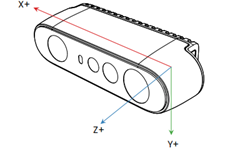 | 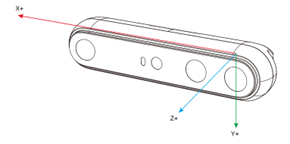 | 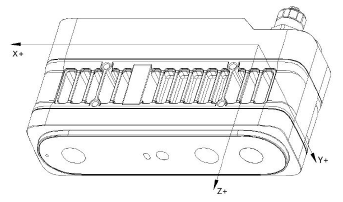 |
| 深度 | 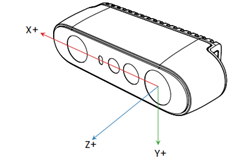 | 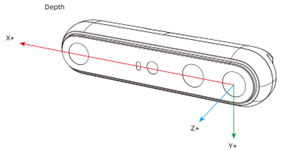 | 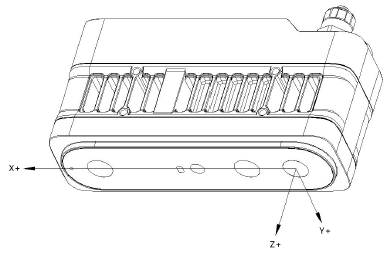 |
| RGB | 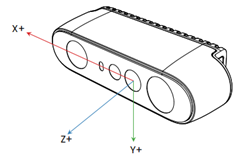 | 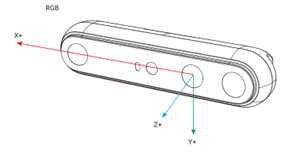 | 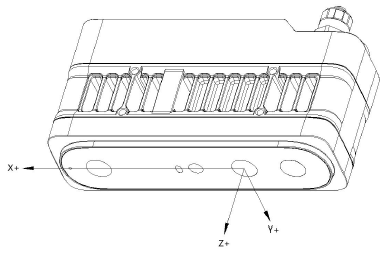 |
Coordinate System Position Reference#
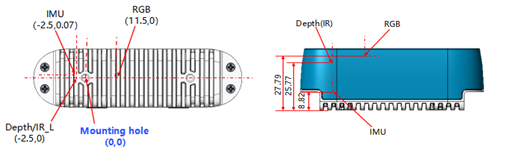
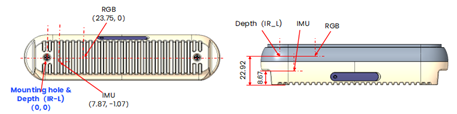
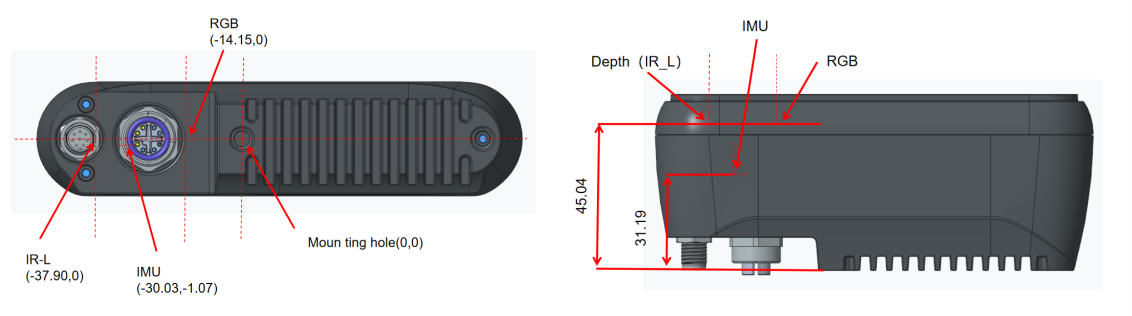
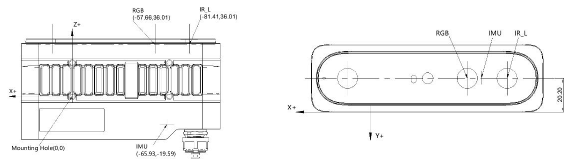
安装位置与 Depth/Color/IMU 之间的相对坐标系关系。
信息
所有参考点均位于组件或位置的中心。
STM-501u / STM-502u#
| 3D 相机坐标系中的位置 (X、Y、Z 单位为 mm) | |
|---|---|
| 安装孔 | 0, 0, 0 |
| 深度 | -2.5, 0, 25.77 |
| 彩色 | 11.5, 0, 27.79 |
| IMU | -2.5, 0.07, 8.82 |
STM-951u / STM-952u#
| 3D 相机坐标系中的位置 (X、Y、Z 单位为 mm) | |
|---|---|
| 安装孔 | 0, 0, 0 |
| 深度 | 0, 0, 22.92 |
| 彩色 | 23.75, 0, 22.92 |
| IMU | 7.87, -1.07, 8.67 |
STM-951g#
| 3D 相机坐标系中的位置 (X、Y、Z 单位为 mm) | |
|---|---|
| 安装孔 | 0, 0, 0 |
| 深度 | -37.90, 0, 45.04 |
| 彩色 | -14.15, 0, 45.04 |
| IMU | -30.03, -1.07, 31.19 |
STM-955g#
| 3D 相机坐标系中的位置 (X、Y、Z 单位为 mm) | |
|---|---|
| 安装孔 | 0, 0, 0 |
| 深度 | -81.41, -20.20, 36.01 |
| 彩色 | -57.66, -20.20, 36.01 |
| IMU | -65.93, -20.20, -19.59 |
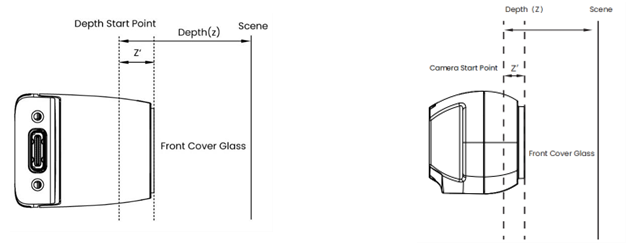
相机起点参考#
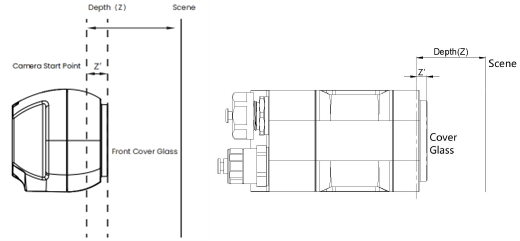
相机起点或零点基准可描述为深度 = 0 的起点或平面。深度/RGB/LRM 零点相对于相机前盖玻璃的距离列于下表中。
| STM-501u | STM-502u | STM-951u | STM-952u | STM-951g | STM-955g | |
|---|---|---|---|---|---|---|
| 深度 (Z') | 4.230 mm | 4.930 mm | 4.080 mm | 4.780 mm | 4.080 mm | 4.040 mm |
| RGB (Z') | 2.210 mm | 2.910 mm | 4.080 mm | 4.780 mm | 4.080 mm | 4.040 mm |
| LRM (Z') | 0 mm | 0.7 mm | 0 mm | 0.7 mm | 0 mm | 0 mm |
流传输模式#
Stereo mini 系列为用户提供了灵活的方法来采集红外、深度和 RGB 图像数据,其中流传输模式是最常见的方法。在此模式下,用户在依次激活相应的数据流之前,为每种数据类型设置目标帧率、分辨率和图像格式。然后,相机将按照用户定义的目标帧率、分辨率和图像格式捕获并输出图像数据。
您可以根据相机当前配置的深度模式和分辨率,从预定义选项(5 fps / 6 fps、10 fps、15 fps、30 fps、60 fps、90 fps 和 100 fps)中为当前场景选择特定的帧率,并以该帧率捕获图像数据。
触发模式#
Stereo mini 系列支持基于特定帧率的图像数据采集方法,同时也支持支持任意频率的自由运行触发模式。在此模式下,相机等待外部输入触发信号,并且只有在收到相机配置的有效外部触发信号后才会完成图像数据采集。然后,相机继续等待下一个外部触发信号。由于两个连续触发之间没有固定的时间限制,而只有一个大于相机采集时间的单个采集时间,因此可以控制两个连续触发之间的时间间隔以实现所需的任何频率。这允许被动采集图像数据。根据您的相机接口,可以通过以下方式触发相机:
- USB 相机型号:主机通过 USB 命令或外部设备通过 8 引脚同步接口发送软件信号。这有助于在任意频率下实现被动触发模式。
- STM-951g:通过网络命令(主机发起)进行软件触发,并通过 M8 A 编码同步接口进行硬件触发。
- STM-955g:通过网络命令(主机发起)进行软件触发,并通过 M12 A 编码同步接口进行硬件触发。
在自由触发模式下,相机的 IR、Depth 和 RGB 固定帧率必须根据需要设置为 5 fps / 6 fps、10 fps、15 fps、30 fps、60 fps 或 90 fps(取决于相机型号)的统一值。这是确定两个连续有效触发之间最小时间间隔所必需的。下表显示了固定帧率、最小时间间隔以及被动触发上限频率之间的关系。
总之,相机只会响应允许范围内的触发信号。这意味着触发频率可以是被动触发有效频率范围内的任意值。
USB 相机型号和 STM-951g
| 相机的固定帧率 (fps) | 支持的被动触发间隔 (ms) | 支持的被动触发频率 (Hz) |
|---|---|---|
| 90 | ≥22.3 | 0–45 |
| 60 | ≥33.4 | 0–30 |
| 30 | ≥66.7 | 0–15 |
| 15 | ≥133.4 | 0–7.5 |
| 10 | ≥200 | 0–5 |
| 6 | ≥333.4 | 0–3 |
| 5 | ≥400 | 0–2.5 |
STM-955g
| 相机的固定帧率 (fps) | 支持的被动触发间隔 (ms) | 支持的被动触发频率 (Hz) |
|---|---|---|
| 20 | ≥100 | 0–10 |
| 15 | ≥133.4 | 0–7.5 |
| 10 | ≥200 | 0–5 |
| 5 | ≥400 | 0–2.5 |
Multi-Camera Synchronization#
对于多相机应用场景,可以将其中一台相机初始化为主相机,其余相机配置为从相机。或者,也可以使用外部信号 generator 作为主触发器,并将所有相机设置为从模式。应用外部同步脉冲时,HW SYNC 输入需要以标称相机帧率(例如,30 Hz 帧率为 33.33 ms)提供 100 微秒的正脉冲。输入为高阻抗,USB 模型的 CMOS 电压电平为 1.8 V,GigE 模型的 CMOS 电压电平为 3.3 V。但是,务必确保使用高分辨率信号 generator。信号 generator 的频率需要与传感器帧率完全匹配。例如,如果传感器设置为 30 fps,实际帧率可能是 30.015 fps。您可能需要使用示波器测量实际帧率,并将信号 generator 配置为相同的频率。因此,最好仅使用一个附加相机作为主同步信号 generator。
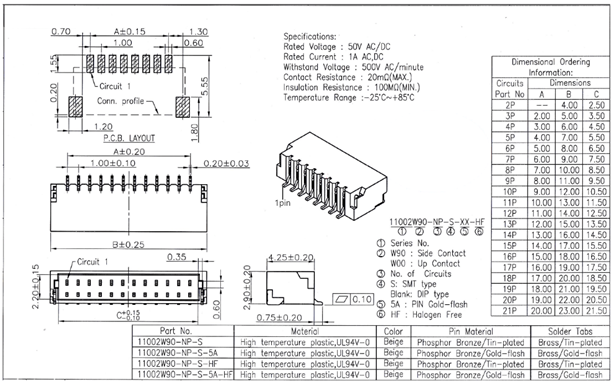
下图显示了多相机设置的机械图。
多相机设置的优势:
- 增加指定空间内的相机覆盖范围,并填补单相机可能存在盲点的遮挡区域
- 捕获同一场景的多个图像并从不同角度扫描对象
- 将有效帧率提高到 30 fps 以上
使用 8 引脚连接器和匹配电缆,可以设计多相机和多传感器网络。请遵循 SDK 中的说明。
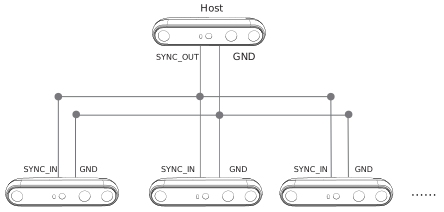
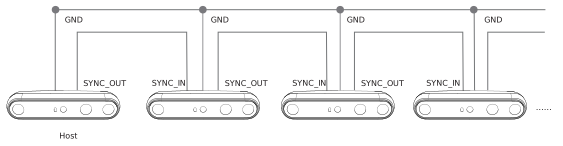
借助多相机同步功能,支持星形和菊花链这两种拓扑结构的多相机帧同步,包括深度图像同步和 RGB 图像同步(关闭自动 Exposure Time 时,时间差 ≤ 5 ms)。
星形拓扑#
菊花链拓扑#
Synchronization Interfaces#
USB#
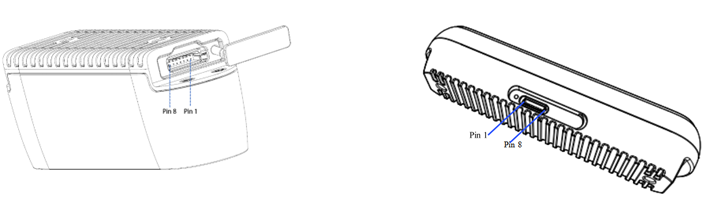
| 引脚 | 定义 | 描述 |
|---|---|---|
| Pin_1 | VCC | 默认电平设置为 1.8 V。如果在 VCC 接口上提供 3.3 V 或 5 V 驱动电压,则可根据需要将 I/O 电平设置调整为 3.3 V 或 5 V。 |
| Pin_2 | GPIO_OUT | 同步驱动信号:高电平有效。高电平区间与红外 Exposure Time 重合。典型应用是驱动外部 Fill 光。 |
| Pin_3 | VSYNC_OUT | 同步触发信号:高电平有效。高电平为次级设备提供触发信号。 |
| Pin_4 | TIMER_SYNC_OUT | 脉冲信号源,重置次级设备的硬件 Timestamp。 |
| Pin_5 | RESET_IN | 硬件复位信号:触发相机断电,然后自动上电并复位。检测输入信号:20 Hz / 50% 占空比 / 连续 5 个周期以上判定为正常输入信号,其他信号将被过滤;允许的频率波动为 ±1 Hz,占空比波动为 ±2%。 |
| Pin_6 | VSYNC_IN | 同步触发信号:高电平有效,用于接收来自主设备的触发/同步信号,持续时间为 1 ms。 |
| Pin_7 | TIMER_SYNC_IN | 硬件 Timestamp 复位信号输入,用于清除硬件 Timestamp。 |
| Pin_8 | GND | 接地 |
同步点的位置如以下图纸所示。
GigE#
| 引脚 | 定义 | 描述 |
|---|---|---|
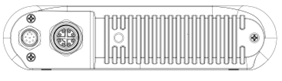
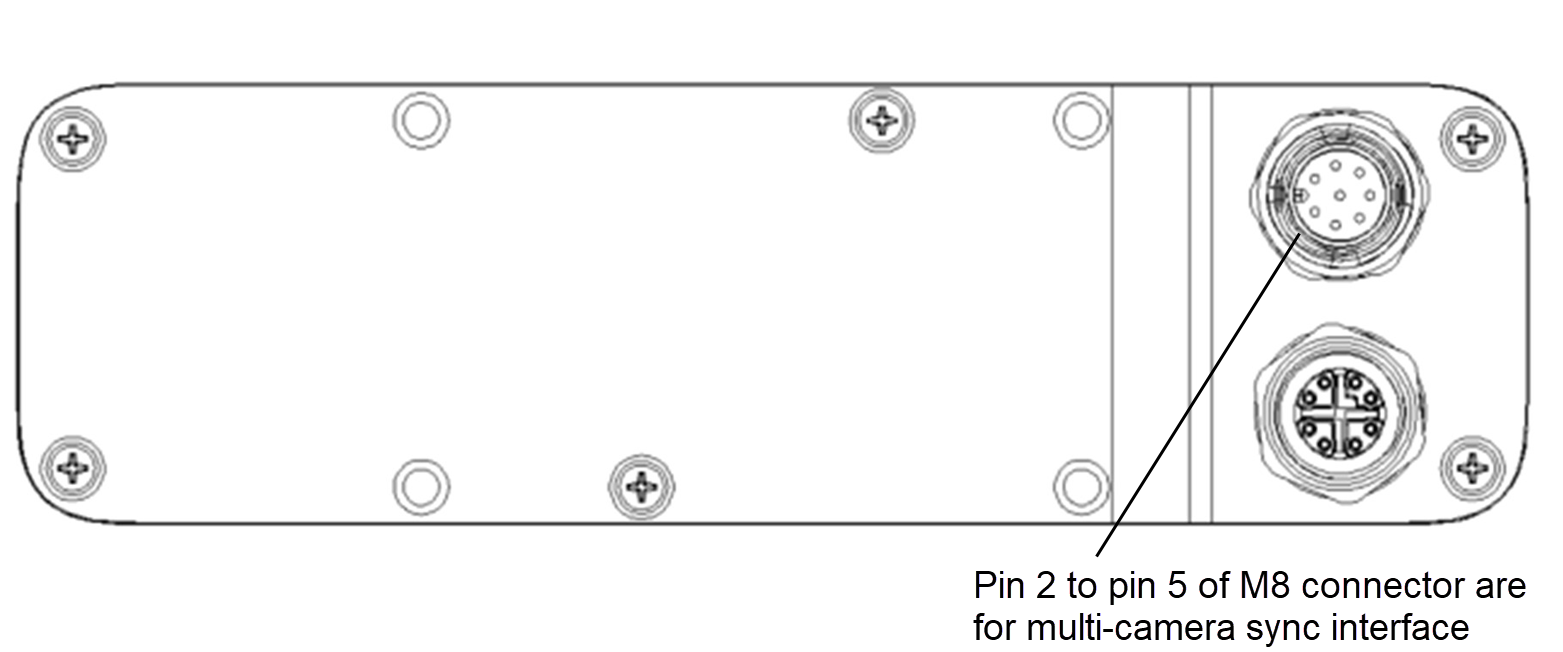
| Pin_2 | 信号 VCC | 默认电平设置为 3.3 V。如果在 VCC 接口上提供 3.3 V、5 V 或 24 V 驱动电压,则可以根据需要将 I/O 电平设置调整为 3.3 V、5 V 或 24 V。 |
| Pin_3 | VSYNC_IN | 同步触发信号:高电平有效,用于接收来自主设备的触发/同步信号,持续时间为 1 ms。 |
| Pin_4 | VSYNC_OUT | 同步触发信号:高电平有效。高电平为次级设备提供触发信号。 |
| Pin_5 | 信号 GND | 接地 |
多相机同步点引脚排列如下图所示:
STM-951g#
STM-955g#
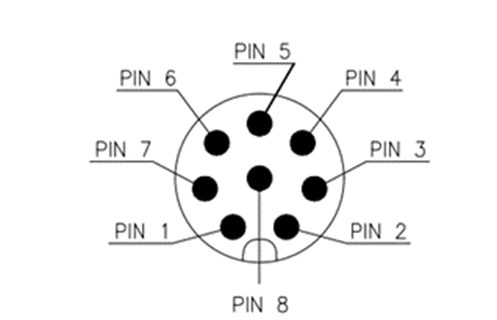
电源连接器的引脚编号(两个相机型号相同):
Camera Functions#
Depth Camera Functions#
Stereo mini 系列公开了以下深度图像设置。
| 节点名称 | 显示名称 | 描述 |
|---|---|---|
| DepthMax | DepthMax | 用于深度数据的最大深度 (mm) |
| DepthMin | DepthMin | 用于深度数据的最小深度 (mm) |
| ExposureAuto | Exposure Auto | 设置自动 Exposure Mode。 |
| ExposureTime | Exposure Time | 设置 Exposure Time。这用于控制感光元件曝光于光线之下的持续时间。ExposureAuto 将自动设置为 Off。 |
| Gain | Gain | 将所选 Gain 控制为绝对物理值。这是应用于视频信号的放大系数。 |
| BslDepthPreset | Depth Preset | 选择针对特定用例优化的预定义算法参数集。可能的值: Default、AMR with IR-Pass、High Accuracy、High Density |
| Pixel Format | Pixel Format | 设备提供的像素格式。它表示由 PixelSize 和 PixelColorFilter 组合在单个 feature 中的所有信息。 Coord3D_C16:3D 坐标 C 16 位 Coord3D_ABC32f:3D 坐标 A-B-C 32 位浮点数 |
| BslComponentMappingMode | Component Mapping Mode | 如何映射深度和色彩平面。 None:不映射深度和色彩。 ColorOntoDepth:缩放色彩并映射到深度上。 DepthOntoColor:缩放深度并映射到色彩上。 DepthOntoColor(HW):缩放深度并映射到色彩上(硬件)。 |
| Scan3dFocalLength | Scan3d Focal Length | 以像素为单位返回相机的焦距。 |
| Scan3dBaseline | Scan3d Baseline | 以双相机立体视觉设置中的物理距离形式返回基线。 |
| Scan3dPrincipalPointU | Scan3d Principal Point U | 返回主点水平位置的值。 |
| Scan3dPrincipalPointV | Scan3d Principal Point V | 返回主点垂直位置的值。 |
Color Camera Functions#
Stereo mini 系列公开了以下彩色图像设置。
| 节点名称 | 显示名称 | 描述 |
|---|---|---|
| ExposureAuto | Exposure Auto | 设置自动 Exposure Mode。 |
| ExposureTime | Exposure Time | 设置 Exposure Time。这用于控制感光元件曝光于光线之下的持续时间。ExposureAuto 将自动设置为 Off。 |
| Gain | Gain | 将所选 Gain 控制为绝对物理值。这是应用于视频信号的放大系数。 |
| BalanceWhiteAuto | Balance White Auto | 控制彩色通道之间自动白平衡的模式。白平衡比率将自动调整。 |
| BalanceRatio | Balance Ratio | 控制彩色图像的白平衡。 |
| BslBacklightCompensation | Backlight Compensation | 控制背光补偿。 |
| BslBrightness | 亮度 | 控制亮度。 |
| BslContrast | 对比度 | 控制对比度。 |
| Gamma | Gamma | 控制 Gamma。 |
| BslHue | BslHue | 控制色调。 |
| BslSaturation | 饱和度 | 控制饱和度。 |
| BslSharpness | Sharpness | 控制清晰度。 |