TDI (Time Delay Integration)#
TDI 提高了光敏度,并可生成具有更宽动态范围的更亮图像,这使其非常适合在微光条件下使用。
信息
此功能仅适用于 Basler racer 2 XL 和 racer 2 L mono 相机。
该功能的使用#
该功能的具体实现因相机而异:
racer 2 XL 相机#
racer 2 XL 相机配备了 TDI 传感器。TDI 传感器由多行像素组成,称为级(stages),它们按阵列排列。
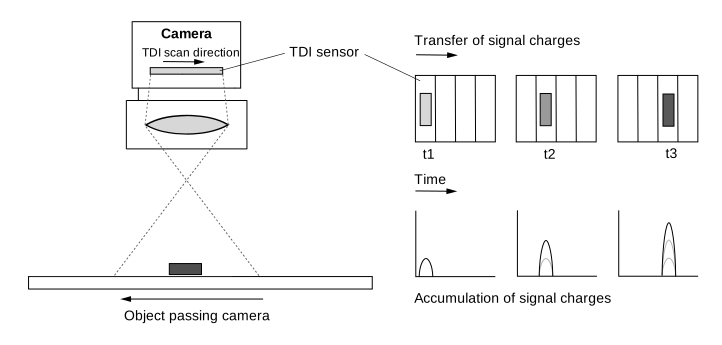
当物体穿过传感器的视场时,其图像会从第一级的曝光区域投影到最后一级的曝光区域。这些级不是逐级单独曝光的,而是作为一个整体块进行曝光。因此,传感器会在每个级对同一个物体进行曝光,并累积和传输电荷,直到它们到达读出线。
以下插图展示了具有四个级的传感器内的电荷传输。
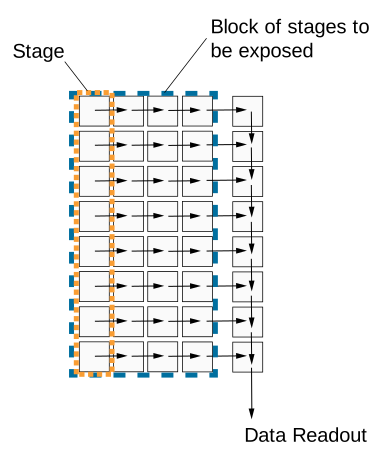
从一级到下一级的电荷传输必须与物体的运动保持精确同步。这确保了持续的曝光和电荷积分。物体的曝光持续时间与其在相机视场中的时间一样长。使用的级越多,有效的 Exposure Time 和积分时间就越长。
以下插图显示了 TDI 传感器的视场及其电荷转移原理:
Number Of Stages#
级的数量决定了电荷累积并从一级转移到下一级直到到达最后一级的频率。级的数量越多,图像灵敏度就越高。例如,如果级的数量为 256,相机采集图像的灵敏度将提高 256 倍。级的数量还会影响最终的 Exposure Time。
传感器可以设置为使用不同数量的级,例如 4 级或最多 256 级。可用的级的数量取决于所使用的传感器。
要设置级的数量,请将 BslTDINumberOfStages 参数值设置为,例如, Stages4 或 Stages256.
信息
在区域传感器采集模式(Area sensor acquisition mode)下,级的数量决定了图像高度。例如,当级的数量设置为 128 时,r2T16416-500cm 相机将在区域传感器采集模式下采集 16416 x 128 的“区域”图像。
Scan Direction#
TDI 传感器的扫描方向必须与通过相机的物体的运动保持同步。扫描方向必须与物体的移动方向相同,以确保持续的曝光和电荷积分。
信息
关于如何设置扫描方向的说明假设您的相机上安装了镜头。镜头会使图像颠倒。
若要设置扫描方向,请设置 BslTDIScanDirection 参数设置为以下值:
Forward:穿过传感器视野的物体在 向前 扫描方向上被扫描。它先通过相机的底部,然后通过顶部。Reverse:穿过传感器视野的物体在 反向 扫描方向。它先通过相机的顶部,然后通过底部。
Resulting Exposure Time#
在 TDI 传感器采集模式中,Exposure Time 不是通过 ExposureTime Property 设置的。相反,它由以下两个采集参数共同决定:
- Number of stages:定义物体在累积和转移电荷期间停留在传感器视野中的时间长度。
- Line rate:定义电荷从一个阶段转移到下一个阶段的速度。它还决定了各个阶段的积分时间。
这两个参数共同决定了总的 Exposure Time:
$$ \text{Exposure time} = \frac{\text{Number of stages}}{\text{Line rate}} $$
下表显示了在 500 kHz 的固定 Line rate 和不同级数下的示例 Exposure Time:
| 级数 | Line rate [kHz] | Exposure Time [µs] |
|---|---|---|
| 4 | 500 | 8 |
| 64 | 500 | 128 |
| 128 | 500 | 256 |
| 256 | 500 | 512 |
下表显示了在固定 128 级以及最高达 500 kHz 的不同 Line rate 下的示例 Exposure Time:
| Line rate [kHz] | 级数 | Exposure Time [µs] |
|---|---|---|
| 100 | 128 | 1280 |
| 200 | 128 | 640 |
| 400 | 128 | 320 |
| 500 | 128 | 256 |
由于级数和 Line rate 都会影响 Exposure Time,因此它们也会影响图像亮度,前提是触发与物体的运动正确同步并且符合像素饱和度限制:
- 较高的级数会增加 Exposure Time,从而导致累积更多电荷。图像会显得更亮。
- 较低的级数会减少 Exposure Time,从而导致累积较少电荷。图像会显得更暗。
- 较高的 Line rate 会减少每个阶段的 Exposure Time,从而导致累积较少电荷。图像会显得更暗。
- 较低的 Line rate 会增加每个阶段的 Exposure Time,从而导致累积更多电荷。图像会显得更亮。
配置 racer 2 XL 相机以使用 TDI#
若要为 TDI 配置 racer 2 XL 相机:
- 设置
BslSensorAcquisitionMode参数至TDISingleLine。传感器使用一条读出线。 - 根据您的系统设置,将
BslTDIScanDirection参数设置为,例如,Forward. - 设置
BslTDINumberOfStages参数设置为,例如 128。
信息
- 确保传感器的读出程序与物体移动的速度和方向完全同步。为进行测试,请相应地更改 Acquisition Line Rate。这也会影响最终的 Exposure Time。
- 在触发暂停后重新触发时,必须至少将前 n 行读出线视为无效,其中 n 表示级数的最小值。
racer 2 L 黑白相机#
racer 2 L mono cameras 配备多行传感器,即双线或四线传感器。传感器的每一像素行都可以设置为使用不同的 Exposure Time 进行曝光。每当触发采集时,传感器的所有像素行同时曝光。对于单次曝光,传感器中的每一行都会在物体上采集不同的区域,因为当任何物体经过相机时,每一行的视场都不同。
以下插图显示了单色四线传感器的视场。
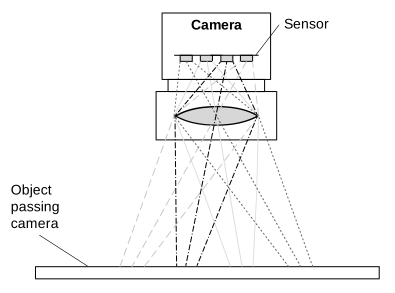
在这种情况下,必须对来自四次不同采集的数据进行缓冲和组合,以获取物体上特定区域的完整信息。这是通过 Spatial Correction 完成的。当前曝光最后一线的数据与过去曝光中获取的前几线的数据相结合。
使用 Line Combination Mode,您最终可以指定组合各个行的像素值以获得 HDR 图像的方式。
Line Combination Mode#
线组合模式允许您定义是将组合传感器行的像素值相加还是取平均值。您可以将 BslLineCombinationMode 参数设置为以下值:
Off:禁用线组合。TDISum:将组合传感器行的像素值相加。这会增加相机的光响应和信噪比。TDIAverage:对组合传感器行的像素值取平均值。这会在不影响相机光响应的情况下提高信噪比。
配置 racer 2 L 黑白相机以使用 TDI#
要将 racer 2 L 彩色相机配置为 TDI 模式:
- 设置 传感器采集模式 设置为双线或四线图像采集:
设置BslSensorAcquisitionMode参数至DualLine或QuadLine具体取决于您是要将两行还是四行用于 TDI。 -
指定每一行(级)的 Exposure Time:
- 设置
ExposureTimeMode参数至Individual. - 设置
ExposureTimeSelector参数至Stage1. - 设置
ExposureTime参数设置为所需的以微秒为单位的 Exposure Time。
注意: 您可以在以下位置找到相机型号的最小和最大 Exposure Time 值 详情 部分位于 Exposure Time 主题中找到有关突发图像采集的更多信息。 - 对其他级重复步骤 b 和 c。
- 设置
-
指定 spatial correction stride 以确定 Spatial Correction 的起始行和方向:
设置BslSpatialCorrectionStride参数设置为,例如 2。 - 设置 行组合模式 用于确定组合行的传感器像素值是进行求和还是平均:
设置BslLineCombinationMode参数设置为,例如,TDIAverage.
使用外部后处理程序组合行信息以生成高动态范围图像。
示例代码#
racer 2 XL 相机#
// Set the sensor acquisition mode to TDI Single Line
camera.BslSensorAcquisitionMode.SetValue(BslSensorAcquisitionMode_TDISingleLine);
// Set the sensor scan direction to Forward
camera.BslTDIScanDirection.SetValue(BslTDIScanDirection_Forward);
// Set the number of stages to 128
camera.BslTDINumberOfStages.SetValue(BslTDINumberOfStages_128);
INodeMap& nodemap = camera.GetNodeMap();
// Set the sensor acquisition mode to TDI Single Line
CEnumParameter(nodemap, "BslSensorAcquisitionMode").SetValue("TDISingleLine");
// Set the sensor scan direction to Forward
CEnumParameter(nodemap, "BslTDIScanDirection").SetValue("Forward");
// Set the number of stages to 128
CEnumParameter(nodemap, "BslTDINumberOfStages").SetValue("");
// Set the sensor acquisition mode to TDI Single Line
camera.Parameters[PLCamera.BslSensorAcquisitionMode].SetValue(PLCamera.BslSensorAcquisitionMode.TDISingleLine);
// Set the sensor scan direction to Forward
camera.Parameters[PLCamera.BslTDIScanDirection].SetValue(PLCamera.BslTDIScanDirection.Forward);
// Set the number of stages to 128
camera.Parameters[PLCamera.BslTDINumberOfStages].SetValue(PLCamera.BslTDINumberOfStages.);
/* Macro to check for errors */
#define CHECK(errc) if (GENAPI_E_OK != errc) printErrorAndExit(errc)
GENAPIC_RESULT errRes = GENAPI_E_OK;  /* Return value of pylon methods */
/* Set the sensor acquisition mode to TDI Single Line */
errRes = PylonDeviceFeatureFromString(hdev, "BslSensorAcquisitionMode", "TDISingleLine");
CHECK(errRes);
/* Set the sensor scan direction to Forward */
errRes = PylonDeviceFeatureFromString(hdev, "BslTDIScanDirection", "Forward");
CHECK(errRes);
/* Set the number of stages to 128 */
errRes = PylonDeviceFeatureFromString(hdev, "BslTDINumberOfStages", "");
CHECK(errRes);
racer 2 L 黑白相机#
// Set the sensor acquisition mode to Dual Line
camera.BslSensorAcquisitionMode.SetValue(BslSensorAcquisitionMode_DualLine);
// Set the exposure time for both lines (stages)
// Select stage 1
camera.ExposureTimeSelector.SetValue(ExposureTimeSelector_Stage1);
// Set the exposure time to 1000 microseconds
camera.ExposureTime.SetValue(1000.0);
// Select stage 2
camera.ExposureTimeSelector.SetValue(ExposureTimeSelector_Stage2);
// Set the exposure time to 1000000 microseconds
camera.ExposureTime.SetValue(1000000.0);
// Set the spatial correction stride to 2
camera.BslSpatialCorrectionStride.SetValue(BslSpatialCorrectionStride_2);
// Set the line combination mode to TDI Sum
camera.BslLineCombinationMode.SetValue(BslLineCombinationMode_TDISum);
INodeMap& nodemap = camera.GetNodeMap();
// Set the sensor acquisition mode to Dual Line
CEnumParameter(nodemap, "BslSensorAcquisitionMode").SetValue("DualLine");
// Set the exposure time for both lines (stages)
// Select stage 1
CEnumParameter(nodemap, "ExposureTimeSelector").SetValue("Stage1");
// Set the exposure time to 1000 microseconds
CFloatParameter(nodemap, "ExposureTime").SetValue(1000.0);
// Select stage 2
CEnumParameter(nodemap, "ExposureTimeSelector").SetValue("Stage2");
// Set the exposure time to 1000000 microseconds
CFloatParameter(nodemap, "ExposureTime").SetValue(1000000.0);
// Set the spatial correction stride to 2
CEnumParameter(nodemap, "BslSpatialCorrectionStride").SetValue("");
// Set the line combination mode to TDI Sum
CEnumParameter(nodemap, "BslLineCombinationMode").SetValue("TDISum");
// Set the sensor acquisition mode to Dual Line
camera.Parameters[PLCamera.BslSensorAcquisitionMode].SetValue(PLCamera.BslSensorAcquisitionMode.DualLine);
// Set the exposure time for both lines (stages)
// Select stage 1
camera.Parameters[PLCamera.ExposureTimeSelector].SetValue(PLCamera.ExposureTimeSelector.Stage1);
// Set the exposure time to 1000 microseconds
camera.Parameters[PLCamera.ExposureTime].SetValue(1000.0);
// Select stage 2
camera.Parameters[PLCamera.ExposureTimeSelector].SetValue(PLCamera.ExposureTimeSelector.Stage2);
// Set the exposure time to 1000000 microseconds
camera.Parameters[PLCamera.ExposureTime].SetValue(1000000.0);
// Set the spatial correction stride to 2
camera.Parameters[PLCamera.BslSpatialCorrectionStride].SetValue(PLCamera.BslSpatialCorrectionStride.);
// Set the line combination mode to TDI Sum
camera.Parameters[PLCamera.BslLineCombinationMode].SetValue(PLCamera.BslLineCombinationMode.TDISum);
/* Macro to check for errors */
#define CHECK(errc) if (GENAPI_E_OK != errc) printErrorAndExit(errc)
GENAPIC_RESULT errRes = GENAPI_E_OK;  /* Return value of pylon methods */
/* Set the sensor acquisition mode to Dual Line */
errRes = PylonDeviceFeatureFromString(hdev, "BslSensorAcquisitionMode", "DualLine");
CHECK(errRes);
/* Set the exposure time for both lines (stages) */
/* Select stage 1 */
errRes = PylonDeviceFeatureFromString(hdev, "ExposureTimeSelector", "Stage1");
CHECK(errRes);
/* Set the exposure time to 1000 microseconds */
errRes = PylonDeviceSetFloatFeature(hdev, "ExposureTime", 1000.0);
CHECK(errRes);
/* Select stage 2 */
errRes = PylonDeviceFeatureFromString(hdev, "ExposureTimeSelector", "Stage2");
CHECK(errRes);
/* Set the exposure time to 1000000 microseconds */
errRes = PylonDeviceSetFloatFeature(hdev, "ExposureTime", 1000000.0);
CHECK(errRes);
/* Set the spatial correction stride to 2 */
errRes = PylonDeviceFeatureFromString(hdev, "BslSpatialCorrectionStride", "");
CHECK(errRes);
/* Set the line combination mode to TDI Sum */
errRes = PylonDeviceFeatureFromString(hdev, "BslLineCombinationMode", "TDISum");
CHECK(errRes);
# Set the sensor acquisition mode to Dual Line
camera.BslSensorAcquisitionMode.Value = "DualLine"
# Set the exposure time for both lines (stages)
# Select stage 1
camera.ExposureTimeSelector.Value = "Stage1"
# Set the exposure time to 1000 microseconds
camera.ExposureTime.Value = 1000.0
# Select stage 2
camera.ExposureTimeSelector.Value = "Stage2"
# Set the exposure time to 1000000 microseconds
camera.ExposureTime.Value = 1000000.0
# Set the spatial correction stride to 2
camera.BslSpatialCorrectionStride.Value = ""
# Set the line combination mode to TDI Sum
camera.BslLineCombinationMode.Value = "TDISum"
您也可以使用 pylon Viewer 轻松设置参数。