跳转到内容
STAGING SERVER
DEVELOPMENT SERVER

Hardware Installation (GMSL Cameras)#

This topic tells you how to install one or several ace 2 GMSL cameras.

信息

If you want to evaluate Basler GMSL cameras together with an NVIDIA Jetson Orin Nano Super Developer Kit in a first step, you can use the Basler GMSL Adapter Board which is part of the Basler GMSL Adapter Kit for Jetson Orin Nano Super Developer Kit.

准备工作#

Make sure that the following steps have been executed before starting the hardware installation:

在开始硬件安装之前,请确保以下各项可用:

  • One or several Basler ace 2 GMSL cameras. It depends on your host system how many GMSL cameras can be connected.
    For a list of supported host systems, see the "All Camera Enablement Packages" section on the Basler website.
  • Depending on the number of ace 2 GMSL cameras you want to install:
    Corresponding number of Coaxial Cable with FAKRA Connector.
  • A lens for each camera you want to install.
    If you already know what lens you will be using in your actual application, use this lens during the camera installation and setup. If not, Basler suggests using a zoom lens for the installation and initial setup. Contact Basler technical support if you need assistance in determining the best lens for your application.
  • Illumination for your application. Contact Basler technical support if you need assistance in determining the best illumination for your application.

信息

Make sure that the host system provides sufficient power. See the camera power requirements in the General Specifications table of the corresponding camera topic.
If the host system doesn't provide sufficient power, the camera may behave in an unexpected way (e.g., the camera may not be found at all or may restart spontaneously).

安装相机#

信息

Basler GMSL cameras: Connecting or disconnecting the camera when the camera is powered on can cause increased stress on the camera. Do not hot-plug the camera.

  • Turn off power before connecting or disconnecting the camera.
  • Do not disconnect the camera while the camera is capturing and transmitting images or data.

Connectors on ace 2 GMSL Cameras

  1. Make sure that all components are disconnected from the power supply.
  2. 从镜头接口上取下保护盖。
  3. Mount a lens on each camera. Be careful not to insert the lens any deeper than specified in the Maximum Allowed Lens Intrusion topic.
  4. 如果要使用相机的任何 I/O 线路,请执行以下步骤:
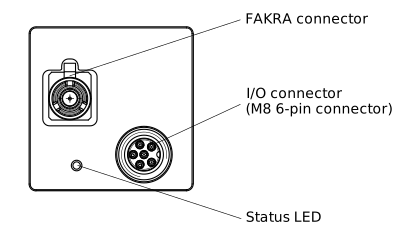
    1. For each camera, plug the 6-pin connector of the I/O cable into the I/O connector of the camera.
    2. For each camera, connect the other end of the I/O cable to the device that sends and receives I/O signals.
  5. Connect the FAKRA coaxial cables:
    1. For each camera, plug the FAKRA connector of the coaxial cable into the FAKRA connector of the camera.
    2. For each camera, plug the other end of the FAKRA cable into the FAKRA port of the host system.

后续步骤#

See Configuring GMSL Cameras for information about the next steps.