图像采集与 I/O 控制 (Stereo ace)#
input line 允许您控制相机,例如,在特定时间点触发图像拍摄。output line 可让您检索有关相机的信息,例如,正在拍摄图像时。
I/O 线路#
Stereo ace 相机提供一个光耦输入线和一个输出线:
Out2预配置为 Stereo ace 相机的输出线。In1预配置为 Stereo ace 相机的输入线。Out1是用于触发投影仪的内部线路。它不能用作输出线。
您不能更改 I/O 线路的线路模式。
光电耦合输入线路#
下图展示了使用光电耦合输入线路的典型电路:
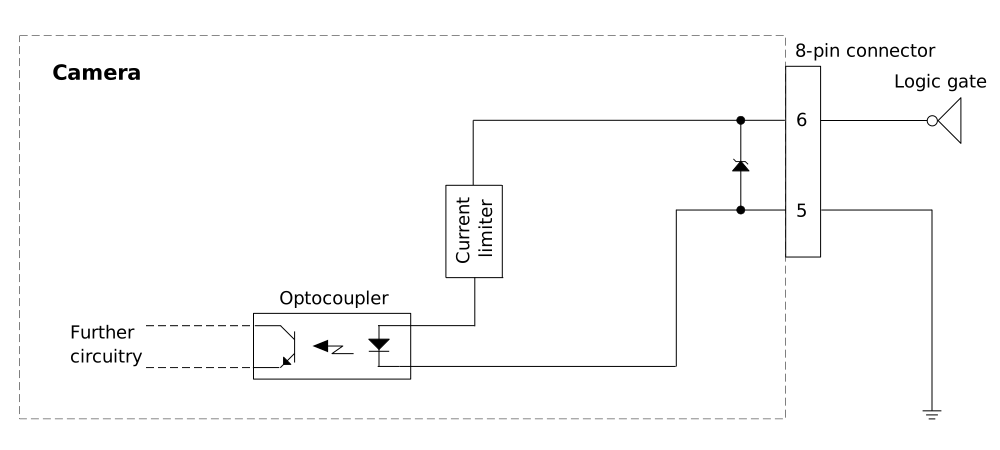
输入线路连接到引脚 6。引脚 5 接地。
通用输出线#
注意:将不正确的电信号施加到相机的 GPO 线可能会严重损坏相机。
在将任何外部电路连接到 GPIO 线路之前,请使用 Line Mode 功能,配置输入或输出线路。
确保按以下规定施加适当的输入或输出信号电压。
下图显示了使用输出线的典型电路:
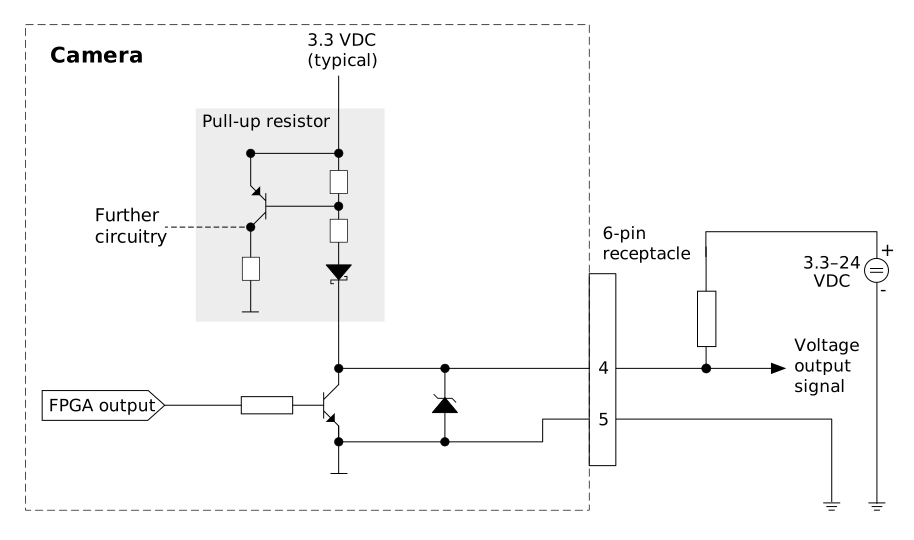
输出线 Out2 连接到引脚 4。引脚 5 连接到地。
电气要求#
输入线路#
| 电压 | 描述 |
|---|---|
| 30 VDC | 绝对最大电压 绝对不能超过此电压。否则可能会损坏相机并导致保修失效。 |
| 0-24 VDC | 安全工作范围 |
| 0–1.0 VDC | 逻辑 0 |
| >2.2 VDC | 逻辑 1 |
- 最小电流:5 mA
- 典型电流:5–15 mA
未实现信号的去抖动。因此,您必须确保输入线上的电信号是干净的(例如,通过使用 PLC 输出或应用低通滤波器)。
输出线路#
| 电压 | 描述 |
|---|---|
| 30 VDC | 绝对最大电压 绝对不能超过此电压。否则可能会损坏相机并导致保修失效。 |
| 3.3-24 VDC | 安全工作范围 |
| <3.3 VDC | 不可靠的 GPIO 输出 |
- 内部上拉电阻:≈650 Ω,集电极开路。在许多应用中必须提供一个额外的上拉电阻。
- 最大电流:50 mA
- Leakage current: <60 µA
I/O 线缆#
Basler 建议使用 Power-I/O 线缆 M12,M,8P/开放。线缆文档包括了 I/O 线的引脚输出和颜色编码。
特征和配置#
即: DigitalIOControl 功能类别包含用于配置和监控 I/O 线路操作的各种功能。
Line Selector#
Line Selector 功能允许您选择要配置的 I/O 线路。要选择线路,请将 LineSelector 参数设置为所需的 I/O 线路,例如 Line1。
Line Status#
要确定 I/O 线路的状态:
- 设置
LineSelector参数至In1用于输入线或Out2用于输出线。 - 获取
LineStatus参数。
值为 false (0) 意味着轮询时的 Line Status 为低。值为 true (1) 意味着轮询时的 Line Status 为高。
Line Source(仅输出线路)#
输出线 Out2 可以配置为通过 LineSource parameter. This allows you to monitor the status of the camera or to control external devices.
要配置线路源:
- 设置
LineSelector参数至Out2. - 设置
LineSource参数设置为以下值:Low: The line is always low.High: The line is always high.ExposureActive: The line is enabled during the exposure of each frame.ExposureAlternateActive: The line is enabled during the exposure of every second frame.
您可以使用 ExposureActive signal to monitor whether the camera is currently exposing.
Line Inverter#
即: LineInverter parameter inverts the electrical signal level of an I/O line, i.e., its 线路状态 from high to low or vice versa.
要启用 Line Inverter:
- 设置
LineSelectorparameter to the desired I/O line. - 设置
LineInverter参数至trueto invert the electrical signal level of the I/O line selected or tofalseto disable inversion.
示例: If the input line In1 is configured as a trigger input source, inverting the signal level means that the trigger will come at the falling edge of the trigger signal instead of on the rising edge.
For the output line Out2, the level of the selected output signal is inverted.
自由运行和触发器操作#
可以在 free run 模式和 triggered mode 下操作相机。
在 free run 中,根据配置的帧速率(默认值或通过 AcquisitionFrameRate 参数指定)在内部触发相机。
While in free run mode, you can synchronize the triggering of multiple cameras using the Precision Time Protocol feature.
在 triggered mode, an external trigger source is used to trigger the camera, e.g., via software trigger or via hardware trigger (using input line In1)。
The trigger is always a FrameTrigger, i.e., it triggers the acquisition of a single frame in the current Operating Mode.
自由运行图像采集#
要启用自由运行图像采集:
- 设置
TriggerSelector参数至FrameStart. - 设置
TriggerMode参数至Off.
触发图像采集#
信息
New trigger signals are ignored until the camera is ready to accept another trigger. The minimum interval between two trigger signals depends on the Acquisition Frame Rate.
软件触发器#
要通过软件触发器启用图像采集:
- 设置
TriggerSelector参数至FrameStart. - 设置
TriggerSource参数至Software. - 设置
TriggerMode参数至On. - 使用以下方式触发单帧图像:
TriggerSoftware.
现在将采集、处理单个视差图,并将其传输至客户端软件。
确保在软件触发器接收图像之前开始采集。
硬件触发器#
要通过硬件触发器启用图像采集:
- 设置
TriggerSelector参数至FrameStart. - 设置
TriggerSource参数至In1. - 设置
TriggerMode参数至On.
图像在以下信号的上升沿触发:In1(若LineInverter参数设置为false)或下降沿(若LineInverter参数为true)。图像经相机采集并处理后,将发送至主计算机。
确保在硬件触发器接收图像之前开始采集。