外设控制#
外设控制中包含的功能基于 SLP 协议,该协议使相机能够与灯光或光学设备直接进行通信。
外设控制部分包含以下 camera features 及其参数:
- Peripheral Devices Control 主题:
某些参数在不同类型的外设之间共享,因此在当前主题中进行了描述,其中包括配置步骤。 - Light Control 主题:
专门用于配合 Basler ace 2、boost R 和 dart M 相机运行的光源设备的参数。
有关适用于 Basler ace U 和 ace L 相机以及没有 Peripheral Devices Control 功能的 ace 2、boost R 和 dart M 相机的 Light Control 功能的信息,请参阅 Light Control (ace U/L) 主题。 - Optic Control:专门用于镜头等光学设备的参数。
以下信息适用于所有外设:
- Device Type:所选外设的类型。
- Model Name:设备的产品名称和型号。
- Firmware Version:当前安装在设备上的固件版本。
- Error Status:外设当前的错误状态,包括任何活动的故障状况。
这些字段中显示的值取决于当前选定的外设。当您选择不同的外设时,显示的信息会相应更新,以显示设备特定的值。
有关其余参数的信息,请参阅 Using the Peripheral Devices Control Parameters。
特定于某种设备类型的参数可在相应的功能主题(Light Control 或 Optic Control)中查看和介绍。
信息
有关参数名称更改和从早期固件版本迁移的信息,请参阅 Compatibility and Parameter Mapping 主题中的表格。该主题概述了从旧版到新版参数的映射关系。
以下小节介绍了适用于光源设备和光学设备的功能。
该功能的使用#
准备外设#
若要准备外设:
- 如果尚未连接,请连接外设(例如灯光、镜头)以及控制器(如果需要)。
- 接通电源。
-
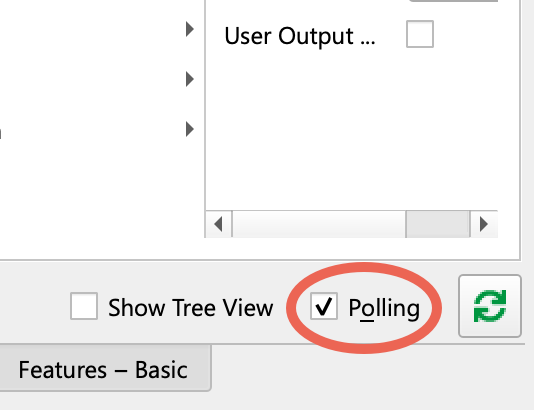
使用 pylon Viewer 时,请确保选择了功能窗格中的轮询选项:
-
确保相机空闲,即未在捕获图像。
- 设置
BslPeripheralControlMode参数至On.
这可以通过以下方式启用照明设备通信: GPIO line 并将 Line 3 设置为PeripheralControl. - 执行
BslLightControlEnumerateDevices命令。
这会为 light device ID 分配给新设备并启用对所连接光源设备的访问。 - 如果
BslPeripheralErrorSummary显示错误时,通过设置以下各项来检查所有连接的设备(灯光和镜头):BslPeripheralDeviceSelector,并针对您要检查的外设进行设置。
即:BslPeripheralDeviceErrorStatus参数向您显示所选设备的状态。 - 您只需要进行配置
BslPeripheralDeviceTriggerSource和BslPeripheralDeviceTriggerActivation如果您想将连接的光源用于频闪。
对于大多数应用,默认值FlashWindows小节了解BslPeripheralDeviceTriggerSource是一个不错的选择。
有关详细信息,请参阅 Light Control 主题中的配置触发信号和频闪持续时间部分。如果您使用连续光,则无需配置这两个参数。
配置触发信号和频闪持续时间#
外设通过在 BslPeripheralDeviceTriggerSource 中配置的信号进行触发。触发的效果取决于所连接外设的类型。只会向所有外设传输一个触发信号。
以下示例展示了频闪模式下的光源如何响应触发信号发生状态变化:
- 最初,光源已关闭。
- 光源由触发信号打开。
- 光源将保持点亮一段时间,即频闪持续时间
- 频闪持续时间结束后,光源将再次关闭。
要在配备 Peripheral Devices Control 功能的相机上配置触发信号和频闪持续时间:
- 设置
BslPeripheralTriggerSource参数设置为要用于开启连接光源的源,例如:FlashWindow. - 如果适用,请设置
BslPeripheralTriggerActivation参数设置为以下值:RisingEdge(默认):
当信号 上升时,即信号状态从低电平变为高电平时,所有连接的光源都会点亮。FallingEdge:
当信号 下降时,即信号状态从高电平变为低电平时,所有连接的光源都会点亮。AnyEdge:当信号 下降 或 上升.
检查和清除错误#
Basler ace 2、boost R 和 dart M 相机可以从连接的外设读取以下错误数据:
错误状态可以帮助您自行更正错误。
要检查并清除错误:
- 如果您连接了多个设备:
- 检查
BslPeripheralErrorSummary参数以找出哪个设备遇到问题,例如,Device2。如果多个设备出现问题,则该值为MultipleDevices. - 设置
BslPeripheralDeviceSelector参数分配给遇到问题的设备。
- 检查
- 获取
BslPeripheralDeviceErrorStatus参数的值,并在下方的 错误状态 表中查找其含义。
信息
您可以使用 BslPeripheralOvertriggerCount 参数,用于确定在一个或多个连接的外设未准备好处理它们时接收到的触发信号数量。
错误状态#
即: BslPeripheralDeviceErrorStatus 参数可采用以下值:
| 值 | 含义 |
|---|---|
| 无错误 | 未检测到错误。 |
| 未连接 | 外设未连接到相机或尚未完成枚举。请执行 BslPeripheralEnumerateDevices 命令以枚举设备。 |
| 通信故障 | 如果外设与相机之间的数据传输出现故障,则会发生通信错误。这可能是由电缆过长或线路上的噪声过大引起的。 |
| 连接丢失 | 与先前连接的光源设备的连接已丢失。例如,如果电缆松动,就会发生这种情况。 |
| 硬件错误 | 灯光设备遇到技术故障。有关硬件错误类型的更多信息,请执行 BslLightDeviceErrorStatusReadAndClear 命令以检索 错误代码。[^a] |
| 外设错误 | 外设遇到内部错误。[^a] |
| 不支持的设备版本 | 外设与当前相机不兼容。联系支持团队以了解是否有可用的固件更新。 |
检查设备信息#
您可以从相机中读取有关所连接设备的详细信息:
- 使用以下选项选择要使用的设备
BslPeripheralDeviceSelector例如Device2. - 使用以下选项检查设备类型
BslPeripheralDeviceType。该值将是LightControl或OpticControl. - 使用以下代码获取所连接设备的型号名称和固件版本
BslPeripheralDeviceModelName和BslPeripheralDeviceFirmwareVersion.
示例代码#
信息
这些代码示例仅适用于固件中包含 Peripheral Devices Control 功能的相机。
ace 2、boost R、dart M 相机#
// Enable the peripheral devices control mode
camera.BslPeripheralControlMode.SetValue(BslPeripheralControlMode_On);
// Enumerate the peripheral devices
camera.BslPeripheralEnumerateDevices.Execute();
// Check the error summary for any errors that might have occurred
auto summary = camera.BslPeripheralErrorSummary.GetValue();
// Configure the trigger source for all devices.
camera.BslPeripheralTriggerSource.SetValue(BslPeripheralTriggerSource_FlashWindow);
// Trigger on the rising edge of the selected signal.
camera.BslPeripheralTriggerActivation.SetValue(BslPeripheralTriggerActivation_RisingEdge);
// Check for overtrigger from the selected trigger source and reset it
auto count = camera.BslPeripheralOvertriggerCount.GetValue();
camera.BslPeripheralOvertriggerCountReset.Execute();
// Select the peripheral device to configure.
camera.BslPeripheralDeviceSelector.SetValue(BslPeripheralDeviceSelector_Device1);
// Check device type and model name and firmware version
auto deviceType = camera.BslPeripheralDeviceType.GetValue();
auto modelName = camera.BslPeripheralDeviceModelName.GetValue();
auto firmwareVersion = camera.BslPeripheralDeviceFirmwareVersion.GetValue();
// Read error status of the device
auto status = camera.BslPeripheralDeviceErrorStatus.GetValue();
INodeMap& nodemap = camera.GetNodeMap();
// Enable the peripheral devices control mode
CEnumParameter(nodemap, "BslPeripheralControlMode").SetValue("On");
// Enumerate the peripheral devices
CCommandParameter(nodemap, "BslPeripheralEnumerateDevices").Execute();
// Check the error summary for any errors that might have occurred
String_t summary = CEnumParameter(nodemap, "BslPeripheralErrorSummary").GetValue();
// Configure the trigger source for all devices.
CEnumParameter(nodemap, "BslPeripheralTriggerSource").SetValue("FlashWindow");
// Trigger on the rising edge of the selected signal.
CEnumParameter(nodemap, "BslPeripheralTriggerActivation").SetValue("RisingEdge");
// Check for overtrigger from the selected trigger source and reset it
String_t count = CEnumParameter(nodemap, "BslPeripheralOvertriggerCount").GetValue();
CCommandParameter(nodemap, "BslPeripheralOvertriggerCountReset").Execute();
// Select the peripheral device to configure.
CEnumParameter(nodemap, "BslPeripheralDeviceSelector").SetValue("Device1");
// Check device type and model name and firmware version
String_t deviceType = CEnumParameter(nodemap, "BslPeripheralDeviceType").GetValue();
String_t modelName = CEnumParameter(nodemap, "BslPeripheralDeviceModelName").GetValue();
String_t firmwareVersion = CEnumParameter(nodemap, "BslPeripheralDeviceFirmwareVersion").GetValue();
// Read error status of the device
String_t status = CEnumParameter(nodemap, "BslPeripheralDeviceErrorStatus").GetValue();
// Enable the peripheral devices control mode
camera.Parameters[PLCamera.BslPeripheralControlMode].SetValue(PLCamera.BslPeripheralControlMode.On);
// Enumerate the peripheral devices
camera.Parameters[PLCamera.BslPeripheralEnumerateDevices].Execute();
// Check the error summary for any errors that might have occurred
string summary = camera.Parameters[PLCamera.BslPeripheralErrorSummary].GetValue();
// Configure the trigger source for all devices.
camera.Parameters[PLCamera.BslPeripheralTriggerSource].SetValue(PLCamera.BslPeripheralTriggerSource.FlashWindow);
// Trigger on the rising edge of the selected signal.
camera.Parameters[PLCamera.BslPeripheralTriggerActivation].SetValue(PLCamera.BslPeripheralTriggerActivation.RisingEdge);
// Check for overtrigger from the selected trigger source and reset it
string count = camera.Parameters[PLCamera.BslPeripheralOvertriggerCount].GetValue();
camera.Parameters[PLCamera.BslPeripheralOvertriggerCountReset].Execute();
// Select the peripheral device to configure.
camera.Parameters[PLCamera.BslPeripheralDeviceSelector].SetValue(PLCamera.BslPeripheralDeviceSelector.Device1);
// Check device type and model name and firmware version
string deviceType = camera.Parameters[PLCamera.BslPeripheralDeviceType].GetValue();
string modelName = camera.Parameters[PLCamera.BslPeripheralDeviceModelName].GetValue();
string firmwareVersion = camera.Parameters[PLCamera.BslPeripheralDeviceFirmwareVersion].GetValue();
// Read error status of the device
string status = camera.Parameters[PLCamera.BslPeripheralDeviceErrorStatus].GetValue();
/* Macro to check for errors */
#define CHECK(errc) if (GENAPI_E_OK != errc) printErrorAndExit(errc)
GENAPIC_RESULT errRes = GENAPI_E_OK;  /* Return value of pylon methods */
size_t len = 0;
char summary_str[64] = {0};
char count_str[64] = {0};
char deviceType_str[64] = {0};
char modelName_str[64] = {0};
char firmwareVersion_str[64] = {0};
char status_str[64] = {0};
/* Enable the peripheral devices control mode */
errRes = PylonDeviceFeatureFromString(hdev, "BslPeripheralControlMode", "On");
CHECK(errRes);
/* Enumerate the peripheral devices */
errRes = PylonDeviceExecuteCommandFeature(hdev, "BslPeripheralEnumerateDevices");
CHECK(errRes);
/* Check the error summary for any errors that might have occurred */
len = sizeof(summary_str);
errRes = PylonDeviceFeatureToString(hdev, "BslPeripheralErrorSummary", summary_str, &len);
CHECK(errRes);
/* Configure the trigger source for all devices. */
errRes = PylonDeviceFeatureFromString(hdev, "BslPeripheralTriggerSource", "FlashWindow");
CHECK(errRes);
/* Trigger on the rising edge of the selected signal. */
errRes = PylonDeviceFeatureFromString(hdev, "BslPeripheralTriggerActivation", "RisingEdge");
CHECK(errRes);
/* Check for overtrigger from the selected trigger source and reset it */
len = sizeof(count_str);
errRes = PylonDeviceFeatureToString(hdev, "BslPeripheralOvertriggerCount", count_str, &len);
CHECK(errRes);
errRes = PylonDeviceExecuteCommandFeature(hdev, "BslPeripheralOvertriggerCountReset");
CHECK(errRes);
/* Select the peripheral device to configure. */
errRes = PylonDeviceFeatureFromString(hdev, "BslPeripheralDeviceSelector", "Device1");
CHECK(errRes);
/* Check device type and model name and firmware version */
len = sizeof(deviceType_str);
errRes = PylonDeviceFeatureToString(hdev, "BslPeripheralDeviceType", deviceType_str, &len);
CHECK(errRes);
len = sizeof(modelName_str);
errRes = PylonDeviceFeatureToString(hdev, "BslPeripheralDeviceModelName", modelName_str, &len);
CHECK(errRes);
len = sizeof(firmwareVersion_str);
errRes = PylonDeviceFeatureToString(hdev, "BslPeripheralDeviceFirmwareVersion", firmwareVersion_str, &len);
CHECK(errRes);
/* Read error status of the device */
len = sizeof(status_str);
errRes = PylonDeviceFeatureToString(hdev, "BslPeripheralDeviceErrorStatus", status_str, &len);
CHECK(errRes);
# Enable the peripheral devices control mode
camera.BslPeripheralControlMode.Value = "On"
# Enumerate the peripheral devices
camera.BslPeripheralEnumerateDevices.Execute()
# Check the error summary for any errors that might have occurred
summary = camera.BslPeripheralErrorSummary.Value
# Configure the trigger source for all devices.
camera.BslPeripheralTriggerSource.Value = "FlashWindow"
# Trigger on the rising edge of the selected signal.
camera.BslPeripheralTriggerActivation.Value = "RisingEdge"
# Check for overtrigger from the selected trigger source and reset it
count = camera.BslPeripheralOvertriggerCount.Value
camera.BslPeripheralOvertriggerCountReset.Execute()
# Select the peripheral device to configure.
camera.BslPeripheralDeviceSelector.Value = "Device1"
# Check device type and model name and firmware version
deviceType = camera.BslPeripheralDeviceType.Value
modelName = camera.BslPeripheralDeviceModelName.Value
firmwareVersion = camera.BslPeripheralDeviceFirmwareVersion.Value
# Read error status of the device
status = camera.BslPeripheralDeviceErrorStatus.Value
您也可以使用 pylon Viewer 轻松设置参数。