pylon IP Configurator 概述#
pylon IP Configurator 是 Basler pylon Software Suite 的一部分。IP Configurator 适用于 Windows、Linux 和 macOS。您可以通过 Tools 菜单或在 Devices 窗格中右键单击 GigE 相机来打开 IP Configurator。
选择网络适配器时的用户界面#
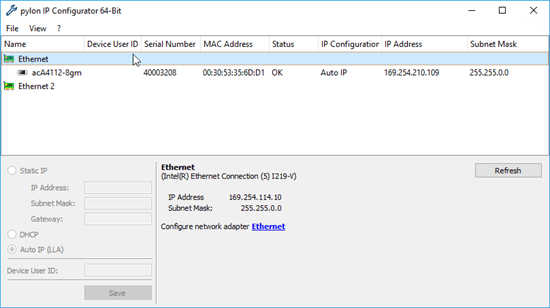
当您选择网络适配器时,以下适配器信息显示在顶部窗格下方:
- 连接和网络适配器的名称。
- IP 地址:网络适配器的 IP 地址。
- 子网掩码:网络适配器的子网掩码。
该区域还包含 Windows …属性对话框的链接,您可以在其中更改适配器配置。
适配器信息的右侧是一个 Refresh 按钮。单击该按钮时,IP Configurator 会更新显示的网卡和相机信息。这样可以确保显示的所有信息都是最新信息。
选择相机时的用户界面#
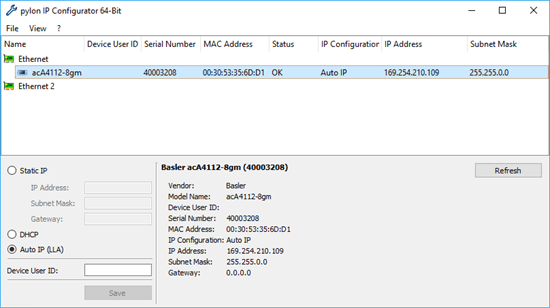
选择相机时,将显示以下相机信息:
顶部窗格
- 名称:相机型号的名称。
- 设备用户 ID:相机的用户定义标识符(如果已分配)。
- 序列号:相机的序列号。
- MAC 地址:相机的 MAC 地址。
- 状态:相机的连接状态。
- IP 配置:用于为相机分配当前 IP 地址的方法。
- IP 地址:相机的当前 IP 地址。
- 子网掩码:相机的子网掩码。
在顶部窗格下方
- 相机名称。
- 供应商:相机供应商的名称。
- 型号名称:相机型号的名称。
- 设备用户 ID:相机的用户定义标识符(如果已分配)。
- 序列号:相机的序列号。
- MAC 地址:相机的 MAC 地址。
- IP 配置:用于为相机分配当前 IP 地址的方法。
- IP 地址:相机的当前 IP 地址。
- 子网掩码:相机的子网掩码。
- 网关:相机使用的网关(如果适用)。
相机信息的右侧是一个 Refresh 按钮。单击该按钮时,IP Configurator 会更新显示的网卡和相机信息。这样可以确保显示的所有信息都是最新信息。
提示#
提示文本显示在窗口的右下角区域。例如,如果由于 IP 地址问题而无法连接相机,提示文本会告诉您如何解决该问题。以下屏幕截图显示了一个示例:
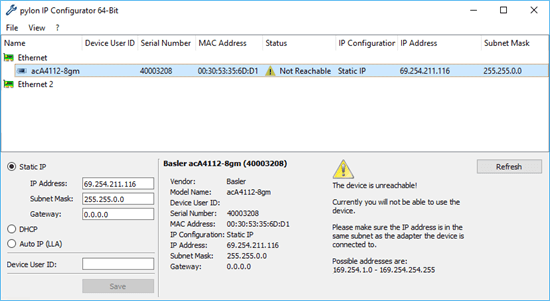
窗口左下方区域中的窗格包含用于更改 IP 配置和设置相机的设备用户 ID 的控件。