跳转到内容
STAGING SERVER
DEVELOPMENT SERVER

Hardware Installation (CoaXPress Cameras)#

This topic tells you how to install a Basler CoaXPress camera, i.e., a Basler boost, racer 2, and ace 2 V camera.

Depending on your camera model, you can establish up to four CoaXPress connections.

一般注意事项#

To operate your Basler CoaXPress camera, you need to install the following software and hardware components:

The following table lists suitable frame grabbers or interface cards, and accessories of the Basler portfolio.

相机 Frame Grabbers or
Interface Cards
配件
ace 2 V CXP-12 Interface Card 1C, 2C, or 4C
imaFlex CXP-12 Quad
imaWorx CXP-12 Quad
CoaXPress data cable, Micro-BNC x2 (HD-BNC), P
Power-I/O cable, M8 6p/open, P
Heat sink and compressed air cooler
boost R CXP-12 Interface Card 1C, 2C, or 4C
imaFlex CXP-12 Quad
imaWorx CXP-12 Quad
CoaXPress data cable, Micro-BNC x2 (HD-BNC), P
Power-I/O cable, M8 6p/open, P
Heat sink
Power supply for camera, 18.0 W, M8 6-pin
C-mount, F-mount, M42x0.75-mount (FBD 16 mm), M42x1-mount (FBD 16 mm), M42x1-mount (FBD 45.56 mm), M72x0.75-mount
boost V CXP-12 Interface Card 4C
imaWorx CXP-12 Quad
CoaXPress data cable, Micro-BNC x2 (HD-BNC), P
I/O cable, HRS 6p/open, P
Power Supply for Camera, 24 V, HRS HR10A, 4p
USB 2.0 Cable for Firmware Update (Type A, 1.8 m)
Heat sinks and active fan
C-mount, F-mount, M42x1-mount (FBD 12 mm), M58x0.75-mount (FBD 11.48 mm)
boA13440-17cm CXP-12 Interface Card 2C
CXP-12 Interface Card 4C
imaFlex CXP-12 Quad
CoaXPress data cable, Micro-BNC x2 (HD-BNC), P
Power-I/O cable, M8 6p/open, P
racer 2 S CXP-12 Interface Card 1C, 2C, or 4C
imaFlex CXP-12 Quad
imaWorx CXP-12 Quad
CoaXPress data cable, Micro-BNC x2 (HD-BNC), P
Power-I/O cable, M8 6p/open, P
Power-I/O cable, RS-422 M8 6p/open
Heat sink and compressed air cooler
racer 2 L CXP-12 Interface Card 2C
CXP-12 Interface Card 4C
imaWorx CXP-12 Quad
CoaXPress data cable, Micro-BNC x2 (HD-BNC), P
Power-I/O cable, HRS 12p/open, P
Fin heat sink and compressed air cooler
racer 2 XL imaFlex 2 Dual 100 Optical cable, MPO, 8x PC/F
Cisco 100GBASE-SR4-S QSFP Module
Power-I/O cable, HRS 12p/open, P
Fin heat sink
Power Supply for Camera, 24 V/60 W, DC Jack 5.5/2.1 mm

信息

  • To get an overview of the range of available accessories, visit also the Basler website for lenses, illumination, and accessories. Data and I/O cables are available in various lengths. CoaXPress data cables are also available as drag chain versions.
  • You can also use frame grabbers by other manufacturers. In that case, observe the documentation of the corresponding manufacturers to ensure proper installation. The frame grabbers must be fully compliant with the CoaXPress standard. Basler recommends using devices with a maximum stream packet size ≥ 1 KByte.
  • For boost R cameras, Basler also offers the Basler CXP-12 Evaluation Kit boost. This product bundle is designed to make it easier for you to select the right components for your boost camera model.

安装相机#

准备工作#

在开始硬件安装之前,请确保以下各项可用:

  • A Basler CoaXPress camera.
  • A computer equipped with a frame grabber or a suitable interface card.
  • If you want to power the camera via the interface card or frame grabber (Power over CoaXPress (PoCXP)), make sure that the interface card or frame grabber is connected to the power supply of your computer. (This information does not apply to racer 2 XL cameras.)
  • If you aren't using PoCXP, you need an external power supply. Make sure that the power supply meets the requirements listed in the topic about your camera model.
  • If required, a suitable lens.
    Contact Basler technical support if you need assistance in determining the best lens for your application.
  • If required, a suitable mount.
  • Depending on your camera model, up to four CoaXPress data cables with appropriate connectors or one fiber cable.
  • As applicable, a power or a power and I/O cable with appropriate connectors.
  • 冷却元件(适用时),例如散热板。

General Installation Steps#

信息

  • 确保已断开相机与任何电源的连接,并且已关闭主机并从电源插座中拔出了插头。
  • 请确保在接下来的安装步骤中将相机始终朝下放置,以防止灰尘进入传感器。
  1. Remove the protective seal or cap from the camera front.
  2. If required, attach a mount to the camera.
    Make sure that the mount is attached in the proper direction with the lens mount facing out.
  3. If required, attach a suitable lens to the camera.
    Be careful not to insert the lens any deeper than specified in the Maximum Allowed Lens Intrusion topic.
  4. 提供足够的散热

ace 2 V and racer 2 S Cameras#

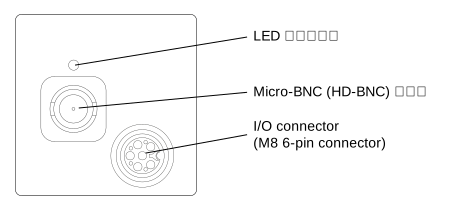
ace 2 V and racer 2 S Connectors

要安装相机:

  1. Follow the general installation steps.
  2. 将相机连接到计算机并接通电源。

    如果您使用 CoaXPress 供电 (PoCXP)

    1. Connect the Micro-BNC (HD-BNC) connector of the camera to the Micro-BNC port of the interface card or frame grabber using the CoaXPress data cable.

    如果您使用外部电源

    1. Connect the CoaXPress data cable to the camera and interface card or frame grabber as described above.
    2. Connect the power I/O cable to the M8 6-pin connector of the camera.
      Note: If you're building your own cables, observe the pin assignment detailed in the topic about your camera model.
    3. Connect the open end of the power I/O cable to a power supply.
      You can use a power supply of the Basler Original Equipment range.
    4. 将电源插头插入电源插座。
  3. Switch on the power to your host computer and let the computer boot up.

    The status LED of the camera indicates different operating and connection states, where each LED indicates the status of exactly one CXP connection.

    For information about the different LED states and corresponding colors, refer to the topic about your camera model. You can find your camera model in the "Models" section.

  4. Proceed with Next Steps.

boost R 相机#

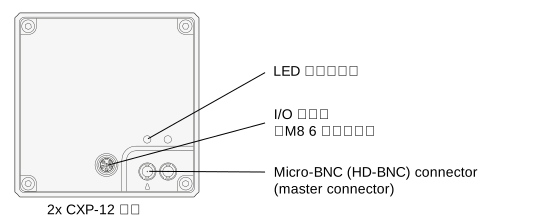
boost R Connectors

要安装相机:

  1. Follow the general installation steps.
  2. 将相机连接到计算机并接通电源。

    如果您使用 CoaXPress 供电 (PoCXP)

    1. Connect the Micro-BNC (HD-BNC) connector(s) of the camera to the Micro-BNC port(s) of the interface card(s) or frame grabber(s) using the CoaXPress data cable(s). Note: If you're using only one CoaXPress data cable, make sure to connect the cable to the master connector of the camera.

    如果您使用外部电源

    1. 如上所述,将 CoaXPress 数据线连接至相机以及接口卡或图像采集卡。ace
    2. Connect the power I/O cable to the M8 6-pin connector of the camera.
      Note: If you're building your own cables, observe the pin assignment detailed in the topic about your camera model.
    3. Connect the open end of the power I/O cable to a power supply.
      You can use a power supply of the Basler Original Equipment range.
    4. 将电源插头插入电源插座。
  3. Switch on the power to your host computer and let the computer boot up.

    The status LED(s) of the camera indicate different operating and connection states, where each LED indicates the status of exactly one CXP connection.

    For information about the different LED states and corresponding colors, refer to the topic about your camera model. You can find your camera model in the "Models" section.

  4. Proceed with Next Steps.

boost V 相机#

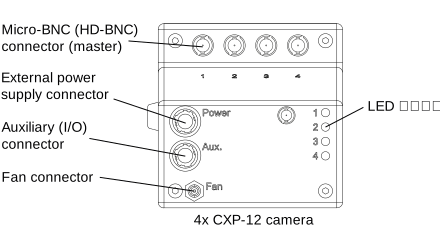
boost V Connectors

要安装相机:

  1. Follow the general installation steps.
  2. 将相机连接到计算机并接通电源。

    如果您使用 CoaXPress 供电 (PoCXP)

    1. Connect the Micro-BNC (HD-BNC) connector(s) of the camera to the Micro-BNC port(s) of the interface card(s) or frame grabber(s) using the CoaXPress data cable(s).
      The connector labeled with "1" must be connected last.

    如果您使用外部电源

    1. 如上所述,将 CoaXPress 数据线连接至相机以及接口卡或图像采集卡。ace
    2. Connect the power cable to the external power supply connector (Hirose micro HR10A-7R-4S) of the camera.
      Note: If you're building your own cables, observe the pin assignment detailed in the topic about your camera model.

      信息

      To ensure a stable power supply via AUX power, switch off PoCXP for all connected channels of the frame grabber or interface card. To do so, open the frame grabber or interface card in the pylon Viewer, navigate to the Transport Layer Control, and execute the PoCxp Off command for each selected CXP connection.

    3. Connect the open end of the power cable to a power supply.
      You can use a power supply of the Basler Original Equipment range.

    4. 将电源插头插入电源插座。
  3. Switch on the power to your host computer and let the computer boot up.

    The status LED(s) of the camera indicate different operating and connection states, where each LED indicates the status of exactly one CXP connection.

    For information about the different LED states and corresponding colors, refer to the topic about your camera model. You can find your camera model in the "Models" section.

  4. Proceed with Next Steps.

racer 2 L Cameras#

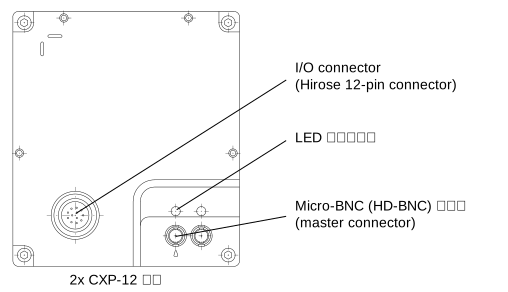
racer 2 L Connectors

要安装相机:

  1. Follow the general installation steps.
  2. 将相机连接到计算机并接通电源。

    如果您使用 CoaXPress 供电 (PoCXP)

    1. Connect the Micro-BNC (HD-BNC) connector(s) of the camera to the Micro-BNC port(s) of the interface card(s) or frame grabber(s) using the CoaXPress data cable(s).
      Note: If you're using only one CoaXPress data cable, make sure to connect the cable to the master connector of the camera.

    如果您使用外部电源

    1. 如上所述,将 CoaXPress 数据线连接至相机以及接口卡或图像采集卡。ace
    2. Connect the power I/O cable to the 12-pin Hirose micro receptacle of the camera.
      Note: If you're building your own cables, observe the pin assignment detailed in the topic about your camera model.
    3. Connect the open end of the power I/O cable to a power supply.
      You can use a power supply of the Basler Original Equipment range.
    4. 将电源插头插入电源插座。
  3. Switch on the power to your host computer and let the computer boot up.

    The status LED(s) of the camera indicate different operating and connection states, where each LED indicates the status of exactly one CXP connection.

    For information about the different LED states and corresponding colors, refer to the topic about your camera model. You can find your camera model in the "Models" section.

  4. Proceed with Next Steps.

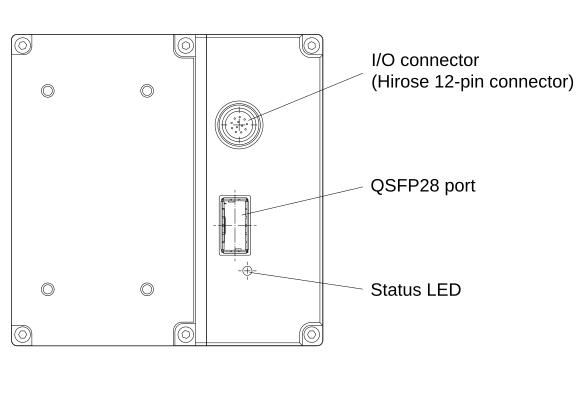
racer 2 XL Cameras#

racer 2 XL Connectors

要安装相机:

  1. Follow the general installation steps.
  2. Insert the fiber optic cable into the QSFP28 transceiver modules.

    警告 — 激光安全说明 激光安全

    为避免受伤,请始终遵循以下安全说明:

    Optical fiber connections emit laser radiation in the infrared range. Laser radiation is invisible and can cause eye damage if the eyes are exposed to it directly. Never look into open fiber ends or active optical ports. Before any installation, maintenance, or cleaning, disconnect the connection or shut it down safely. Dispose of fiber remnants with care.

  3. 将相机连接到计算机并接通电源。

    1. Connect the QSFP28 port of the camera to the QSFP28 port of the frame grabber using the fiber optic cable with the attached QSFP28 transceiver modules.
    2. Connect the power I/O cable to the 12-pin Hirose micro receptacle of the camera.
      Note: If you're building your own cables, observe the pin assignment detailed in the topic about your camera model.
    3. Connect the open end of the power I/O cable to a power supply.
      You can use the power supply 24 V/60 W, DC Jack 5.5/2.1 mm of the Basler Original Equipment range.
    4. 将电源插头插入电源插座。
  4. Switch on the power to your host computer and let the computer boot up.

    The status LED(s) of the camera indicate different operating and connection states, where each LED indicates the status of exactly one CXP connection.

    For information about the different LED states and corresponding colors, refer to the topic about your camera model. You can find your camera model in the "Models" section.

  5. Proceed with Next Steps.

后续步骤#