Array Element Iterator vTool#
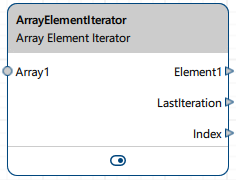
The Array Element Iterator accepts arrays of different types, e.g., images or regions, via Array input pins and outputs the elements via the corresponding Element output pin according to their position in the internal (zero-based) index. This allows you to perform image processing on individual elements of an array.
Download the pylon Software Suite to use the Array Element Iterator vTool.

运作原理#
The Array Element Iterator allows you to separate the individual elements of a data array, thus enabling you to perform image processing on the individual elements. Afterwards, you can use the Array Creator vTool to turn the individual elements into an array again. Elements are processed according to the vTool's internal, zero-based index. In addition, you can configure to also forward any data unchanged. This could be the image or region that the array refers to or any other data.
信息
If more than one input pin is connected, all inputs must come from the same data source. Connecting inputs from different, independent processing chains is not supported. If you need to combine such inputs, add a Data Synchronizer vTool in front of the Array Element Iterator to synchronize the input data.
The following parameters are available:
- Number Of Array Pins: This defines the number of arrays you can input. The same number of Element output pins will be created. The output pins take the data type of the input array, e.g., if you input a RectangleF array, elements of the data type RectangleF are output.
- Number Of Data Pins: This defines the number of Data input pins for forwarding data, e.g., images, regions, or any other data. The same number of Data output pins will be created. The data items are forwarded unchanged to the next vTool in line. This parameter is optional.
- Iteration Mode: This defines whether you want to iterate over all elements of an array or just a specific range. If you select Range, you can specify the start and end of the range.
Iteration uses the size of the largest input array. In All Elements iteration mode, the vTool iterates over all indices from 0 to that size minus one. In range-based iteration mode, only indices within the configured range are iterated. The range is clamped to the largest array size.
As the vTool iterates over the elements of the input array, it outputs each element via the Element pin and the corresponding index position via the Index pin. If multiple arrays are input and an index is not present in an array, e.g., because it is smaller than the others, no value is sent on that array's output. The LastIteration output pin indicates the end of an iteration. It outputs true if the last item of an array has been reached. If multiple arrays have been input, it returns true if the last item of the largest array has been reached.
Error Handling#
Array with errors: If any array input pin receives an array with an array-level error, no iteration takes place. LastIteration returns true, Index returns an error value, and no data is returned on the Element and Data output pins.
Elements and data with errors: Elements with errors inside a valid array and errors on data input pins are forwarded transparently. They are not treated differently from valid values.
No array received: If none of the array input pins receives an array, no processing takes place and nothing is returned. Any values on data input pins are ignored.
No iteration: If all received arrays are empty or the configured index range is completely outside the array bounds, LastIteration returns true, Index is not returned, and data input values are ignored.
配置 vTool#
To configure the Array Element Iterator vTool, double-click it in the Workbench. A dialog opens showing all the available settings. Alternatively, you can find the same settings in the Features - All pane.
输入#
ArrayN#
Accepts arrays to iterate over. You can configure up to 100 array input pins.
- Data type: Array of any simple data type (Boolean, CircleF, EllipseF, Float, Image, Integer, LineF, PointF, RectangleF, Region, String, Transformation Data)
DataN#
Accepts any data (e.g., images, regions, or other data) to pass through unchanged in every iteration step. You can configure up to 100 data pins.
- Data type: Any data type
输出#
ElementN#
Returns the individual elements of the corresponding input array one by one.
- Data type: Same as the data type input at the Array input pin, i.e., any simple data type (Boolean, CircleF, EllipseF, Float, Image, Integer, LineF, PointF, RectangleF, Region, String, Transformation Data)
DataN#
Returns the data (e.g., images, regions, or other data) received on the corresponding input in each step unchanged.
- Data type: Any data type
LastIteration#
Returns whether the last element of an array has been reached. It returns false for all elements except the last and true on the final iteration. It also returns true if no iteration takes place (e.g., all arrays are empty, a range has been specified that is larger than the largest array, or an array with errors is received).
- Data type: Boolean
Index#
Returns the current index position. Returns an error value if any array input has an array-level error. Nothing is output when no iteration takes place.
- 数据类型:整数