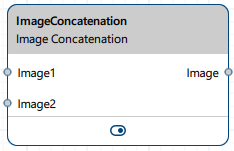
Image Concatenation vTool#
Download the pylon Software Suite to use the Image Concatenation vTool.

运作原理#
You can concatenate images horizontally or vertically. You can also specify horizontal and vertical offsets to create image-in-image effects or to arrange the images diagonally. If the images overlap, the image at the Image2 input pin appears in front of the other image. The offsets apply only to the image at the Image2 input pin.
When the images don't fully cover the output canvas, for example because of positional offsets or different image sizes, gaps can occur. These are regions where neither input image contributes pixel information. To keep a rectangular output image, fill these gaps with the Padding Value parameter. Specify a gray value from 0 to 255. For 16-bit images, this value is scaled automatically (multiplied by 257).
The input images must have the same pixel format.
You can concatenate images from the same input source, e.g., one Camera vTool, or from two input sources, e.g., two Camera vTools. If you have two input sources, you have to synchronize these inputs using the Data Synchronizer vTool. Otherwise, errors may occur sporadically because the inputs aren't in synch and therefore can't be concatenated properly.
配置 vTool#
To configure the Image Concatenation vTool, double-click it in the Workbench. A dialog opens showing all the available settings. Alternatively, you can find the same settings in the Features - All pane.
You can view the result of the image concatenation in a pin data view.
输入#
Image1#
Accepts images directly from a Camera vTool or any other vTool that outputs images.
- 数据类型:图像
- Image format: 8-bit and 16-bit mono or color images (see Supported Pixel Formats)
Image2#
Accepts images directly from a Camera vTool or any other vTool that outputs images.
- 数据类型:图像
- Image format: 8-bit and 16-bit mono or color images (see Supported Pixel Formats)
输出#
图像#
Returns the concatenated image in the same pixel format as the input images. The output dimensions depend on the sizes of the input images and the offset settings.
- 数据类型:图像
- 图像格式:彩色或单色图像(请参阅支持的 Pixel Format)
支持的 Pixel Format#
The following pixel formats are supported natively:
- Mono 8
- Mono 16
- Bayer XX 8
- Bayer XX 16
- RGB 8
- RGB 16
- BGR 8
- BGR 16
- BGRA 8
- BGRA 16
The following formats are accepted and converted internally before processing:
- YCbCr422_8
- YUV422_8
相关的 vTools#
典型前置项#
典型后置项#
- Any vTool that accepts input of data type Image.