
Operator Library: Hardware Platform
AppletProperties 算子没有输入和输出。它用于控制小应用程序以及板卡硬件设置。
该算子提供了一组用于描述小应用程序的参数。其中有些值是由用户定义的,而另一些则是自动生成的。
此算子在每个设计中都是必需的,由 VisualApplets 自动实例化。该算子无法被删除。
| 适用于以下硬件平台 |
|---|
| imaFlex 2 Dual 100 |
| imaFlex CXP-12 Penta |
| imaFlex CXP-12 Quad |
| mE5 marathon VCLx |
| mE5 marathon VCL |
| mE5 marathon VCX-QP |
| mE5 marathon VF2 |
| LightBridge VCL |
| mE5 ironman VQ8-CXP6D |
| mE5 ironman VQ8-CXP6B |
| mE5 ironman VD8-PoCL |
![[注意]](../common/images/admon/note.png) |
可用参数 |
|---|---|
|
AppletProperties 算子为每个硬件平台提供了一组特定的参数。 下方的参数说明指出了哪些硬件平台支持哪些参数。如果未指定限制条件,则所有平台均支持该参数。 |
| VisualAppletsVersion(所有平台) | |
|---|---|
| 键入 | 静态只读参数 |
| 默认 | 不适用 |
| 范围 | 不适用 |
|
所使用的 VisualApplets 版本的版本号。 |
|
| ProjectName(所有平台) | |
|---|---|
| 键入 | 静态只读参数 |
| 默认 | 不适用 |
| 范围 | 不适用 |
|
在设计 (Design)菜单的属性 (Properties)菜单项中指定的项目名称。 |
|
| AppletVersion(所有平台) | |
|---|---|
| 键入 | 静态只读参数 |
| 默认 | 不适用 |
| 范围 | 不适用 |
|
在设计 (Design)菜单的属性 (Properties)菜单项中指定的版本。 |
|
| AppletVendor(所有平台) | |
|---|---|
| 键入 | 静态只读参数 |
| 默认 | 不适用 |
| 范围 | 不适用 |
|
您可以直接在此算子的模块属性 (Module Properties)对话框中输入有关小应用程序供应商的信息。 |
|
| AppletAuthor(所有平台) | |
|---|---|
| 键入 | 静态只读参数 |
| 默认 | 不适用 |
| 范围 | 不适用 |
|
您可以直接在此算子的模块属性 (Module Properties)对话框中输入有关小应用程序作者的信息。 |
|
| BuildTime(所有平台) | |
|---|---|
| 键入 | 静态只读参数 |
| 默认 | 不适用 |
| 范围 | 不适用 |
|
BuildTime 参数是一个自动生成的字符串,用于显示小应用程序的构建时间(最新网表生成的日期和时间)。 该参数值仅在 Framegrabber SDK 中可见。以下图片展示了该字符串的格式: 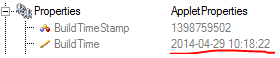 |
|
| AppletUid(所有平台) | |
|---|---|
| 键入 | 静态只读参数 |
| 默认 | 不适用 |
| 范围 | 不适用 |
|
小应用程序的唯一 ID。每次进行新构建时(如果设置了前提条件检查),都会创建一个新 ID。 |
|
| FrontGpiPullControl03 / FrontGpiPullControl47(imaFlex 2 Dual 100 平台) | ||||
|---|---|---|---|---|
| 键入 | 动态、静态写入参数 | |||
| 默认 | PullUp | |||
| 范围 | {PullUp, PullDown} | |||
|
此参数用于控制前端插槽 GPI 信号的上拉和下拉电阻(20 kOhm),无论它们配置为差分还是单端模式。您可以将 GPI 设置为 PullUp 或 PullDown 状态。 当 GPI 引脚未由外部驱动,或外部驱动器的上电时间晚于采集卡时,上拉电阻会决定该引脚上的电平。如果连接了外部驱动器,其驱动能力必须足够强,以便覆盖 20 kOhm 的上拉电阻。 FrontGpiPullControl03 参数用于控制 GPI 分组通道 A(GPI 引脚 0–3)的行为,而 FrontGpiPullControl47 参数则用于控制 GPI 分组通道 B(GPI 引脚 4–7)的行为。 为了让上拉电阻正常工作,必须将外部 GPIO 电源连接到相应的连接器引脚(分组通道 A 或通道 B 的 GPI 电压输入端和 GPI 接地输入端)。
|
||||
| FrontGpiType03 / FrontGpiType47(imaFlex 2 Dual 100 平台) | ||||
|---|---|---|---|---|
| 键入 | 动态、静态写入参数 | |||
| 默认 | SingleEnded | |||
| 范围 | {SingleEnded, Differential} | |||
|
此参数用于控制 GPI 引脚是运行于差分模式还是单端模式。FrontGpiType03 参数管理分组通道 A(GPI 引脚 0–3),FrontGpiType47 参数管理分组通道 B(GPI 引脚 4–7)。 在 SingleEnded 模式下,每个 GPI 引脚都会原封不动地传递到 VisualApplets 中,从而允许独立使用该分组中的所有四个引脚。 在 Differential 模式下,偶数编号的 GPI 引脚与下一个奇数编号的引脚组合,在 VisualApplets 中形成一个差分通道。当差分模式激活时,偶数引脚传输差分信号,而奇数引脚仅代表负对状态,可以忽略。
|
||||
| FiberPortProtocol0 / FiberPortProtocol1(imaFlex 2 Dual 100 平台) | ||||
|---|---|---|---|---|
| 键入 | 静态写参数 | |||
| 默认 |
QSFP28[0]: CoF QSFP28[1]: DataForwarding |
|||
| 范围 | {CoF, DataForwarding} | |||
|
此参数定义了采集卡相应 QSFP28 端口的光纤协议。端口 0 通常用于连接相机(CoF),而端口 1 用于将数据转发到另一块采集卡。从采集卡的两个端口通常都设置为 DataForwarding。 CoF 代表 CoaXPress over Fiber(CXP 3.0 标准)。DataForwarding 是 Basler 用于采集卡与采集卡之间通信的协议。这两种协议均支持每通道 25 Gbit/s,每个 QSFP28 端口的总带宽可达 100 Gbit/s。 在特殊条件下,可以将两个 100 Gbit/s 的相机连接到单块采集卡。此类设置需要满足特定的要求。不过,采集卡必须先执行预处理并将产生的数据带宽至少削减一半,然后才能通过 PCIe 将数据传输到主机内存或 GPU。 PCIe 提供的有效带宽约为 13 GB/s,而单个 QSFP28 端口可提供约 12.5 GB/s 的带宽。两个 QSFP28 端口合计会产生约 25 GB/s 的内部带宽,如果不进行预处理和带宽削减,则无法通过 PCIe 传输。此外,板载 RAM 系统对可以同时通过 RAM 进行流式传输的数据量也施加了进一步的限制。 有关数据转发功能的更多详情,请参见 'Data Forwarding with imaFlex 2 Dual 100 Frame Grabbers'。
|
||||
| DesignClock(所有 imaFlex 平台) | ||||
|---|---|---|---|---|
| 键入 | 静态只读参数 | |||
| 默认 | 312.5 | |||
| 范围 | [312.5; 400.0] | |||
|
该参数表示以兆赫兹(MHz)为单位的设计系统时钟频率。您可以在 VisualApplets 的 Design 菜单、Change FPGA Clock 菜单项中更改设计系统时钟频率。使用高于 135 MHz 的频率设置可能会导致时序违规。在这种情况下,请降低频率。
|
||||
| DesignClock(mE5 marathon 和 LightBridge VCL 平台) | ||||
|---|---|---|---|---|
| 键入 | 静态只读参数 | |||
| 默认 | 125 | |||
| 范围 | [125;312.5] | |||
|
该参数表示以兆赫兹(MHz)为单位的设计系统时钟频率。您可以在 VisualApplets 的 Design 菜单、Change FPGA Clock 菜单项中更改设计系统时钟频率。使用高于 135 MHz 的频率设置可能会导致时序违规。在这种情况下,请降低频率。
|
||||
| ExtensionGpioType (imaFlex CXP-12 Quad 和 imaFlex CXP-12 Penta 平台) | |||||||
|---|---|---|---|---|---|---|---|
| 键入 | 动态写入参数 | ||||||
| 默认 | OpenDrain | ||||||
| 范围 | {OpenDrain, PushPull} | ||||||
|
此参数允许用户选择外部扩展 GPIO 连接器的电路类型。在 PushPull 模式下,GPIO 会被直接驱动。
|
|||||||
| FrontGpioPullControl (imaFlex CXP-12 Penta 平台) | ||||
|---|---|---|---|---|
| 键入 | 动态写入参数 | |||
| 默认 | PullUp | |||
| 范围 | {PullUp, PullDown} | |||
|
|
||||
| FrontGpioType (imaFlex CXP-12 Penta 平台) | ||||
|---|---|---|---|---|
| 键入 | 动态写入参数 | |||
| 默认 | SingleEnded | |||
| 范围 | {SingleEnded, Differential} | |||
|
|
||||
| FrontGpioInversion (imaFlex CXP-12 Penta 平台) | ||||
|---|---|---|---|---|
| 键入 | 动态写入参数 | |||
| 默认 | 熄灭 | |||
| 范围 | {On, Off} | |||
|
|
||||
| PcieInterfaceType (ironman 平台) | ||||
|---|---|---|---|---|
| 键入 | 静态写参数 | |||
| 默认 | Generation_2 | |||
| 范围 | {Generation_1, Generation_2} | |||
|
PcieInterfaceType 参数允许您选择 PCIe 接口类型,从而确定支持的 DMA 带宽。 Generation_2(默认)代表 PCIe Generation 2 协议,提供 3,600,000 字节/秒的带宽。 Generation_1 代表 PCIe Generation 1 协议,提供 1,800,000 字节/秒的带宽。 Generation_1 设计消耗的 FPGA 资源略少。使用 Generation_1 设计更容易让 Applet 实现时序收敛。Generation_2 提供了最大的性能,但让 Applet 实现时序收敛更具挑战性。为了满足时序要求,可能需要进行多次布局布线综合运行。
|
||||
| PcieInterfaceType(mE5 marathon 和 LightBridge VCL 平台) | ||||
|---|---|---|---|---|
| 键入 | 静态写参数 | |||
| 默认 | Generation_2 | |||
| 范围 | {Generation_1, Generation_2} | |||
|
PcieInterfaceType 参数允许您选择 PCIe 接口类型,从而确定支持的 DMA 带宽。 Generation_1: The applet only supports PCIE generation 1. Thus, the maximum DMA transmission bandwidth is ca. 900 MByte/s (1MByte = 1^10Byte). The DmaToPC operator is limited so that LinkParallelism x LinkPixelWidth needs to be <= 64 bit. Generation_2: The applet supports PCIE generation 2. Thus, the maximum DMA transmission bandwidth is ca. 1800 MByte/s (1MByte = 1^10Byte). The DmaToPC operator is limited so that LinkParallelism x LinkPixelWidth needs to be <= 128 bit. Generation_1 的实现消耗的资源少于 Generation_2 的实现。对于不需要 Generation_2 的高带宽但资源短缺的设计,Generation_1 模式非常有用。
|
||||
| GpioType(mE5 marathon 和 ironman 平台) | |||||||
|---|---|---|---|---|---|---|---|
| 键入 | 动态写入参数 | ||||||
| 默认 | OpenDrain | ||||||
| 范围 | {OpenDrain, PushPull} | ||||||
|
此参数允许用户选择外部 GPIO 连接器的电路类型。在 PushPull 模式下,GPIO 由内部直接驱动。
|
|||||||
| BuildTimeStamp(所有平台 - 隐藏) | ||||
|---|---|---|---|---|
| 键入 | 静态写参数 | |||
| 默认 | 不适用 | |||
| 范围 | 不适用 | |||
BuildTimeStamp 是一个自动生成的识别号。它是一个 32 位 Timestamp,可以在运行时从 Applet 中读取,用于检查加载的 Applet 与加载的 Applet 运行时环境之间的一致性。 |
||||
| ProjectNameHash(所有平台 - 隐藏) | ||||
|---|---|---|---|---|
| 键入 | 静态只读参数 | |||
| 默认 | 不适用 | |||
| 范围 | 不适用 | |||
针对 ProjectName 中的条目(设计菜单、属性菜单项)的 32 位哈希值。该值可以在运行时从 Applet 中读取,用于检查加载的 Applet 与加载的 Applet 运行时环境之间的一致性。 |
||||
| AppletUidHigh(所有平台 - 隐藏) | ||||
|---|---|---|---|---|
| 键入 | 静态只读参数 | |||
| 默认 | 不适用 | |||
| 范围 | 不适用 | |||
参数 AppletUid 表示一个 128 位数字。该数字的高 64 位作为数字在 AppletUidHigh 中输出。 |
||||
| AppletUidLow(所有平台 - 隐藏) | ||||
|---|---|---|---|---|
| 键入 | 静态只读参数 | |||
| 默认 | 1 | |||
| 范围 | {0; 2^32 – 1} | |||
参数 AppletUid 表示一个 128 位数字。该数字的低 64 位作为数字在 AppletUidLow 中输出。 |
||||
以下示例展示了 AppletProperties 算子的使用:
-
示例 - 基础采集
-
示例 - 基础采集
-
示例 - 基础采集
-
示例 - 基础采集
 上一页
上一页

