
Operator Library: Parameters
该算子通过设计中任意位置的 field 参数生成 1:1 map 参数(在 Field 参数中)。您可以在 Reference 参数中指定引用的参数(路径和名称)。
引用的 field 参数可以是 VA_DOUBLEFIELD 类型之一。 map 参数会镜像引用参数的所有 Property。
Since there are no field parameters specified in the GenICam standard, the created GenICam API and the created Framegrabber API code (FgLib) vary on this point. In the GenICam API code, the two parameters <DisplayName>_Index und <DisplayName>_Value are created.
您可以在设计层次结构中定义一个目标,以便在其中使引用的 参数可见并可访问。 目标由两个参数定义:DisplayHierarchy 和 DisplayName。 在 DisplayHierarchy 中,您寻址的是引用 operator 自身所在的 同一进程中的一个分层框。 在参数 DisplayName 中,您为目标参数设置名称。 如果同时设置了 DisplayHierarchy 和 DisplayName,则由 DisplayName 定义的参数将在 DisplayHierarchy 寻址的分层框中可用。 如果 DisplayName 为空,则不会创建任何参数。 如果设置了 DisplayName,但 DisplayHierarchy 为空, 则由 DisplayName 定义的参数将添加到父级层次结构(即引用 operator 自身所在的 分层框)中。
这使您能够将设计中的 field 参数提供给您希望的任何分层级别(设计层级)。 例如,您可以将受保护的分层框内模块的 field 参数直接在受保护分层框自身的 Property 下进行参数化。
映射的参数本身也可以被引用。 因此,您可以引用引用算子中 Field 参数的内容, 或者引用您在参数 DisplayName 和 DisplayHierarchy 中定义的参数。 这在由其他受保护的分级框构建受保护的分级框时尤为重要。
![[注意]](../common/images/admon/note.png) |
所有相关参数同时更新 |
|---|---|
|
如果更改了其中一个连接的参数(引用参数、Field map 参数或目标参数),则所有其他连接参数中的值也会随之更改。 |
该运算符没有输入和输出,因为它不会干扰设计的数据流结构。
您可以在“库参数”中找到有关库参数的一般介绍。
示例:
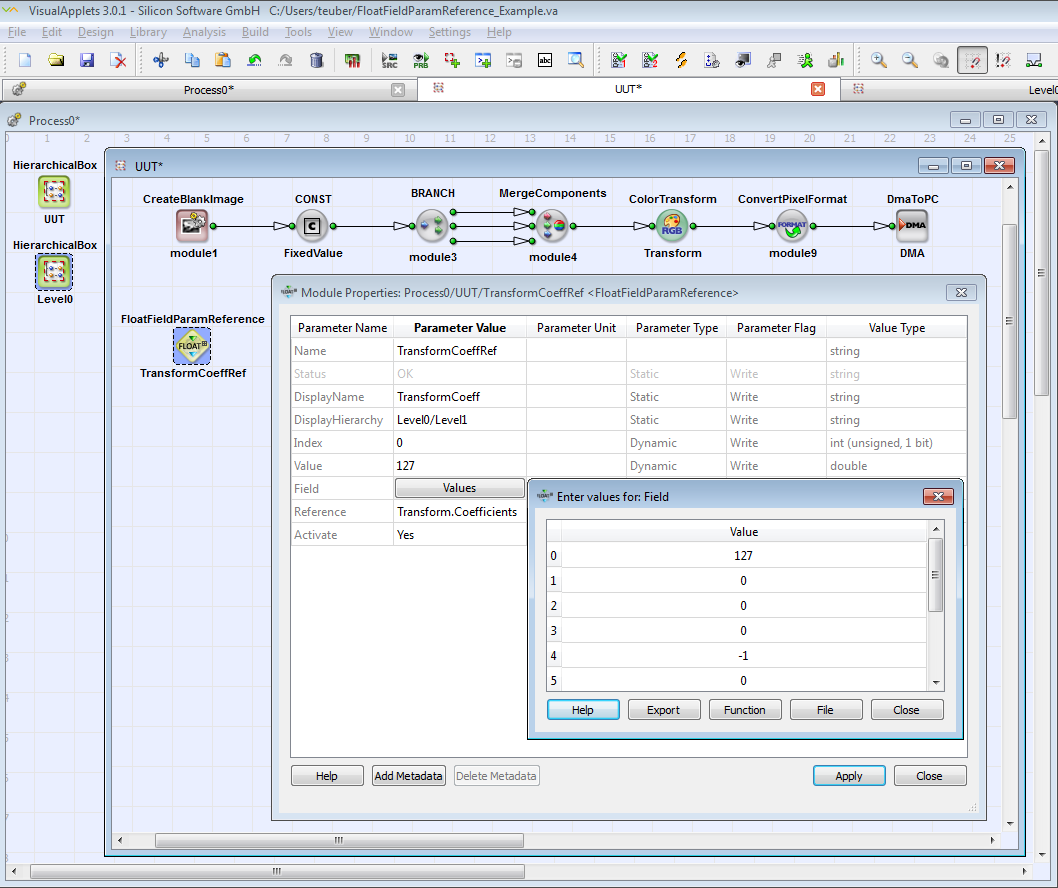
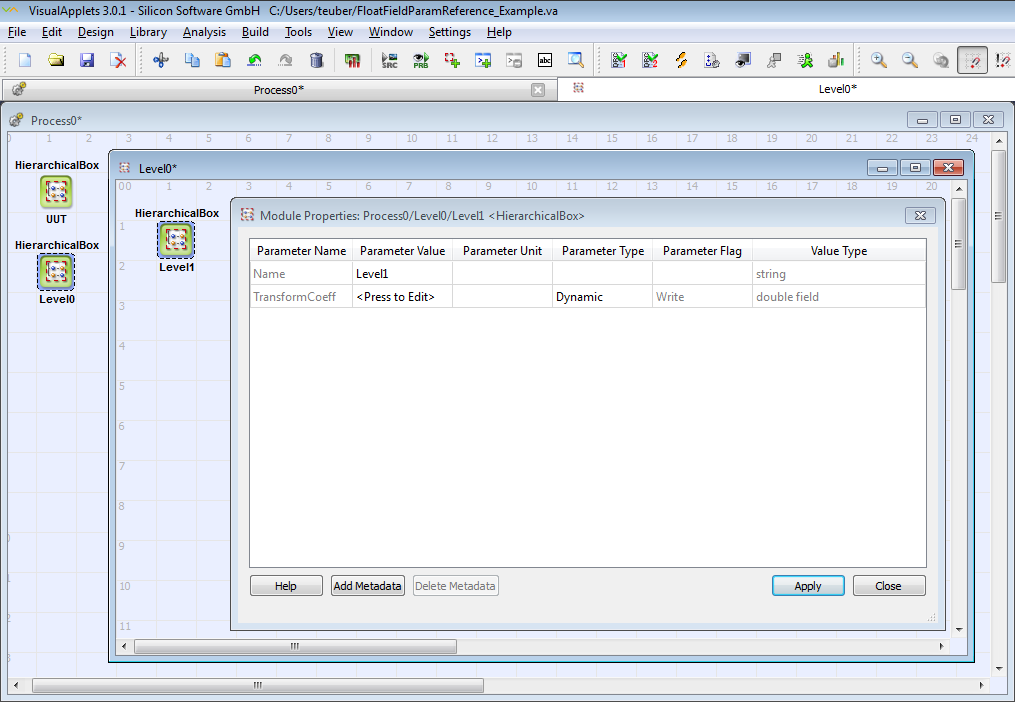
map 参数 TransformCoeff 现在可在 Process0/Level0/Level1 中使用:
| 状态 | |
|---|---|
| 键入 | 静态读取(尽管 GUI 显示为写入)参数 |
| 默认 | 没有任何 |
| 范围 | 成功或错误信息 |
|
显示错误状态。如果参数 Activate 设为 Yes, 则会检查其他模块参数。 此参数显示检查结果, 即 OK 或错误消息。 此参数不包含在最终的小程序中。 |
|
| 显示名称 | |
|---|---|
| 键入 | 静态写参数 |
| 默认 | 没有任何 |
| 范围 | 任何字符串 |
|
如果您希望在设计的另一个点(除 reference 算子实例本身之外)对引用的 field 参数(在 Reference 参数中定义)进行访问授权, 则需要定义一个新的参数。 在此处指定此新参数的名称。 如果此字段为空,则不会创建新参数。 |
|
| 显示层级 | ||||
|---|---|---|---|---|
| 键入 | 静态写参数 | |||
| 默认 | 没有任何 | |||
| 范围 | 任何字符串 | |||
|
在此处指定您要附加在参数 DisplayName 中定义的新映射参数的层次框 。 对于此参数,您可以使用自动完成功能和语法高亮显示。要使用自动完成功能,请点击 Module Properties 对话框中 此参数的 Parameter Values 字段 ,并按下键盘上的 TAB 键。有关自动完成功能的更详细说明, 请访问 'Autocompletion and Syntax Highlighting for Translator and Reference Operators'。 如果您定义了一个新参数 DisplayName, 但将参数 DisplayHierarchy 留空:新参数将 添加到包含参考运算符实例的层次框中。 (请注意,如果参考运算符实例 位于最高(处理)级别,则无法执行此操作。)
|
||||

| 索引 | |
|---|---|
| 键入 | 动态写入参数 |
| 默认 | 0 |
| 范围 | UInt |
|
在此处设置 field index。 |
|
| 值 | |
|---|---|
| 键入 | 动态、写入、读取参数 |
| 默认 | 0 |
| 范围 | 有符号整数 (64 位)、无符号整数 (64 位) |
|
设置或读取由 Index 参数寻址的 field 条目。 |
|
| 字段 | |
|---|---|
| 键入 | 静态、动态、写入、读取参数 |
| 默认 | 没有任何 |
| 范围 | 阵列 |
|
用于访问引用的 field 参数的 map 参数。 此参数镜像引用 field 参数的所有 Property。 |
|
| 描述 | |
|---|---|
| 键入 | 静态写参数 |
| 默认 | - |
| 范围 | any text |
|
在此处输入参数 Value 的描述。 |
|
| Reference | ||||
|---|---|---|---|---|
| 键入 | 静态写参数 | |||
| 默认 | 没有任何 | |||
| 范围 | any string defining the referenced parameter: relative path to module, module name, and parameter name | |||
|
在此处定义设计中引用参数的位置。 对于此参数,您可以使用自动完成功能和语法高亮显示。要使用自动完成功能,请点击 Module Properties 对话框中 此参数的 Parameter Values 字段 ,并按下键盘上的 TAB 键。有关自动完成功能的更详细说明, 请访问 'Autocompletion and Syntax Highlighting for Translator and Reference Operators'。
|
||||

| Activate | |
|---|---|
| 键入 | 动态写入参数 |
| 默认 | 无 |
| 范围 | {No,Yes} |
|
Yes = 激活对引用参数的访问以及来自引用参数的访问(通过映射参数 Value)。 No = 停用对引用参数的访问和来自引用参数的访问,并禁用参数 Status。 参数 DisplayName 和 DisplayHierarchy 无效。 |
|
 上一页
上一页

