Operator CoFTxTrigger

Operator Library: Hardware Platform

This operator allows transmission of trigger packets to a CoaXPress over fiber (CoF) camera in VisualApplets design.

The operator generates trigger packets according to the trigger type provided on the input port I. The TX trigger is a 4-bit value, which represents the trigger type as defined in the CXP standard. Up to 16 different trigger types can be defined. Every valid input value on the port I results in transmission of a CoF trigger packet of the type equal to the provided value.

The operator docks to the TX master lane within the connection between camera and frame grabber. The Design Rules Check (DRC) checks whether a corresponding camera operator is instantiated and the master lane selection between the CoFCamera and the CoFTxTrigger operators matches. In case of errors, the DRC provides an error message, and the operator will get a red background overlay. There is no instantiation order, both CoFCamera and CoFTxTrigger can be used as desired. But to pass the DRC, both operators and the correct mapping to ports are required.

Available for Hardware Platform
imaFlex 2 Dual 100

Resources

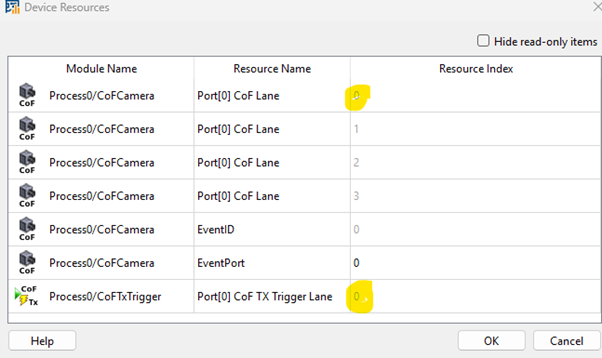
The operator mirrors the FiberConnection parameter setting into the FPGA Device Resources dialog as read-only parameters. You can see the FPGA device resources, if you open the FPGA Device Resources dialog from the Analysis menu. The device resources are read-only:

FPGA Device Resources

Figure 416. FPGA Device Resources


Depending on the allocated port, the resource is of the type Port[0] CoF TX Trigger Lane or of the type Port[1] CoF TX Trigger Lane with the index range from 0 to 3. The operator allocates always only one lane, as the transmission of trigger packets is running always over the master lane.

Signal Output Ports

There are several status signal output ports that indicate the processing state of the trigger packet. These ports provide information about what happens to the trigger signal during operation.

  • TriggerSent: A pulse on this port indicates that a trigger packet has been successfully sent to the connected camera.

  • TriggerAck: A pulse on this port indicates that a sent trigger packet has been acknowledged by the connected camera.

  • TriggerOverRequest: A high value on this port indicates an over-request condition. This occurs when too many trigger values are provided on the input port within the time window of a single trigger packet transmission. In this situation, the next trigger can't be sent because the previous one is still being transmitted.

    According to the CoaXPress (CXP) standard, the next trigger packet must not be sent until the previous packet has been acknowledged or has timed out (480 nanoseconds).

    [Note] You Can Violate This Rule in VisualApplets

    VisualApplets allows intentional violation of this rule for special cases where the camera requires a higher trigger rate or overlapping trigger events of different types. In such cases, the system only checks that two trigger packets do not overlap (minimum gap: 33.28 nanoseconds), which is much shorter than the 480 ns timeout defined by the CXP standard.

  • TriggerLost: A pulse on this port indicates that a sent trigger packet has not been acknowledged by the connected camera within the 480 nanoseconds time-out window.

I/O Properties

Property Value
Operator Type M
Input Link I, trigger type
Output Links TriggerSent, indicates that a trigger packet has been successfully sent
TriggerAck, indicates that a sent trigger packet has been acknowledged
TriggerOverRequest, indicates an over-request condition
TriggerLost, indicates that a sent trigger packet has not been acknowledged

Supported Link Format

Link Parameter Input Link I Output Link TriggerSent Output Link TriggerAck Output Link TriggerOverRequest Output Link TriggerLost
Bit Width 4 1 1 1 1
Arithmetic unsigned unsigned unsigned unsigned unsigned
Parallelism 1 1 1 1 1
Kernel Columns 1 1 1 1 1
Kernel Rows 1 1 1 1 1
Img Protocol VALT_PIXEL0D VALT_SIGNAL VALT_SIGNAL VALT_SIGNAL VALT_SIGNAL
Color Format VAF_GRAY VAF_GRAY VAF_GRAY VAF_GRAY VAF_GRAY
Color Flavor FL_NONE FL_NONE FL_NONE FL_NONE FL_NONE
Max. Img Width any don't care don't care don't care don't care
Max. Img Height any don't care don't care don't care don't care

Parameters

FiberConnection
Type Static Write parameter
Default port_0_lane_0
Range {port_0_lane_0, port_1_lane_0}

This parameter defines on which QSFP28 port the camera is connected and which lane of that port is the master lane: the lane that can transmit trigger packets.

Only camera configurations with 4 lanes are supported on port 0 and port 1. Consequently, CoFTxTrigger can use only lane 0 on both ports.

The selected QSFP28 port can be used only if the FiberProtocol parameter in the AppletProperties operator for that port is set to the CoF and not to DataForwarding.

If FiberProtocol is set to DataForwarding and the CoFTxTrigger operator attempts to map to that fiber port, the Design Rule Check (DRC) will generate an error message. In this case, the FiberConnection parameter will be marked as conflicted (red), and hovering over it will display a quick-tip help message explaining the conflict.

Only one CoFTxTrigger operator can use the same hardware QSFP28 port on the same lane. Mappings between multiple operators must be unique across the entire design.

The CoFTxTrigger operator expects the presence of a CoFCamera operator on the same master lane. If this condition is not met, the FiberConnection parameter will be marked as conflicted (red), and hovering over it will display a quick-tip help message explaining the conflict.